Skip to content
Tradie Forms
Contact supportOpen app
Tradie Forms
IntroductionQuick startFAQ

Using the app

Form typesWorkspaceJobsStarting a formCompleting a formAI assistantPDF downloadsShare links
Presets
PDF toolsTeamsCustom forms

Form guides

Overview
QLD Form 1QLD Form 11QLD PDR Form 12QLD Form 14QLD Form 19QLD Form 2QLD Form 3QLD Form 5QLD Form 6QLD Form 9

Account and billing

Managing your accountBilling

Support

TroubleshootingFeedback
Section
Section
Page title
Page title
Short description for the help article
Description continues on a second line
Short description for the help article
Description continues on a second line
Intro paragraph
Intro paragraph
Intro paragraph
Intro paragraph
Intro paragraph
Intro paragraph
Section heading
Section heading
Body paragraph
Body paragraph
Body paragraph
Body paragraph
Body paragraph
Body paragraph
Note
Callout title
Callout body
Callout body
Note
Callout title
Callout body
Callout body
Another heading
Another heading
Body paragraph
Body paragraph
Body paragraph
Body paragraph
Body paragraph
Body paragraph
List item one
List item two
List item three
List item one
List item two
List item three
Was this page helpful?
Yes
Yes
No
No

Loading documentation page

On this page
On this page
TOC item
TOC item
TOC item
TOC item
TOC item
TOC item
TOC item
TOC item
TOC item
TOC item

Form guides

QLD Form 11

Overview and section help for Queensland Form 11 treatment plant service reports

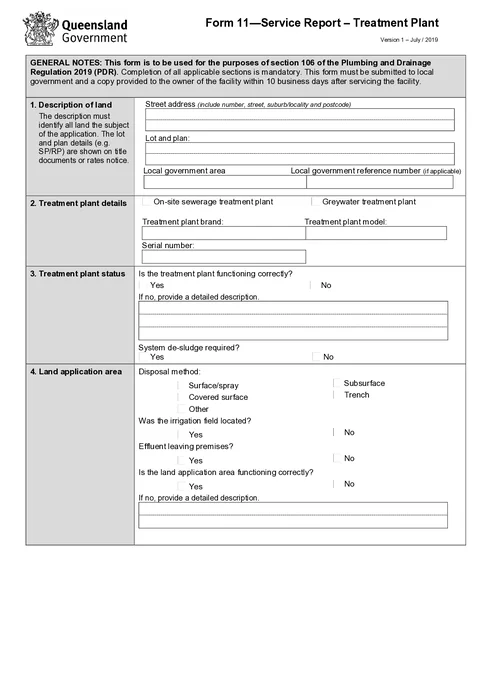
QLD Form 11 PDF preview
QLDPlumbing

Queensland Government

Queensland Form 11 service report for on-site sewerage and greywater treatment plants under the Plumbing and Drainage Regulation 2019.

Open this form

Use this guide when you fill QLD Form 11 Service Report - Treatment Plant in Tradie Forms. The web form follows the Queensland PDF layout for treatment plant service reporting.

Open the form while the plant details and service readings are available.

Before you start

Have these ready:

  • Property street address, lot and plan, and local government area
  • Treatment plant brand, model, and serial number
  • Service and annual test results where applicable
  • Owner name, phone, postal address, and email
  • Service date, arrival and departure times, and technician licence details
  • Signature and declaration date

Submit the completed report to the local government and give a copy to the facility owner within 10 business days after servicing the facility.

After download

  1. Preview the property, plant identifiers, status, readings, technician and declaration.
  2. Download the signed PDF.
  3. Give it to the local government and facility owner within the current required period.
  4. Keep it with the service readings and job records.

Tradie Forms prepares the report. It does not service the plant, assess the readings or send the report.

Property

Identify the land where the treatment plant service was carried out.

What to enter

  • Street address
  • Lot and plan details where relevant
  • Local government area
  • Local government reference number if applicable

Tips

Use address search on Solo or Team to start the street address, then check lot and plan details from title or rates documents.

Treatment Plant

Record the treatment plant being serviced.

What to enter

  • Plant type: on-site sewerage or greywater treatment plant
  • Brand, model, and serial number from the unit nameplate

Tips

Take a photo of the nameplate on site if the serial number is hard to read.

Plant Status

Record the current operating status of the treatment plant.

What to enter

  • Whether the plant is functioning correctly
  • A detailed description if you answered No
  • Whether system de-sludge is required

Before download

If the plant is not functioning correctly, include enough detail for the owner and local government to understand the fault.

Land Application

Record how effluent is disposed of and whether the land application area is working.

What to enter

  • Disposal method (surface/spray, subsurface, covered surface, trench, or other)
  • Whether the irrigation field was located
  • Whether effluent is leaving the premises
  • Whether the land application area is functioning correctly
  • A detailed description if the land application area is not functioning correctly

Service Tests

Record routine service test results where they apply to the system being serviced.

What to enter

  • pH, residual chlorine, clarity, and temperature readings where tested
  • Whether the air blower filter was cleaned or replaced
  • Pump, audible alarm, visual alarm, and chlorine tablet status

Tips

Tick the test row when you completed that check on this visit, then enter the reading or result.

Annual Tests

Record annual test results where they apply to the system being serviced.

What to enter

  • Primary and secondary tank sludge test results in mm
  • Air blower back pressure test result in kPa

Tips

Only complete the rows that apply to this service visit and system type.

Service Procedure

Confirm whether the service followed the manufacturer's operation and maintenance procedures.

What to enter

  • Yes or No to whether the service was completed in accordance with the manufacturer's recommended procedures

Tips

Manufacturer operation and maintenance procedures are available from the manufacturer or supplier if you need to confirm steps on site.

Owner

Record the owner details for this service report.

What to enter

  • Owner's name
  • Phone number
  • Postal address
  • Email address

Tips

Use saved owner details on Solo or Team when you service the same property regularly.

Technician

Record when the service was carried out and who performed the work.

What to enter

  • Service date
  • Arrival and departure times
  • Minutes on site
  • Company name
  • Service technician name
  • Licence number

Before download

Check the licence number matches the technician who signed the declaration.

Declaration

Sign the declaration to confirm the information in this report is true and accurate.

What to enter

  • Signature
  • Date

Before download

Preview the PDF and confirm the signature and date appear in the declaration block before you lodge with council or hand to the owner.

Was this page helpful?

QLD Form 1

Overview and section help for Queensland Form 1 permit work applications

QLD PDR Form 12

Overview and section help for Queensland Form 12 specialist work compliance statements

On this page

Before you startAfter downloadPropertyWhat to enterTipsTreatment PlantWhat to enterTipsPlant StatusWhat to enterBefore downloadLand ApplicationWhat to enterService TestsWhat to enterTipsAnnual TestsWhat to enterTipsService ProcedureWhat to enterTipsOwnerWhat to enterTipsTechnicianWhat to enterBefore downloadDeclarationWhat to enterBefore download