Skip to content
Tradie Forms
Contact supportOpen app
Tradie Forms
IntroductionQuick startFAQ

Using the app

Form typesWorkspaceJobsStarting a formCompleting a formAI assistantPDF downloadsShare links
Presets
PDF toolsTeamsCustom forms

Form guides

Overview
QLD Form 1QLD Form 11QLD PDR Form 12QLD Form 14QLD Form 19QLD Form 2QLD Form 3QLD Form 5QLD Form 6QLD Form 9

Account and billing

Managing your accountBilling

Support

TroubleshootingFeedback
Section
Section
Page title
Page title
Short description for the help article
Description continues on a second line
Short description for the help article
Description continues on a second line
Intro paragraph
Intro paragraph
Intro paragraph
Intro paragraph
Intro paragraph
Intro paragraph
Section heading
Section heading
Body paragraph
Body paragraph
Body paragraph
Body paragraph
Body paragraph
Body paragraph
Note
Callout title
Callout body
Callout body
Note
Callout title
Callout body
Callout body
Another heading
Another heading
Body paragraph
Body paragraph
Body paragraph
Body paragraph
Body paragraph
Body paragraph
List item one
List item two
List item three
List item one
List item two
List item three
Was this page helpful?
Yes
Yes
No
No

Loading documentation page

On this page
On this page
TOC item
TOC item
TOC item
TOC item
TOC item
TOC item
TOC item
TOC item
TOC item
TOC item

Form guides

QLD Form 5

Overview and section help for Queensland Form 5 testing or commissioning reports

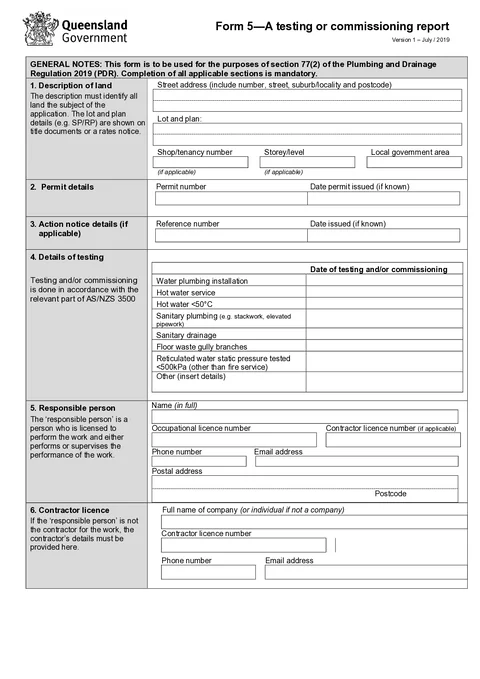
QLD Form 5 PDF preview
QLDPlumbing

Queensland Government

Testing or commissioning report for plumbing and drainage work under the Plumbing and Drainage Regulation 2019.

Open this form

QLD Form 5 is completed by the competent person who tests or commissions plumbing or drainage when an inspector requires that testing or commissioning.

Open the form after the testing or commissioning is finished and the records are ready.

Before you start

Have these ready:

  • Site address and local government area
  • Permit number and issue date
  • Action notice reference if one applies
  • Testing or commissioning dates
  • Responsible person details
  • Contractor details if different from the responsible person
  • Competent person details
  • Signature and declaration date

The competent person must give the signed report to the responsible person within 5 business days after the testing or commissioning is finished. Check how the responsible person must provide it to the local government for the job.

After download

  1. Preview the permit, test dates, people, result and declaration.
  2. Download the signed PDF and give it to the responsible person within the current required period.
  3. Follow the local government's process for the permit or action notice.
  4. Keep the report with the underlying test or commissioning records.

Tradie Forms prepares the report. It does not carry out the test, decide compliance or send the report.

Description of Land

Identify the land where the testing or commissioning was carried out.

What to enter

  • Street address
  • Lot and plan details where relevant
  • Shop, tenancy, or level where relevant
  • Local government area

Tips

Use address search on Solo or Team to start the address, then check the manual fields. Lot and plan details usually need to come from title, rates, or permit documents.

Before download

Check the land details match the permit and the tested installation.

Permit Details

Enter the permit details linked to the tested or commissioned work.

What to enter

  • Permit number
  • Date the permit was issued

Tips

Use the permit document, not the job number or invoice number, unless they are the same reference used by the local government.

Before download

Check the permit number and date against the issued permit.

Action Notice Details

Complete this section only when an action notice applies to the work.

What to enter

  • Action notice reference number
  • Action notice date

Tips

Leave the section blank when there is no action notice. Do not add unrelated notes here.

Before download

Check the reference and date against the notice from the local government or relevant authority.

Details of Testing

Record the dates when testing or commissioning was carried out.

What to enter

  • Date tested or commissioned for each applicable installation type
  • Only fill rows that match the work reported
  • Use the actual test or commissioning date

Tips

Use your test sheets, commissioning records, or job diary. If different parts were tested on different dates, keep the dates accurate.

Before download

Check dates against your site records and the responsible person's paperwork.

Responsible Person

Enter the responsible person for the work.

What to enter

  • Full name
  • Occupational licence number
  • Contractor licence number if applicable
  • Phone and email
  • Postal address

Saved details

If you regularly report the same responsible person details, save this section. Prefilling saved details requires Solo or Team.

Before download

Check that the responsible person details match the person responsible for the tested or commissioned work.

Contractor Licence

Complete this section when the responsible person is not the contractor for the work.

What to enter

  • Contractor company or individual name
  • Contractor licence number
  • Phone and email

Tips

Leave this section blank when the responsible person and contractor are the same, unless your process requires it.

Before download

Check the contractor licence and contact details against the contract, licence records, or business paperwork.

Competent Person

Enter the competent person who carried out the testing or commissioning.

What to enter

  • Full name
  • Occupational licence number
  • Contractor licence number if applicable
  • Phone and email

Tips

Use the person who actually completed the testing or commissioning, not just the office contact.

For this form, the competent person must either hold a licence authorising the testing or commissioning, or be considered competent by the local government.

Before download

Check the name and licence details against the test or commissioning record.

Declaration

Complete the declaration after checking the testing report.

What to enter

  • Signature
  • Declaration date

Before download

Check land details, permit details, testing dates, and person details before signing.

Was this page helpful?

QLD Form 3

Overview and section help for Queensland Form 3 covered work declarations

QLD Form 6

Overview and section help for Queensland Form 6 remote area compliance notices

On this page

Before you startAfter downloadDescription of LandWhat to enterTipsBefore downloadPermit DetailsWhat to enterTipsBefore downloadAction Notice DetailsWhat to enterTipsBefore downloadDetails of TestingWhat to enterTipsBefore downloadResponsible PersonWhat to enterSaved detailsBefore downloadContractor LicenceWhat to enterTipsBefore downloadCompetent PersonWhat to enterTipsBefore downloadDeclarationWhat to enterBefore download