Skip to content
Tradie Forms
Contact supportOpen app
Tradie Forms
IntroductionQuick startFAQ

Using the app

Form typesWorkspaceJobsStarting a formCompleting a formAI assistantPDF downloadsShare links
Presets
PDF toolsTeamsCustom forms

Form guides

Overview
QLD Form 1QLD Form 11QLD PDR Form 12QLD Form 14QLD Form 19QLD Form 2QLD Form 3QLD Form 5QLD Form 6QLD Form 9

Account and billing

Managing your accountBilling

Support

TroubleshootingFeedback
Section
Section
Page title
Page title
Short description for the help article
Description continues on a second line
Short description for the help article
Description continues on a second line
Intro paragraph
Intro paragraph
Intro paragraph
Intro paragraph
Intro paragraph
Intro paragraph
Section heading
Section heading
Body paragraph
Body paragraph
Body paragraph
Body paragraph
Body paragraph
Body paragraph
Note
Callout title
Callout body
Callout body
Note
Callout title
Callout body
Callout body
Another heading
Another heading
Body paragraph
Body paragraph
Body paragraph
Body paragraph
Body paragraph
Body paragraph
List item one
List item two
List item three
List item one
List item two
List item three
Was this page helpful?
Yes
Yes
No
No

Loading documentation page

On this page
On this page
TOC item
TOC item
TOC item
TOC item
TOC item
TOC item
TOC item
TOC item
TOC item
TOC item

Form guides

QLD Form 19

How to complete Queensland Form 19 final inspection certificates in Tradie Forms.

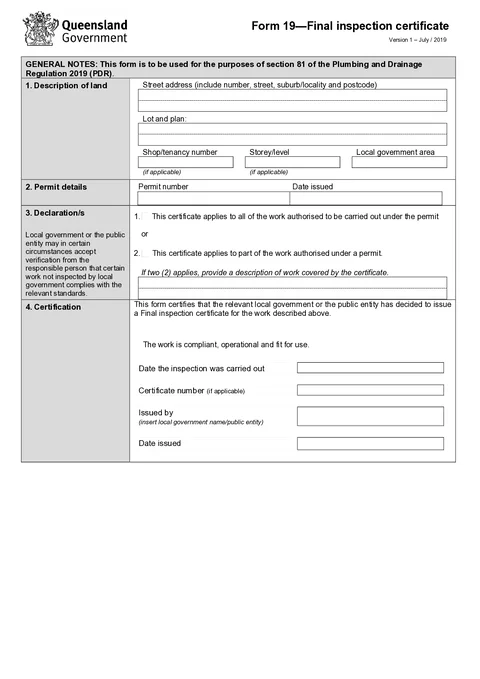
QLD Form 19 PDF preview
QLDPlumbing

Queensland Government

Queensland Form 19 final inspection certificate for plumbing and drainage work under the Plumbing and Drainage Regulation 2019.

Open this form

Use this guide to prepare Form 19 - Final inspection certificate in Tradie Forms. The web form follows the current Queensland PDF sections.

Form 19 is not a plumber’s general completion note. Business Queensland says the relevant local government or public sector entity uses it to certify that permit work is compliant, operational and fit for use. They can issue it for all work under a permit or a distinct completed part.

Open the QLD Form 19 template when you have the authority’s inspection and issuing details ready.

Before you start

  • Confirm the local government or public sector entity has decided to issue the certificate
  • Have the current permit and any amendments open
  • Have the property, lot and plan, permit and inspection details ready
  • Know whether the certificate covers all work or a distinct part of the work
  • Have the issuing authority name, inspection date and issue date

Do not present a prepared draft as an issued final inspection certificate. The issuing local government or public sector entity controls whether and when Form 19 is issued.

Property

Enter the street address, lot and plan, shop or tenancy number, storey or level, and local government area for the land covered by the certificate.

Use the same land description as the permit. Address search can fill the street details and may fill the local government area, but check both against the permit before continuing.

For a staged development or multi-tenancy job, make sure the land and scope details identify the completed part without relying on an internal job nickname.

Permit Details

Copy the permit number and date issued from the current permit. Do not copy them from an invoice or an old job record. If the permit was amended, check which permit record the authority used for the inspection.

Declaration

Choose whether the certificate applies to all work under the permit or part of the work.

If you select part of the work, the description becomes required. Name the completed townhouse, stage, floor, area or plumbing work clearly enough that an owner can understand what the certificate covers without opening the full permit file.

Useful: Townhouse 3 sanitary drainage, water service and fixtures

Too vague: Stage 1

Certification

Enter the:

  • Date the inspection was carried out
  • Certificate number, if the authority supplied one
  • Issued by local government or public entity name
  • Date issued

The inspection date and issue date record different events. Check both against the authority’s record.

Check before download

  1. The land description matches the permit
  2. The permit number and issue date come from the current permit
  3. Exactly one scope option is selected
  4. Part-work scope is described precisely
  5. Inspection date, issuer and issue date match the authority’s details
  6. The PDF preview says exactly what the issuing authority intends to certify

After download

Business Queensland guidance says copies are issued to the permit holder and owner. Keep the finished certificate with the permit, amendments and inspection record. Put a part-work description in the filename or job note so it is not mistaken for whole-permit completion later.

For deeper help, read the practical Form 19 guide, common Form 19 mistakes, or record keeping and handover guide.

Was this page helpful?

QLD Form 14

Overview and section help for Queensland Form 14 compliance declarations

QLD Form 2

How to complete Queensland Form 2 permit amendment and extension applications in Tradie Forms.

On this page

Before you startPropertyPermit DetailsDeclarationCertificationCheck before downloadAfter download