Skip to content
Tradie Forms
Contact supportOpen app
Tradie Forms
IntroductionQuick startFAQ

Using the app

Form typesWorkspaceJobsStarting a formCompleting a formAI assistantPDF downloadsShare links
Presets
PDF toolsTeamsCustom forms

Form guides

Overview
QLD Form 1QLD Form 11QLD PDR Form 12QLD Form 14QLD Form 19QLD Form 2QLD Form 3QLD Form 5QLD Form 6QLD Form 9

Account and billing

Managing your accountBilling

Support

TroubleshootingFeedback
Section
Section
Page title
Page title
Short description for the help article
Description continues on a second line
Short description for the help article
Description continues on a second line
Intro paragraph
Intro paragraph
Intro paragraph
Intro paragraph
Intro paragraph
Intro paragraph
Section heading
Section heading
Body paragraph
Body paragraph
Body paragraph
Body paragraph
Body paragraph
Body paragraph
Note
Callout title
Callout body
Callout body
Note
Callout title
Callout body
Callout body
Another heading
Another heading
Body paragraph
Body paragraph
Body paragraph
Body paragraph
Body paragraph
Body paragraph
List item one
List item two
List item three
List item one
List item two
List item three
Was this page helpful?
Yes
Yes
No
No

Loading documentation page

On this page
On this page
TOC item
TOC item
TOC item
TOC item
TOC item
TOC item
TOC item
TOC item
TOC item
TOC item

Form guides

QLD Form 2

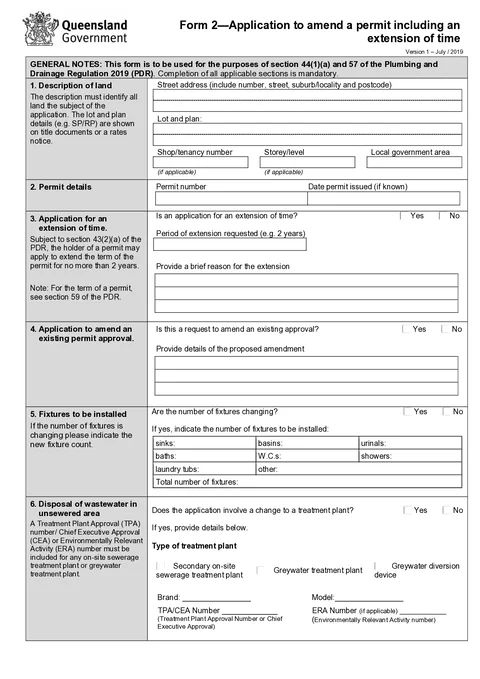
How to complete Queensland Form 2 permit amendment and extension applications in Tradie Forms.

QLD Form 2 PDF preview
QLDPlumbing

Queensland Government

Application to amend a plumbing permit or request an extension of time under the Plumbing and Drainage Regulation 2019.

Open this form

Use this guide when you fill Form 2 - Application to amend a permit including an extension of time in Tradie Forms. The web form follows the Queensland PDF layout for this application.

Open the form after checking the current permit and proposed change.

Before you start

  • Form 2 is for amending an existing permit or requesting an extension of time. Use QLD Form 1 for a new permit work application.
  • Have the existing permit number and property details ready.
  • For an extension, check the permit end date. Business Queensland says to apply at least 10 business days before the permit ends.
  • Attach a site and soil evaluation report when the wastewater section applies.

Property

Enter the street address, lot and plan, shop or tenancy number, storey, and local government area for the land covered by the permit.

Use address search to find the site quickly. Local government area may autofill from the address.

Permit Details

Enter the permit number and date the permit was issued if you know it.

Extension of Time

Tick Yes if you are requesting more time to complete the permitted work.

If yes, enter the period of extension and a brief reason. The approved form allows an extension request of no more than 2 years. Confirm the permit end date and current local government requirements before lodging.

Permit Amendment

Tick Yes if you are requesting changes to an existing permit approval.

If yes, describe the proposed amendment in the details field.

The local government needs to approve and issue the amended permit before additional work covered by the amendment starts.

Fixtures

Tick Yes if the number of fixtures is changing.

If yes, enter counts for sinks, basins, urinals, baths, W.C.s, showers, laundry tubs, and other fixtures. The total updates automatically.

Wastewater Disposal

Complete this section when the application involves a change to a treatment plant in an unsewered area.

Tick the treatment plant type, brand, model, and approval numbers. Enter bedrooms serviced and daily wastewater flow where required. Tick if a site and soil evaluation report is attached.

Owner

Enter the property owner's name, phone, postal address, and email.

Save these as a saved detail on Solo or Team to prefill on your next Form 2.

Applicant

Enter the applicant name, phone, company name, and email. The applicant does not have to be the owner but must ensure the information is correct.

Save applicant details as a saved detail on Solo or Team to prefill on your next Form 2.

Declaration

Sign and date the declaration. The local government relies on the owner and applicant information when assessing the application.

After download

  1. Preview the property, permit, requested changes, owner, applicant and declaration.
  2. Download the PDF and include updated plans, reports, consent and fee where required.
  3. Lodge it through the current local government process.
  4. Keep the application and lodgement record with the permit file.

Tradie Forms prepares the application. It does not amend or extend the permit.

Was this page helpful?

QLD Form 19

How to complete Queensland Form 19 final inspection certificates in Tradie Forms.

QLD Form 3

Overview and section help for Queensland Form 3 covered work declarations

On this page

Before you startPropertyPermit DetailsExtension of TimePermit AmendmentFixturesWastewater DisposalOwnerApplicantDeclarationAfter download