Skip to content
Tradie Forms
Contact supportOpen app
Tradie Forms
IntroductionQuick startFAQ

Using the app

Form typesWorkspaceJobsStarting a formCompleting a formAI assistantPDF downloadsShare links
Presets
PDF toolsTeamsCustom forms

Form guides

Overview
SA Backflow Report

Account and billing

Managing your accountBilling

Support

TroubleshootingFeedback
Section
Section
Page title
Page title
Short description for the help article
Description continues on a second line
Short description for the help article
Description continues on a second line
Intro paragraph
Intro paragraph
Intro paragraph
Intro paragraph
Intro paragraph
Intro paragraph
Section heading
Section heading
Body paragraph
Body paragraph
Body paragraph
Body paragraph
Body paragraph
Body paragraph
Note
Callout title
Callout body
Callout body
Note
Callout title
Callout body
Callout body
Another heading
Another heading
Body paragraph
Body paragraph
Body paragraph
Body paragraph
Body paragraph
Body paragraph
List item one
List item two
List item three
List item one
List item two
List item three
Was this page helpful?
Yes
Yes
No
No

Loading documentation page

On this page
On this page
TOC item
TOC item
TOC item
TOC item
TOC item
TOC item
TOC item
TOC item
TOC item
TOC item

Form guides

SA Backflow Report

Overview and section help for the SA Office of the Technical Regulator backflow prevention device report

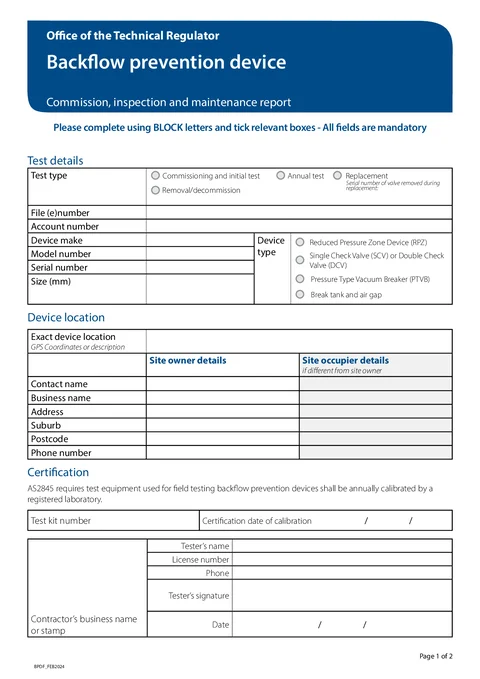
SA Backflow Report PDF preview
SAPlumbing

Office of the Technical Regulator

Commission, annual test, replacement, or decommission report for backflow prevention devices. Export the official OTR PDF within 7 days.

Open this form

The SA Backflow Prevention Device Report is used to record commissioning, annual testing, replacement, or decommissioning of backflow prevention devices in South Australia.

Before you start

Have these ready:

  • Test type and file (e)number
  • Device make, model, serial number, and size
  • Exact device location
  • Site owner contact details
  • Site occupier details if different from the owner
  • Test kit number and calibration date
  • Tester name, licence, phone, and signature
  • Valve readings for the nominated device type

The Office of the Technical Regulator says the completed report must be forwarded within 7 days of completing the work.

After download

Preview the PDF, download it, then email it to otr.plumbbackflow@sa.gov.au or post it to:

Office of the Technical Regulator, Plumbing trades, GPO Box 320, Adelaide SA 5001.

Tradie Forms prepares the PDF. It does not lodge the report with OTR or decide whether a device passes the test.

Test Details

Record why you are on site and the device identity.

What to enter

  • Test type: commissioning, annual test, replacement, or removal/decommission
  • Serial number of valve removed when replacing a device
  • File (e)number and account number
  • Device make, model, serial number, size, and type

Tips

Pick the device type that matches the installed hardware. The test results section only shows fields for RPZ, SCV/DCV, PTVB, or break tank devices.

Before download

Check the test type and device details against the device tag and your test records.

Device Location

Record where the device is and who owns or occupies the site.

What to enter

  • Exact device location (GPS coordinates or a clear description)
  • Site owner name, business name, address, and phone
  • Site occupier details if different from the owner

Tips

Use address search on Solo or Team for SA site owner addresses, then check suburb and postcode before download.

Before download

Confirm owner and occupier details against the job booking or property records.

Certification

Record test kit calibration and tester certification.

What to enter

  • Test kit number
  • Certification date of calibration
  • Contractor business name or stamp
  • Tester name, licence number, and phone
  • Tester's signature and signed date

Tips

Enter the calibration date shown on the test kit record. Check that the kit and calibration meet the current OTR and testing requirements. Save tester details from the certification toolbar for repeat tests.

Before download

Check calibration date, licence number, signature, and signed date before you download.

Test Results

Record valve readings and pass checks for RPZ, SCV/DCV, or PTVB devices.

What to enter

  • RPZ: downstream isolation valve, differential pressure, relief valve opening pressure, and check valve 2
  • SCV/DCV: downstream gate valve and check valves 1 and 2
  • PTVB: downstream gate valve, air inlet status, opened-at pressure if applicable, and check valve

Tips

Only fill the row that matches the device type you selected in Test Details. Leave other device result fields blank.

Before download

Check readings against your test kit display and tick only the pass boxes that apply.

Break Tank

Record registered break tank and air gap measurements.

What to enter

  • Inlet orifice size or water service pipe size
  • Minimum air gap, total head, break tank capacity, and overflow pipe size

Tips

This section appears when the device type is break tank and air gap. Pick whether you are recording inlet orifice size or water service pipe size before entering the measurement.

Before download

Check units match the PDF: millimetres for sizes and head, litres for tank capacity.

Open the SA Backflow Report

Prepare the backflow prevention device report.

Was this page helpful?

QLD Form 9

Overview and section help for Queensland Form 9 backflow test reports

TAS Form 21

How to complete Tasmania Form 21 for plumbing work in Tradie Forms.

On this page

Before you startAfter downloadTest DetailsWhat to enterTipsBefore downloadDevice LocationWhat to enterTipsBefore downloadCertificationWhat to enterTipsBefore downloadTest ResultsWhat to enterTipsBefore downloadBreak TankWhat to enterTipsBefore download