Skip to content
Tradie Forms
Contact supportOpen app
Tradie Forms
IntroductionQuick startFAQ

Using the app

Form typesWorkspaceJobsStarting a formCompleting a formAI assistantPDF downloadsShare links
Presets
PDF toolsTeamsCustom forms

Form guides

Overview
QLD Form 1QLD Form 11QLD PDR Form 12QLD Form 14QLD Form 19QLD Form 2QLD Form 3QLD Form 5QLD Form 6QLD Form 9

Account and billing

Managing your accountBilling

Support

TroubleshootingFeedback
Section
Section
Page title
Page title
Short description for the help article
Description continues on a second line
Short description for the help article
Description continues on a second line
Intro paragraph
Intro paragraph
Intro paragraph
Intro paragraph
Intro paragraph
Intro paragraph
Section heading
Section heading
Body paragraph
Body paragraph
Body paragraph
Body paragraph
Body paragraph
Body paragraph
Note
Callout title
Callout body
Callout body
Note
Callout title
Callout body
Callout body
Another heading
Another heading
Body paragraph
Body paragraph
Body paragraph
Body paragraph
Body paragraph
Body paragraph
List item one
List item two
List item three
List item one
List item two
List item three
Was this page helpful?
Yes
Yes
No
No

Loading documentation page

On this page
On this page
TOC item
TOC item
TOC item
TOC item
TOC item
TOC item
TOC item
TOC item
TOC item
TOC item

Form guides

QLD Form 14

Overview and section help for Queensland Form 14 compliance declarations

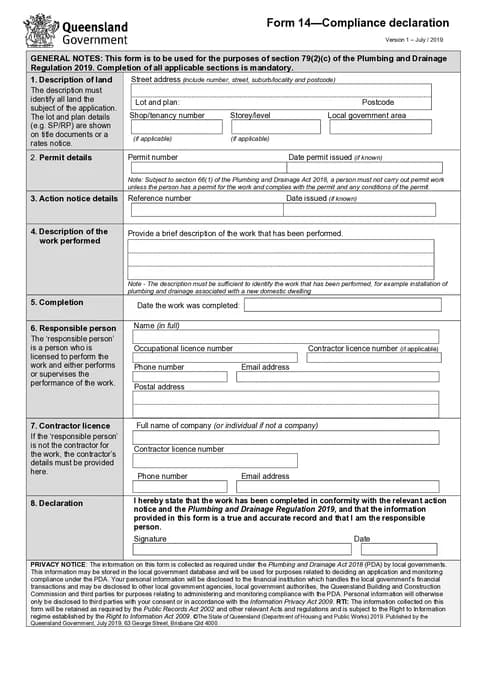
QLD Form 14 PDF preview
QLDPlumbing

Queensland Government

Compliance declaration for completed plumbing and drainage work under the Plumbing and Drainage Regulation 2019.

Open this form

Use this guide when an action notice requires a QLD Form 14 Compliance Declaration stating that specified work is compliant.

Open the form with the action notice, permit and completed work records ready.

Before you start

Have these ready:

  • Site address and local government area
  • Permit number and issue date
  • Action notice reference and issue date
  • Description of work performed
  • Date work was completed
  • Responsible person details
  • Contractor details if different from the responsible person
  • Signature and declaration date

Check the action notice for the stated work, required action and period for giving the declaration to the local government.

After download

Preview the permit, action notice, completed work, people and declaration. Download the signed PDF and give it to the local government as required by the action notice. Keep it with the notice and supporting records.

Tradie Forms prepares the declaration. It does not decide whether the work complies or close the action notice.

Property

Identify the land where the plumbing work was performed.

What to enter

  • Street address
  • Lot and plan details where relevant
  • Postcode when land is identified by lot and plan
  • Shop, tenancy, or level where relevant
  • Local government area

Tips

Use address search on Solo or Team to start the address, then check the manual fields. Lot and plan details usually need to come from title, rates, or permit documents.

Before download

Check the property details match the permit and the completed work.

Permit

Enter the plumbing permit details for the completed work.

What to enter

  • Permit number
  • Date permit issued, if known

Before download

Check the permit number matches the permit authority records for the job.

Action Notice

Enter the action notice that requires the declaration.

What to enter

  • Action notice reference number
  • Date issued, if known

Before download

Check the reference and date against the notice before continuing.

Work

Describe the plumbing work that has been completed.

What to enter

  • A brief description sufficient to identify the work performed

Tips

Use a clear summary such as installation of plumbing and drainage associated with a new domestic dwelling.

Before download

Check the description matches the permit scope and the work you completed on site.

Completion

Record when the work was finished.

What to enter

  • Date the work was completed

Before download

Use the actual completion date, not the date you are lodging the declaration.

Responsible Person

Enter details for the responsible person who signs the declaration.

What to enter

  • Full name
  • Occupational licence number
  • Contractor licence number, if applicable
  • Phone number and email
  • Postal address

Tips

On Solo or Team, save responsible person details to prefill the next Form 14.

Before download

Check licence numbers match current QBCC and occupational licence records.

Contractor

Complete this section when the responsible person is not the contractor for the work.

What to enter

  • Company or individual name
  • Contractor licence number
  • Phone number and email

Before download

Leave blank when the responsible person is also the contractor.

Declaration

Complete the declaration after checking the form details.

What to enter

  • Signature
  • Declaration date

Before download

Confirm the stated work was completed in conformity with the action notice and the Plumbing and Drainage Regulation 2019 before signing.

Was this page helpful?

QLD PDR Form 12

Overview and section help for Queensland Form 12 specialist work compliance statements

QLD Form 19

How to complete Queensland Form 19 final inspection certificates in Tradie Forms.

On this page

Before you startAfter downloadPropertyWhat to enterTipsBefore downloadPermitWhat to enterBefore downloadAction NoticeWhat to enterBefore downloadWorkWhat to enterTipsBefore downloadCompletionWhat to enterBefore downloadResponsible PersonWhat to enterTipsBefore downloadContractorWhat to enterBefore downloadDeclarationWhat to enterBefore download