Skip to content
Tradie Forms
Contact supportOpen app
Tradie Forms
IntroductionQuick startFAQ

Using the app

Form typesWorkspaceJobsStarting a formCompleting a formFill with AIPDF downloadsShare linksSaved detailsSaved signaturePresets
PDF toolsTeamsCustom forms

Form guides

Overview

Account and billing

Managing your accountBilling

Support

TroubleshootingFeedback
Section
Section
Page title
Page title
Short description for the help article
Section
Section
Page title
Page title
Short description for the help article
Body paragraph
Body paragraph
Body paragraph
Body paragraph
Body paragraph
Body paragraph
Body paragraph
Body paragraph
Body paragraph
Body paragraph
Body paragraph
Body paragraph
Body paragraph
Body paragraph
Body paragraph
Body paragraph
Body paragraph
Body paragraph
Body paragraph
Body paragraph
Body paragraph
Body paragraph
Body paragraph
Body paragraph
Body paragraph
Body paragraph
Body paragraph
Body paragraph
Body paragraph
Body paragraph
Body paragraph
Body paragraph
Body paragraph
Body paragraph
Body paragraph
Body paragraph
Body paragraph
Body paragraph
Body paragraph
Body paragraph

Using the app

Teams

Use a shared business workspace with team drafts, saved details, integrations, and billing

Team is for businesses that want shared paperwork under one workspace.

What changes in a team

When your business workspace is active:

  • New cloud drafts belong to the team
  • Completed records are saved under the team
  • Team saved details and presets are shared
  • Integration connections are shared
  • Team billing controls access for members
  • PDF audit trail (Team) or stored PDF copies (Solo) can keep downloaded PDFs for re-download

Each user can belong to one Tradie Forms team.

Switching workspace

Use the account menu to switch between:

  • Personal for your own drafts, saved details, presets, and billing
  • Your business for shared team work

Check the active workspace before starting a job. The draft and saved details go wherever the workspace is set.

Team roles

Team admins manage billing, team members, invites, and integrations. They also enable Connect import and manage field mappings for the team. Members can fill forms, import jobs with the saved mapping, and use shared team library items while the team workspace is active.

Team member management opens through Organisations.

Team plan

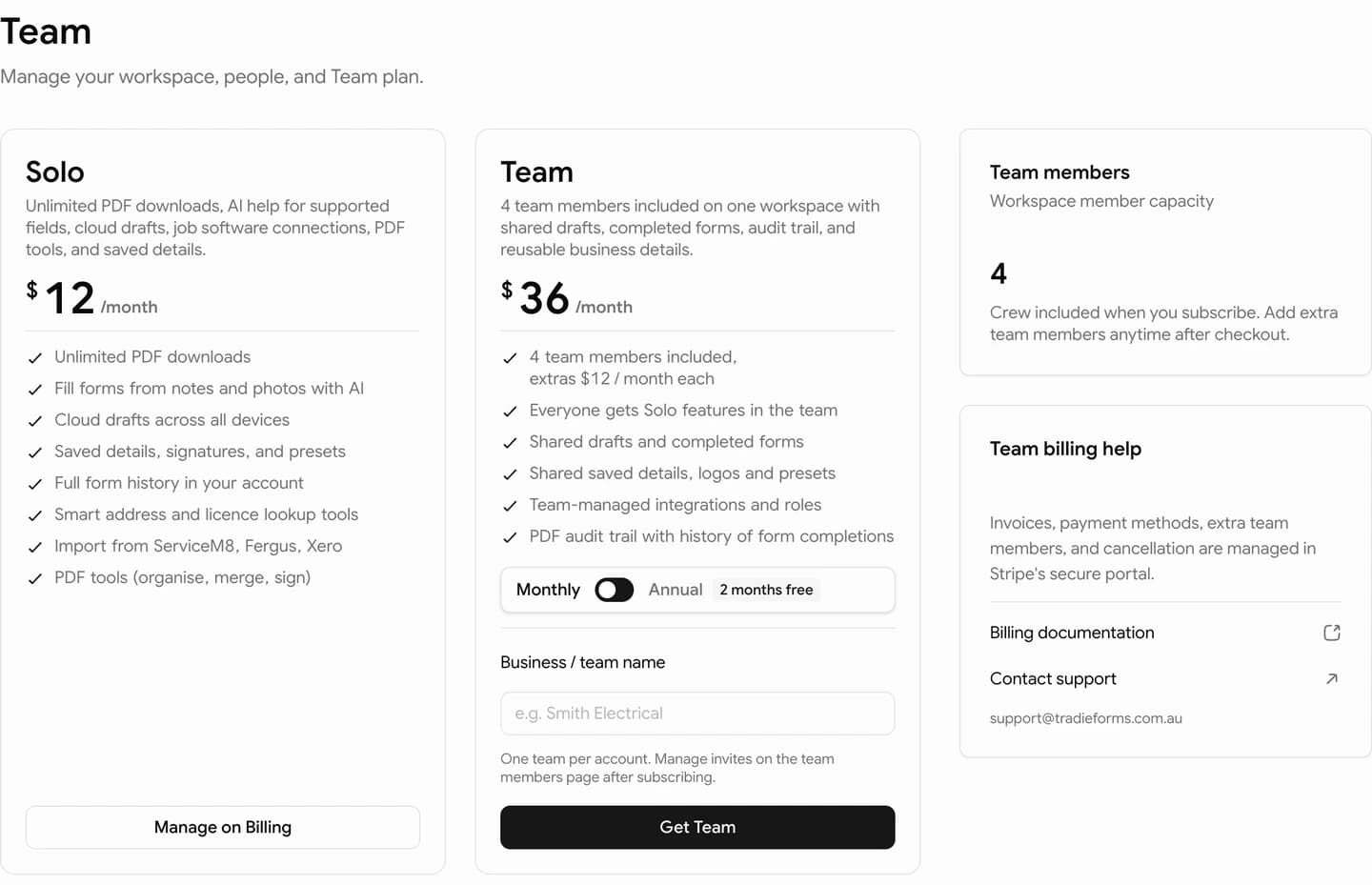
Team includes:

  • 4 members in the base price
  • Extra team members available
  • Unlimited PDF downloads for team members in the team workspace
  • Cloud drafts and full completed history
  • Shared saved details and presets
  • PDF tools download
  • ServiceM8, Fergus, and Xero integrations
  • PDF audit trail

Display pricing is:

  • Team: $36/month or $360/year
  • Extra member: $12/month or $120/year beyond the included four

Check the app checkout for the current billing screen before subscribing.

Solo vs Team

SoloTeam
WorkspacePersonalShared business
MembersOne user4 included, extras available
DraftsPersonal cloud draftsShared team cloud drafts
Saved details and presetsPersonalShared with members
ConnectionsPersonalShared, admin-managed
Stored PDF copiesYes (latest)Yes (all)
PDF audit trail (full history)Not includedYes

Billing

Compare Free, Solo, and Team.

Connections

Connect ServiceM8, Fergus, or Xero for shared team import.

PDF tools

Check licences, organise, merge, split, sign, stamp, convert, and mark up PDFs

Custom forms

Request a new public template or a private template for your business

On this page

What changes in a teamSwitching workspaceTeam rolesTeam planSolo vs Team