Review the PDF before download
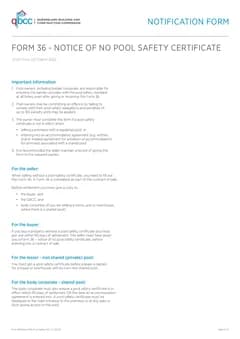
QLD Form 36 no pool safety certificate notices ready for export
Complete the notice when no pool safety certificate is in effect for a sale or lease and export the official QBCC PDF.
Give the buyer and QBCC the notice before settlement, not a half-filled PDF the night before.
Quick answers
Plain facts about this form for tradies, inspectors, and office admins.
- What form is this?
- QLD Form 36 Notice of No Pool Safety Certificate (QLD Form 36).
- Who is it for?
- QLD builders
- Which authority?
- Queensland Government
- Can I fill it on my phone?
- Yes. Tradie Forms guides you through each section on mobile and exports the official PDF layout when you are ready to hand over.
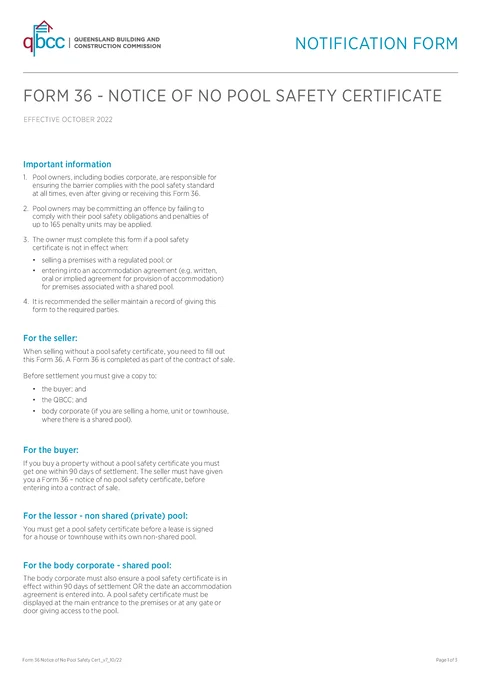
Preview the QLD Form 36 PDF before you export
Fill the guided sections, then check the finished PDF layout before you download, send, or hand it over.

Hand over the layout people expect
Keep a clean copy for the job record
What you fill in
Three guided groups across six PDF sections.
Owner and Property
Property owner details, pool location, and lot on plan.
Purchaser and Settlement
Purchaser details, pool type, and proposed settlement or lease date.
Declaration
Owner declaration, signature, and date.
Pool sale paperwork holds up settlement
What trips up owners and agents when no pool safety certificate is in effect.
Owner and buyer details twice
Postal addresses, phones, and emails for both parties are easy to mistype in a flat PDF.
Settlement date changes
The proposed settlement or lease date needs to match the contract and still fit the official form layout.
QBCC expects the official PDF
Generic PDF editors do not match the Building Act 1975 Form 36 field order.
Form 36 finished before settlement
Three steps when no pool safety certificate is in effect.
Open the form
Open the form on your phone or laptop when preparing a sale or lease with a pool.
Matches the QBCC Form 36 layout (October 2022).
Fill each section online
Work through owner and pool details, purchaser contact information, and the proposed settlement or lease date.
Saved owner details cut repeat typing on the next property.
Export and distribute
Sign, download the official PDF, and give copies to the buyer, QBCC, and body corporate if the pool is shared.
Email poolsafety@qbcc.qld.gov.au or lodge in person at a QBCC service centre.
Built for QLD property sales and leases
Six guided sections
Owner, property, pool type, purchaser, settlement, and owner declaration in PDF order.
Owner details saved
Save and apply owner contact and postal details when you complete the next Form 36.
Validation while you fill
Missing purchaser details, settlement date, or signature surface before export.
PDF ready to lodge
Download the filled Form 36 for the buyer, QBCC, and body corporate when required.
Before you export
Tradie Forms checks these requirements against the Queensland Government template.
- Owner and purchaser details are required.
- Settlement date and owner declaration signature are required before export.
Frequently asked questions
Start your QLD Form 36 notice
Fill online before settlement. Export the official PDF when you are ready to distribute.