Queensland Government · Live template

QLD Form 6 remote area notices finished on site

Record completed plumbing work in remote areas in the Queensland PDF order under the Plumbing and Drainage Regulation 2019.

Hand council the finished notice while you are still on site, not after hours at the kitchen table.
Exports the Form 6 PDF
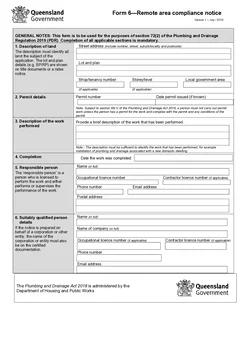
Seven guided sections in PDF order
Responsible person details saved for the next job

Quick answers

Plain facts about this form for tradies, inspectors, and office admins.

What form is this?
QLD Form 6 Remote Area Compliance Notice (QLD Form 6).
Who fills it?
Plumbing, Draining working in QLD.
Which authority?
Queensland Government
Can I fill it on my phone?
Yes. Tradie Forms guides you through each section on mobile and exports the official PDF layout when you are ready to hand over.

Preview the QLD Form 6 PDF before you export

Fill the guided sections, then check the finished PDF layout before you download, send, or hand it over.

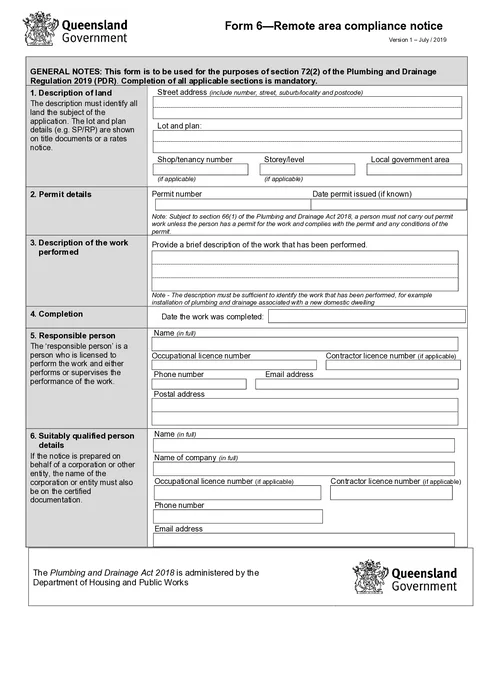
QLD Form 6 form preview
Preview of the QLD Form 6 Remote Area Compliance Notice PDF layout used for export.

Review the PDF before download

Hand over the layout people expect

Keep a clean copy for the job record

What you fill in

Guided groups follow the form layout.

  1. Property and Permit

    Site description and permit details for the remote area notice.

  2. Work and Completion

    Description of work performed and completion date.

  3. Responsible and Qualified Person

    Licensed parties for the completed remote area work.

  4. Declaration

    Qualification, signature, and declaration date.

Remote area paperwork is harder when the PDF is buried in email

What slows QLD plumbers and drainers down after remote area work.

Same site and permit details every job

Street address, permit number, and responsible person contact should carry over from your last Form 6 on that site.

Work description buried in a flat PDF

Property, permit, and completion details are easy to miss on a phone PDF viewer.

Council wants the PDF in order

Generic PDF editors do not match the Plumbing and Drainage Regulation 2019 Form 6 field order.

Sign off before you leave site

Three steps without retyping the same block.

Open the form

Open the form on your phone or laptop. Sign in later if you want cloud drafts across devices.

Preview the same PDF layout before download.

Fill each section at the job

Work through guided groups with gaps flagged on site.

Saved responsible person details cut repeat typing.

Hand over the PDF

Preview, then download when council or the permit authority needs the notice.

Free tier includes monthly PDF exports.

Built for QLD remote area compliance notices

Seven guided sections

Property, permit, work, completion, responsible person, qualified person, and declaration in PDF order.

Address search on site

Search street and postal addresses without retyping suburb and postcode.

Responsible person details

Save licence holder name, licence, phone, and email for the next notice.

Works on your phone

Fill between jobs and export when council or the permit authority needs the notice.

Before you export

Tradie Forms checks these requirements against the Queensland Government template.

  • Declaration qualification, date, and signature are required before export.
  • Confirm the finished notice meets local government requirements for remote area plumbing work.
  • Give the finished notice through the required process for the permit and local government.

Frequently asked questions

Built for Australian tradies

Start your QLD Form 6 on site

Open the form, record the work completed, and hand over the finished notice.

No credit card required
3 free PDF exports per month