NT WorkSafe · Live template

Complete the NT CoC addendum for ESS, EV, and solar work

Fill the NT WorkSafe certificate of compliance addendum for battery, EV charger, solar, and inverter installations.

Attach the addendum when you are still using hard-copy triplicate certificate books.
More forms for NT electricians

Exports to the NT WorkSafe PDF
Seven guided sections
Gaps flagged before export

Quick answers

Plain facts about this form for tradies, inspectors, and office admins.

What form is this?
NT Electrical Safety Certificate of Compliance - Addendum (NT CoC Addendum).
Who fills it?
Electrical working in NT.
Which authority?
NT WorkSafe
Can I fill it on my phone?
Yes. Tradie Forms guides you through each section on mobile and exports the official PDF layout when you are ready to hand over.

Preview the NT CoC addendum before export

Fill the addendum in job-friendly sections, then check the NT WorkSafe PDF layout before you download.

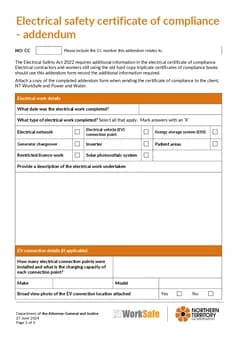
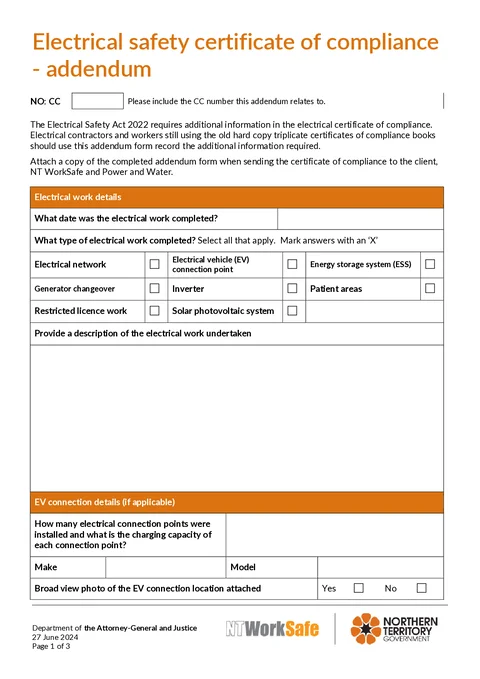
NT CoC Addendum form preview
Preview of the NT certificate of compliance addendum PDF layout.

Review work types and equipment details

Check photo confirmation answers

Download a clean addendum for distribution

What you fill in

Three guided groups follow the form layout.

  1. Reference and Work

    Related CC number, completion date, work types, and description.

  2. Technology Details

    EV, solar, ESS, and inverter details when applicable.

  3. Lodgement

    Distribution and retention instructions after export.

ESS and EV details are easy to miss on a flat PDF

The addendum captures technology-specific details that the main certificate book does not cover.

Multiple technology blocks on one form

EV, ESS, inverter, and solar sections each need different details. A flat PDF makes it easy to skip a block.

Photo confirmation checkboxes

Broad-view photo attached questions are tiny on the PDF and painful on a phone.

Re-typing make, model, and serial numbers

Equipment details should be captured once at the job, not copied from photos later.

From installation details to addendum PDF

Three steps to finish the addendum.

Open the form

Open the addendum on your phone or laptop at the job. Sign in later if you want cloud drafts.

Exports the NT WorkSafe PDF layout.

Fill each technology section

Complete the work type checkboxes and the EV, ESS, inverter, or solar blocks that apply.

Optional sections stay visible like the PDF.

Attach and distribute

Preview, download, and attach the addendum to the main certificate for client, NT WorkSafe, and Power and Water.

Retain your copy for five years.

Built for NT supplementary electrical work

Seven guided sections

Work through reference, work type, EV, solar, ESS, inverter, and lodgement notes in order.

Multi-select work types

Tick every work type that applies without hunting PDF checkboxes.

Technology-specific blocks

EV charger, battery, inverter, and solar sections match the official addendum layout.

Lodgement reminders built in

Submit section reminds you who needs a copy after export.

Before you export

Tradie Forms checks these requirements against the NT WorkSafe template.

  • CC number, work completed date, and work description are required before export.
  • Attach the addendum when sending the certificate to the client, NT WorkSafe, and Power and Water.

Frequently asked questions

Built for Australian tradies

Start the NT CoC addendum online

Open the form, finish on site, and download the finished PDF.

No credit card required
3 free PDF exports per month