Review the PDF before download
NSW electrical test and tag register for your site pack
Record equipment inspections, results, and tester signatures and export the official HIISP PDF.
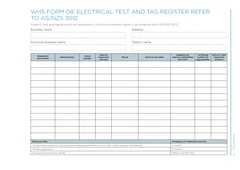
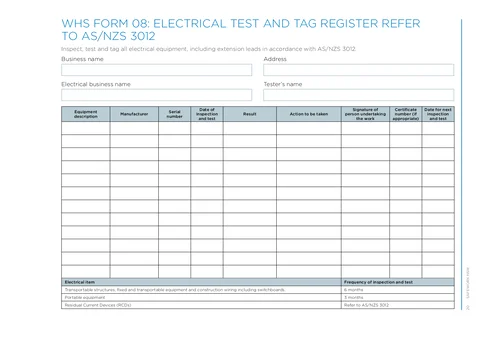
Guided business header and up to 12 equipment rows follow the WHS Form 08 layout.
Quick answers
Plain facts about this form for tradies, inspectors, and office admins.
- What form is this?
- NSW WHS Form 08: Electrical Test and Tag Register (NSW WHS Test and Tag Register).
- Who fills it?
- Building working in NSW.
- Which authority?
- SafeWork NSW
- Can I fill it on my phone?
- Yes. Tradie Forms guides you through each section on mobile and exports the official PDF layout when you are ready to hand over.
Preview the NSW WHS Test and Tag Register PDF before you export
Fill the guided sections, then check the finished PDF layout before you download, send, or hand it over.

Hand over the layout people expect
Keep a clean copy for the job record
What you fill in
Three groups cover the full test and tag register PDF.
Business and Equipment
Business header and equipment test rows for the site pack.
Test and tag registers are painful on a phone PDF
What slows teams on WHS Form 08.
Wide tables with nine columns
Serial numbers, inspection dates, and signatures are tedious to tap through in a flat PDF viewer on site.
Tester signature on every row
Each item needs a dated result and signature, but the same business details should carry across jobs.
Principal expects the HIISP layout
Site packs need the official column order, not a retyped spreadsheet.
Finish the test and tag page before the site pack goes out
Three steps without fighting the table on a phone.
Open the form
Start on your phone or laptop. Sign in later if you want cloud drafts across devices.
Matches the HIISP test and tag register PDF layout.
Add business and equipment rows
Enter the business header, then add each tested item in table order.
Saved business details cut repeat typing.
Export the filled PDF
Download or share the completed register for your WHS site pack.
Repeat when new equipment is added to the job.
Built for HIISP test and tag registers
Business header first
Business name, address, and tester details match the top of the official PDF.
Equipment rows in PDF order
Add up to 12 rows with description, result, signature, and next inspection date.
Saved business details
Reuse business and tester details from your last register.
Official PDF export
Download the filled SafeWork NSW layout for your WHS site file.
Before you export
Tradie Forms checks these requirements against the SafeWork NSW template.
- Business name is required before export.
Frequently asked questions
Ready to finish the test and tag register on site?
Open the guided form and export the official PDF when every row is complete.