SafeWork NSW · HIISP

NSW WHS policy sign-off finished on site

Sign the Housing Industry Site Safety Pack WHS policy and export the official PDF for your site records.

One guided sign-off section stamps name, position, signature, and date onto the policy PDF.
More forms for NSW builders

Exports the SafeWork NSW PDF layout
Signature stamp on the policy line
Saved signatory details for repeat jobs

Quick answers

Plain facts about this form for tradies, inspectors, and office admins.

What form is this?
NSW WHS Form 03: Work Health and Safety Policy (NSW WHS Policy).
Who fills it?
Building working in NSW.
Which authority?
SafeWork NSW
Can I fill it on my phone?
Yes. Tradie Forms guides you through each section on mobile and exports the official PDF layout when you are ready to hand over.

Preview the NSW WHS Policy PDF before you export

Fill the guided sections, then check the finished PDF layout before you download, send, or hand it over.

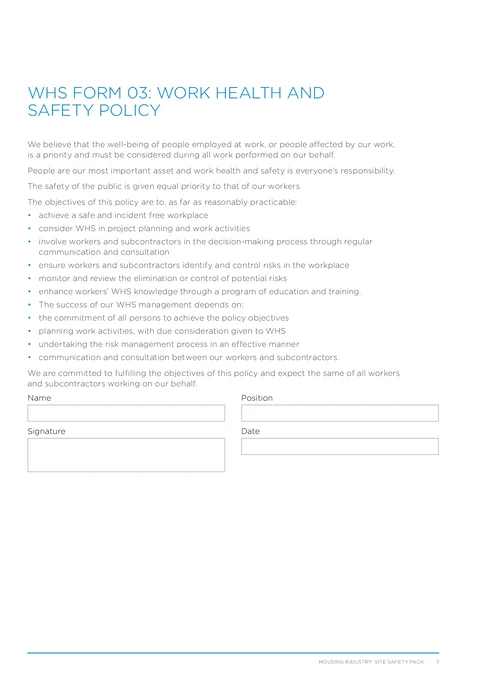
NSW WHS Policy form preview
Preview of the WHS Form 03 Work Health and Safety Policy PDF layout used for export.

Review the PDF before download

Hand over the layout people expect

Keep a clean copy for the job record

What you fill in

One sign-off group covers the policy acknowledgement on the PDF.

  1. Policy Sign-off

    Name, position, signature, and date for the WHS policy acknowledgement.

Policy sign-off should not wait until you are back at the desk

What slows teams on the HIISP WHS policy page.

Printing just to sign one page

A full policy PDF is awkward to print, sign, and scan when you only need the acknowledgement block.

Signature boxes on a phone PDF

Generic PDF viewers make it hard to sign cleanly on a small screen between jobs.

Inconsistent records across sites

Principal contractors want the same SafeWork NSW layout, not a reshuffled export from a desktop editor.

Sign off before the site file goes out

Three steps without retyping the same block.

Open the form

Start on your phone or laptop. Sign in later if you want cloud drafts across devices.

Matches the HIISP WHS policy PDF layout.

Complete the sign-off

Enter name, position, signature, and date with validation before export.

Saved signatory details cut repeat typing.

Export the filled PDF

Download or share the signed policy page for your WHS site pack.

Same PDF order principals expect.

Built for the HIISP WHS policy page

Policy text stays on the PDF

The full WHS policy wording exports on the official layout. You only fill the sign-off block in the app.

Signature stamp export

Sign on your phone and stamp it into the signature box on the exported PDF.

Saved signatory block

Store repeat name and position details once, then apply them on the next site pack job.

Works on your phone

Finish the acknowledgement between jobs and download when the site file needs the signed policy.

Before you export

Tradie Forms checks these requirements against the SafeWork NSW template.

  • Name, position, signature, and date are required before export.

Frequently asked questions

Built for Australian tradies

Ready to sign your NSW WHS policy on site?

Open the guided form and export the official PDF when sign-off is complete.

No credit card required
3 free PDF exports per month