SafeWork NSW · HIISP

NSW WHS roles and responsibilities on site

Record who holds WHS responsibility and export the official SafeWork NSW roles PDF for your site pack.

Guided sign-offs for the business owner and supervisor follow the HIISP field order on the PDF.
More forms for NSW builders

Exports the SafeWork NSW PDF layout
Owner and supervisor signature stamps
Saved names for repeat site packs

Quick answers

Plain facts about this form for tradies, inspectors, and office admins.

What form is this?
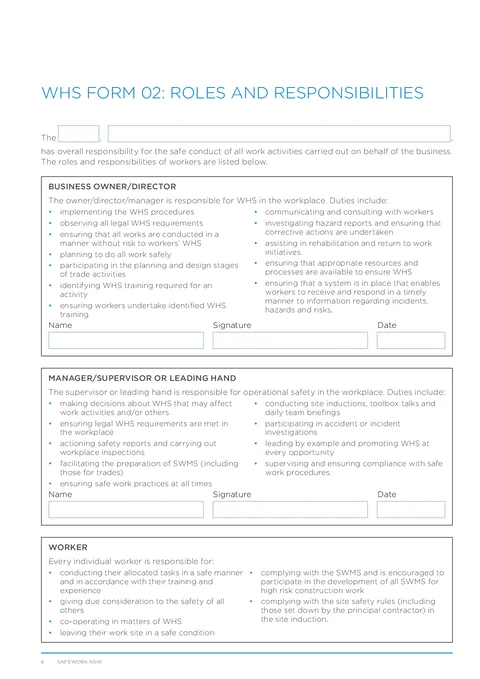
NSW WHS Form 02: Roles and Responsibilities (NSW WHS Roles).
Who fills it?
Building working in NSW.
Which authority?
SafeWork NSW
Can I fill it on my phone?
Yes. Tradie Forms guides you through each section on mobile and exports the official PDF layout when you are ready to hand over.

Preview the NSW WHS Roles PDF before you export

Fill the guided sections, then check the finished PDF layout before you download, send, or hand it over.

NSW WHS Roles form preview
Preview of the WHS Form 02 Roles and Responsibilities PDF layout used for export.

Review the PDF before download

Hand over the layout people expect

Keep a clean copy for the job record

What you fill in

Four groups mirror the roles and responsibilities PDF.

  1. Overview and Business Owner

    Overall responsibility and business owner sign-off.

  2. Supervisor Sign-off

    Supervisor or leading hand name, signature, and date.

Roles paperwork is easy to leave until the site file is due

What slows teams on WHS Form 02.

Two sign-offs on one cramped PDF page

Owner and supervisor signature lines are easy to miss when you are filling a flat PDF on a phone.

Same names on every new project

Director and leading hand details repeat across jobs but rarely carry over from the last export.

Audits want the official layout

Principal contractors expect the Housing Industry Site Safety Pack order, not a retyped Word version.

Sign off before the site pack goes out

Three steps without retyping the same block.

Open the form

Start on your phone or laptop. Sign in later if you want cloud drafts across devices.

Matches the HIISP roles PDF layout.

Fill overview and sign-offs

Record overall responsibility, then complete owner and supervisor sign-off rows.

Saved names cut repeat typing.

Export the filled PDF

Download or share the completed roles page for your WHS site pack.

Same PDF order principals expect.

Built for HIISP roles and responsibilities

Overview plus two sign-offs

Capture overall responsibility, then business owner and supervisor name, signature, and date.

Duty lists stay on the PDF

The bullet lists for each role export on the official layout. You only fill the sign-off fields.

Saved owner and supervisor blocks

Store repeat names once and apply them when you start the next site safety pack.

Dual signature stamps

Sign on your phone and stamp into both signature boxes on the exported PDF.

Before you export

Tradie Forms checks these requirements against the SafeWork NSW template.

  • Overview, business owner, and supervisor sign-offs are required before export.

Frequently asked questions

Built for Australian tradies

Ready to finish NSW WHS roles on site?

Open the guided form and export the official PDF when sign-offs are complete.

No credit card required
3 free PDF exports per month