SafeWork NSW · HIISP

NSW WHS organisation details for your site pack

Complete organisation, insurance, and contact details for the Housing Industry Site Safety Pack and export the official PDF.

Five guided sections follow the HIISP Form 01 layout, including address search and insurance rows.
More forms for NSW builders

Exports the SafeWork NSW PDF layout
Address search for business address
Logo and signature stamp on export

Quick answers

Plain facts about this form for tradies, inspectors, and office admins.

What form is this?
NSW WHS Form 01: Organisation Details (NSW WHS Org Details).
Who fills it?
Building working in NSW.
Which authority?
SafeWork NSW
Can I fill it on my phone?
Yes. Tradie Forms guides you through each section on mobile and exports the official PDF layout when you are ready to hand over.

Preview the NSW WHS Org Details PDF before you export

Fill the guided sections, then check the finished PDF layout before you download, send, or hand it over.

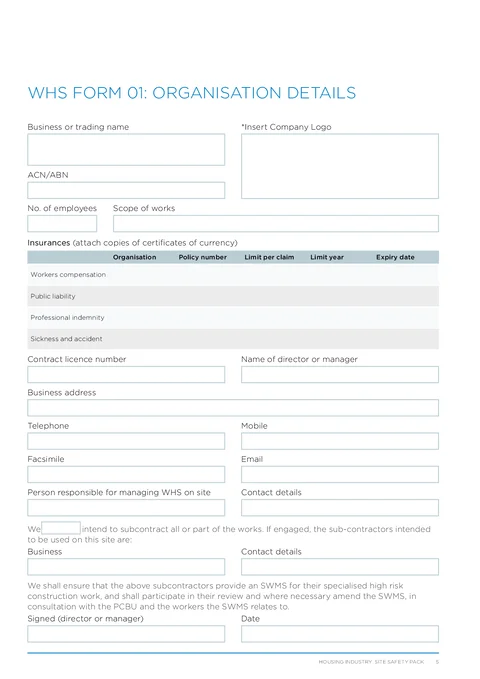
NSW WHS Org Details form preview
Preview of the WHS Form 01 Organisation Details PDF layout used for export.

Review the PDF before download

Hand over the layout people expect

Keep a clean copy for the job record

What you fill in

Five groups cover the full organisation details PDF.

  1. Organisation and Contact

    Business details, address search, and WHS site contacts.

  2. Insurances

    Workers compensation, public liability, and other policy rows.

  3. Sign-off

    Director or manager signature and date.

Organisation pages are painful on a phone PDF

What slows teams on WHS Form 01.

Insurance tables with dozens of boxes

Four insurance rows and contact lines are tedious to tap through in a flat PDF viewer on site.

Same business details every job

ABN, address, and director details should carry from your last site pack instead of starting cold.

Logo and signature on one page

Desktop tools struggle to place a logo and signature cleanly on the official layout from a phone.

Finish the org page before the site pack goes out

Three steps without retyping the same block.

Open the form

Start on your phone or laptop. Sign in later if you want cloud drafts across devices.

Matches the HIISP organisation PDF layout.

Fill each section in order

Work through organisation, insurances, contact, subcontracting, and sign-off with gaps flagged early.

Saved organisation details cut repeat typing.

Export the filled PDF

Download or share the completed organisation page for your WHS site pack.

Attach insurance certificates separately as required.

Built for HIISP organisation details

Five guided sections

Organisation, insurances, contact, subcontracting, and sign-off in the same order as the PDF.

Business address search

Search the business address without retyping suburb, state, and postcode.

Insurance rows grouped by type

Workers compensation, public liability, professional indemnity, and sickness and accident in clear rows.

Logo and signature export

Upload your logo and sign on your phone, then stamp both onto the exported PDF.

Before you export

Tradie Forms checks these requirements against the SafeWork NSW template.

  • Business name, sign-off signature, and date are required before export.

Frequently asked questions

Built for Australian tradies

Ready to finish NSW org details on site?

Open the guided form and export the official PDF when every section is complete.

No credit card required
3 free PDF exports per month