Documentation page
Documentation page
How to complete the Housing Industry Site Safety Pack Safe Work Method Statement in Tradie Forms.

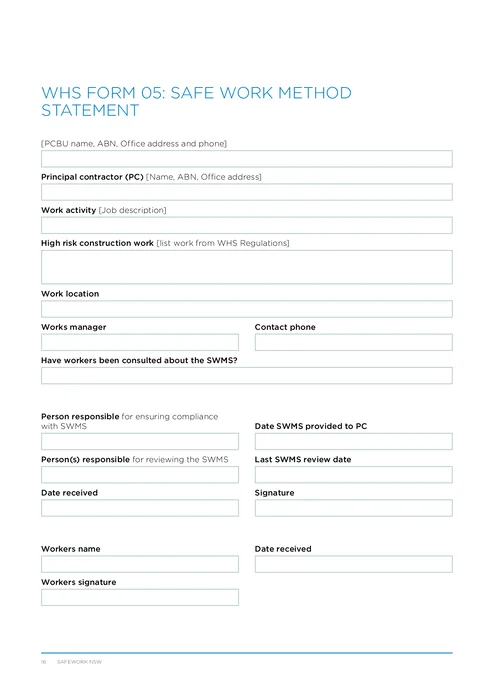
WHS Form 05 records the Safe Work Method Statement for high risk construction work on a residential site pack job: who is doing the work, what the high risk activity is, the site-specific task rows, and who was consulted. The PCBU that carries out the high risk work prepares it before that work starts; the finished PDF is the SafeWork NSW Housing Industry Site Safety Pack layout for the site file and the principal. SafeWork NSW requires a SWMS for high risk construction work, not for every ordinary construction task.
This is the current SafeWork NSW WHS Form 05 from the Housing Industry Site Safety Pack. Tradie Forms follows the official section order and maps your answers onto the official PDF layout.
Almost every Form 05 problem comes from reusing last job's wording without checking this site. Have these in front of you.
Confirmation that the work is high risk construction work
Falls more than two metres, work near energised electrical services, powered mobile plant zones, deep trenches, asbestos disturbance, and the rest of the SafeWork NSW high risk list. Ordinary tasks that are not high risk do not need a SWMS row.
Form 04 hazards for this stage, if you completed one
Lift only the high risk items into this SWMS so the method and the risk assessment do not contradict each other.
PCBU and principal contractor identity
Business name, ABN, office address and phone for the PCBU, plus the principal's name, ABN and address when a principal is on the job.
The real site address and works manager contact
The job location the crew will work at, not the builder's office, and a mobile that answers during the task.
How the crew will be consulted
Toolbox talk, pre-start, or a walk-through of the task rows, so you can record consultation rather than invent it after the fact.
A clear task sequence for the high risk work
Each step you will put in a row: the task, the site-specific hazard, and the control that will actually be on site before that step starts.
Business Name gates the download. Every other field is optional in the app, but a usable SWMS still needs the high risk description, site-specific task rows, consultation, and the people who own compliance and worker receipt.
Captures the person conducting a business or undertaking for this SWMS: the business that will carry out the high risk work. On the finished PDF these values compose into a single line with the business name, ABN, office address and phone.
The name on your ABN record and insurance, written the same way as on Form 01 and the rest of this site pack. Use ABN lookup from the business name to fill the ABN when the name is known. A leftover trading name from another job is a common gate-check fail.
From your ABN record or a current certificate of currency. Use ABN lookup to fill the business name when you start from the number. Check the result against the entity on site, because a group structure can return a related company.
The PCBU office or registered business address, not the job site. Address search is limited to New South Wales and fills the street line, suburb, state and postcode. Check the result if the business has moved recently.
Starts on NSW. Confirm it when you type the address by hand.
Filled by address search. Confirm it against the business record when typing manually.
The office or primary business number a principal or inspector can call, for example 02 4923 1100. Prefer a monitored number, not a site-only handset that changes every job.
Save this section as PCBU to prefill it on your next SWMS for this business.
Records the principal contractor when one is involved on the project. SafeWork NSW construction guidance expects the principal to get a copy of the SWMS for high risk construction work. On the finished PDF the name, ABN and address compose into a single line.
The principal contractor business as it appears on the project file, for example Harbour Homes Pty Ltd. Leave blank only when there is no principal on this job. Use ABN lookup from the name to fill the ABN when known.
From the principal's ABN record or project paperwork. Use ABN lookup to fill the name when you start from the number. Confirm it matches the entity named in the contract or site induction pack.
The principal's office address, not the job site. Address search is limited to New South Wales. Check the result against the project contact sheet if the principal has more than one office.
Starts on NSW. Confirm it when typing by hand.
Filled by address search. Confirm against the project record when typing manually.
Save this section as Principal Contractor to prefill it on your next SWMS for the same principal.
Names what this SWMS covers and which high risk construction work triggers it. Keep both fields specific to this site and this stage of work.
The job description a site supervisor can read in thirty seconds. Name the building work and location context, not a trade label alone.
Second-storey extension and roof framing
Building work
The high risk construction work types that apply, drawn from the SafeWork NSW high risk list. You can cover more than one high risk activity on one SWMS when the method stays clear. Do not list ordinary tasks that are not high risk construction work.
If you finished Form 04 first, the high risk items on that assessment are the starting point for this description and for the task rows below.
The site where the high risk construction work will be carried out. The finished PDF shows a single composed address line.
The job site address, not the PCBU or principal office. Address search is limited to New South Wales and fills the street line, suburb, state and postcode. On multi-dwelling sites, include unit, lot or elevation detail in the street line so workers can tell which building the SWMS covers.
Starts on NSW. Confirm it when typing by hand.
Filled by address search. Confirm it against the site sign or project pack when typing manually.
Who owns day-to-day coordination of this SWMS on site, and how to reach them while the high risk work is under way.
The named person responsible for running the work this SWMS covers, for example Jordan Mitchell. Match the person the crew actually reports to on site, not only the office director.
A mobile that is answered during the task, for example 0412 345 678. Prefer the works manager's site phone over a switchboard that will not reach them on the roof.
Records how workers were consulted about this SWMS. SafeWork NSW expects hazards, risks and controls to be communicated so the people using the document understand it. A signature without a conversation is a weak record.
How consultation happened and who was involved. Name the meeting type, the crew, and what they confirmed. If your pack also uses Form 06, keep the toolbox talk record with this SWMS so both point at the same method.
Toolbox talk with framing crew on 20 June 2026. Workers confirmed fall zones, exclusion areas and edge protection checks before trusses go up.
Workers told about SWMS
The core of the form: up to 15 task rows for the high risk construction work. Each row is one step of that work, with the hazard and the control for that step. Leave unused rows out rather than adding blanks. On the finished PDF the rows fill the task table on page two.
The in-app notice matches the official layout: each row covers the task, hazards and risks, and control measures. SafeWork NSW also expects you to describe how controls are implemented, monitored and reviewed, so put the who-checks-what language into the control column when it is not already obvious.
Add a row for each useful step of the high risk work, including preparation and clean-up when those steps carry the risk. Columns are Task, Hazards and Risks, and Control Measures. Prefer elimination and engineering controls before PPE-only wording. Name who installs and re-checks the control when that is what makes the control real on site.
Task: install roof trusses on east elevation. Hazards: fall more than 2 m from incomplete edge; manual handling of long trusses. Controls: edge protection installed and checked by leading hand before trusses are lifted; team lift procedure; exclusion zone below.
Task: roofing. Hazard: falls. Control: PPE.
Do not pad the table with ordinary non-high-risk tasks. A short SWMS the leading hand can walk in a few minutes beats a long generic list nobody follows. If you need more than 15 high risk steps, split into another SWMS for the extra stage rather than cramming vague rows.
Who owns the SWMS, when it was given to the principal, when it was last reviewed, and the receipt and signature that close the compliance block on page one. All date fields accept today or a past date only, with Today and Yesterday shortcuts.
The person responsible for ensuring work follows this SWMS, matching the official "person responsible for ensuring compliance" line. Usually the works manager or the PCBU representative on site.
The date a copy went to the principal when a principal is on the job. Leave blank only when there is no principal, or when provision has not happened yet and you will re-download after handover. The field does not accept a future date.
Who reviewed the SWMS against this site, matching the official "person(s) responsible for reviewing the SWMS" line. Empty reviewer fields make the document look unowned.
When the method was last checked against this site. Update it after weather, design changes, control changes, or when work drifts off the written method. The field does not accept a future date.
The date this SWMS was received into the site pack or by the person who signs the compliance signature. The field does not accept a future date.
Signed by the person who acknowledges receipt or compliance review on the official form, after the PCBU, activity, location and task rows are correct for this site. Use a saved signature if you have one; check the preview so the stamp sits cleanly in the signature box on page one. Sign when the method is ready for use, not as a blank template for later jobs.
One worker acknowledges receipt of this SWMS on the PDF. The signature attests that the named worker has received the SWMS for this work, not that every hazard on site is eliminated. Complete a new form for each additional worker when the site pack needs separate acknowledgements.
The worker who is acknowledging receipt, for example Alex Chen. Match the name to the person who will sign.
The named worker signs after consultation, so the signature follows a real walk-through of the task rows rather than a blank page. Use a saved signature if the worker has one; check the preview for the worker signature box on page one.
The date the worker received the SWMS. Usually the same day as the toolbox talk or pre-start. The field does not accept a future date.
Starting high risk work before the SWMS exists.
SafeWork NSW requires the SWMS prepared before high risk construction work starts. Finish the form and the pre-start talk before the first high risk step, not after the first sheets go on the roof.
Copying last week's SWMS without a site review.
Generic wording is allowed only after you review it for this site's hazards. Change location, high risk description, and any row that does not match before you download.
Task rows that say nothing useful.
Task: general works. Hazard: injury. Control: PPE. fails a gate check. Name the elevation or area, the fall or energy mechanism, the control that can be inspected, and who checks it.
Listing every ordinary task on the SWMS.
SafeWork NSW does not require non-high-risk activities on a SWMS. Extra ordinary rows bury the high risk method and give auditors more weak wording to challenge.
Controls written on paper but missing on site.
Edge protection, isolation and exclusion zones only count when they are real before the activity starts. Walk the controls first; if a control is not ready, do not start that step.
Leaving PCBU or principal details from another job.
Wrong ABN, trading name or principal block fails simple pack checks. Confirm the header against this project's identity every time.
Recording consultation as a signature only.
Workers need the hazards, risks and controls communicated. Record the toolbox talk or walk-through in Workers Consulted, and keep Form 06 with the pack when you use it.
Leaving review dates and responsible people blank.
Empty reviewer and last-review fields look like a document nobody owns. Name who ensures compliance, who reviewed the method, and when it was last checked for this site.
Tradie Forms does not lodge Form 05 with SafeWork NSW. You remain responsible for the content, worker consultation, controls on site, and any copy the principal contractor needs.
WHS-05 - Roof framing - Merewether.pdf.Check the current SafeWork NSW SWMS guidance for your job. What the principal requires on that site sits with the principal and the authority, not with this page.
High risk construction work triggers, who must prepare a SWMS, and when one document can cover several activities.
Vague rows, generic templates, missing consultation, and controls that are not on site yet.
How Forms 04, 05 and 06 move together from risk assessment through method to toolbox talk.
The regulator publications this guide is based on. Always check the current official form before you lodge.
NSW WHS Site Risk Assessment
How to complete the Housing Industry Site Safety Pack site-specific risk assessment in Tradie Forms.
NSW WHS Toolbox Talk Record (Form 06)
How to complete the Housing Industry Site Safety Pack toolbox talk record in Tradie Forms.