Documentation page
Documentation page
How to sign the Housing Industry Site Safety Pack WHS policy in Tradie Forms.

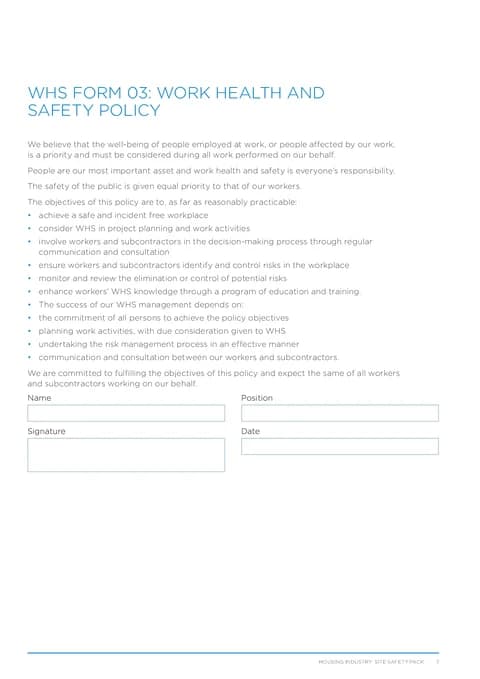
WHS Form 03 is the work health and safety policy page from the Housing Industry Site Safety Pack. The full policy text is already printed on the SafeWork NSW PDF; you only complete the name, position, signature and date acknowledgement. Keep the finished PDF in the site safety file with the rest of the pack, and make the policy available to workers as your arrangements require.
This is the current SafeWork NSW WHS Form 03 from the Housing Industry Site Safety Pack. Tradie Forms follows the official section order and maps your answers onto the official PDF layout.
Almost every Form 03 problem comes from signing a blank template for later, or using a different name from Form 01. Have these in front of you.
Who has authority to acknowledge the policy
The owner, director or manager who can commit the business to the WHS objectives on the page.
That person's name and position
Match Form 01 director or manager wording when the same person signs both, so the pack reads as one business.
A quick read of the printed policy
Objectives and commitment sit on the PDF, not in the app. Sign only when that wording still fits how you run WHS.
The date of this pack entry
Use the day the policy is acknowledged for this site file, not a date held for a later job.
Name, position and date gate the download. Signature should still go on the policy line so the pack is a signed record.
Acknowledges the printed WHS policy for this business. The app only collects the sign-off block; the objectives, commitment and consultation wording appear on the downloaded Housing Industry Site Safety Pack PDF.
The person acknowledging the policy. Use the same spelling as Form 01 Name of Director or Manager when that person is the signatory, so the principal's file does not show two different people in charge of the same pack. If someone else has authority for this acknowledgement, use their full name as they sign other WHS records.
Their role for this pack. Common options are Director, Managing Director, Site Supervisor, Project Manager, WHS Manager and Owner; you can also type a custom title. Prefer the title the principal and workers already use for that person, not a job-site nickname.
The same person named above. Sign when you have read the policy text on the PDF and the name and position are correct for this pack, not as a blank stamp for later jobs. You can use a saved signature; check the preview so the stamp sits cleanly in the signature box on the policy page.
The day this policy acknowledgement is completed for the pack. Today and Yesterday shortcuts are there because this is usually filled when the site file is opened. The field does not accept a future date.
Save this section as Signatory to prefill it on your next Housing Industry Site Safety Pack for this business.
Prefill restores name and position only. The person still needs to review the policy and sign each pack entry.
The finished PDF carries the SafeWork NSW policy objectives and commitment paragraphs above the sign-off block. Nothing you type in the app rewrites that policy text.
Signing without reading the policy on the PDF.
The app only shows the sign-off fields. The commitment and objectives sit on the downloaded page. Open the preview before you treat the file as acknowledged.
Using a different name from Form 01.
Form 01 sets who runs the pack. A Form 03 signed by someone else without explanation makes the site file look inconsistent when a principal checks the first pages.
Prefilling the signatory and skipping the signature.
Saved Signatory details restore name and position only. A policy page with a name and no signature is not a finished acknowledgement for the site file.
Dating the form for a job that has not started.
The date field rejects future dates for a reason. Use the day you actually complete this pack entry; open a fresh Form 03 when the next site pack needs its own acknowledgement.
Treating Form 03 as a complete WHS system.
The signed policy is one page in the pack. It does not replace roles, risk assessment, SWMS, toolbox talks, training or registers the job still needs.
Never revisiting the policy after the business changes.
Trading name, work types or WHS arrangements can outgrow the signed page. Review when the business or how you run sites changes, then re-sign a current pack entry rather than relying on last year's PDF alone.
Keep the finished PDF in the site safety file on site and retain a copy with your business records. Tradie Forms does not lodge Form 03 with SafeWork NSW or any other authority.
WHS-03 - Mitchell Building - 2026-06-15.pdf.Check the current SafeWork NSW Housing Industry Site Safety Pack guidance for your job type. What the principal requires on that site sits with the principal and the authority, not with this page.
Business identity and insurance details that open the same site pack.
Who holds which WHS responsibilities, usually completed with Forms 01 and 03.
How Forms 04, 05 and 06 work together after the policy pages are in the file.
The regulator publications this guide is based on. Always check the current official form before you lodge.
NSW WHS Roles (Form 02)
How to complete WHS Form 02 roles and responsibilities in Tradie Forms.
NSW WHS Site Risk Assessment
How to complete the Housing Industry Site Safety Pack site-specific risk assessment in Tradie Forms.