Documentation page
Documentation page
How to complete SafeWork NSW's Mobile Crane Safety for PCBUs checklist in Tradie Forms.

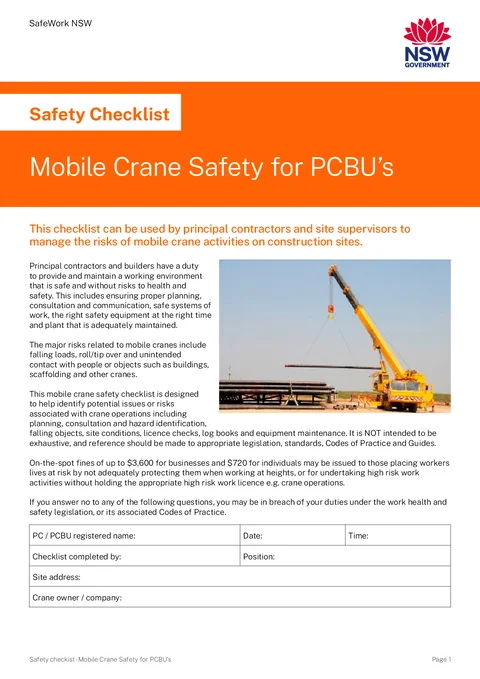
The Mobile Crane Safety for PCBUs checklist records the pre-start, planning and site set-up checks a principal contractor or site supervisor makes before mobile crane work starts. SafeWork NSW publishes it for construction sites; the finished PDF is the official layout for the site safety file. Complete it before the lift, not after the load has already moved.
This is the current SafeWork NSW Mobile Crane Safety for PCBUs checklist. Tradie Forms follows the official section order and maps your answers onto the official PDF layout.
Almost every weak checklist comes from ticking answers in the office instead of checking the crane, crew and set-up area. Have these in front of you.
PCBU and site identity
Registered business name and the job address the principal's file expects for this lift.
Crane company and plant records
Owner or hire company name, registration where the crane is over 10 tonne, logbook, maintenance and major-service evidence, operator's manual, load chart and compliance plate.
Crew and competence evidence
Induction records, high risk work licences for the operations being done, and who is coordinating the lift on site.
Lift plan and SWMS
Site-specific method for the lift, the crane company's SWMS, and any load path or exclusion-zone plan already agreed.
A walk of the set-up area
Ground and standing, overhead powerlines, underground services, wind exposure, nearby plant and people, and the lifting gear for this load.
A decision on any No answers
What must be fixed, who owns the action, and whether the lift pauses until it is controlled.
Seven detail fields gate the download: PCBU name, date, time, who completed the checklist, their position, street address, and crane owner or company. Every yes/no checklist answer starts on Yes, so leaving a row alone still prints Yes on the PDF.
Identifies who owns the checklist entry, when it was done, where the lift is, and which crane company is on site. Fill this from the job and plant records for this lift, not from last week's hire.
The form opens with SafeWork NSW's notice: a No answer may mean a breach of WHS duties or associated Codes of Practice.
The principal contractor or PCBU registered name for this site, as it appears on contracts, insurance and the site pack. Use the same spelling the principal already has on file so the crane checklist sits with the rest of the job records. If you trade under a different name from the legal entity, use the registered name the authority and principal expect on safety paperwork.
The date this checklist is completed for the lift. Today and Yesterday shortcuts are there for on-site completion. The field does not accept a future date, so you cannot pre-date a checklist for a lift that has not been checked yet.
The time of the check, in 24-hour form such as 07:15. Useful when more than one crane activity is recorded for the same site on the same day.
The person who actually walked the records, crew and set-up area. Prefer the site supervisor or PCBU representative coordinating the lift, not someone who only received a phone update from the yard.
Their role on this job. Choose from Site Supervisor, Crane Operator, Dogman / Rigger, Project Manager, or Leading Hand, or type a custom value when none of those fit. Match the role the person holds for this lift.
The job site where the crane is working, not the crane company's depot. Address search is limited to New South Wales and fills the street line, suburb, state and postcode. Check the result against the contract or site sign; new estates can lag search, and the finished PDF prints the address as one line.
Defaults to NSW. Confirm it stays NSW when you type the address by hand.
Filled by address search. Confirm it against the job file when typing manually.
The company that owns or is supplying the mobile crane for this lift, as it will appear on their SWMS and plant documents, for example Hunter Crane Hire Pty Ltd. Do not put your own builder name here unless you own the crane.
Covers crane registration, logbook and maintenance evidence, manuals, load chart, pre-start, compliance plate and visual condition. Answer from the plant and records on site for this lift, not from an invoice or a previous hire.
Every yes/no question in this section starts on Yes. A Yes is only useful when someone has checked the evidence. Switch to No when something is missing or unclear, and write what must happen in Comments. The finished PDF places these answers on the Crane Pre-start page; the compliance-plate serial number is printed beside that question when you have entered one.
Starts on Yes. For plant over 10 tonne capacity, confirm registration with SafeWork from the plant item registration evidence, not from memory. Under 10 tonne, use Yes only when registration is not required for this plant, or record the actual status if the site expects a different answer.
Starts on Yes. Sight the logbook with the crane and check recent entries match this plant and today's operation, including daily inspection entries the crew rely on.
Starts on Yes. Look at the maintenance record the crane company supplies, paper or digital. A verbal "we service it" is not a record.
Starts on Yes. Confirm the major service evidence for this crane is available on site or with the documents the crew brought for the job.
Starts on Yes. Check the cabin or the documents the operator has with the plant, not a copy that stayed in the office.
Starts on Yes. The chart for this crane configuration must be available to the operator for the proposed lifts, not a generic chart for another model.
Starts on Yes. Confirm the plate is on the crane. When the answer is Yes, the serial number field appears and must be filled before download.
Read the serial number from the plate on the crane while you are standing at it. The finished PDF prints that number beside the compliance-plate question so the job file is tied to the plant that was checked. If the plate is missing, answer No on the plate question instead of inventing a number.
Starts on Yes. Walk the plant: outriggers, boom or jib, winch ropes, cabin and controls. Mark No for damage, excessive wear or anything that needs a competent person before use.
Use for what you actually checked or what must be fixed. Name the record, defect or follow-up action. Do not use a comment to paper over an unresolved No.
Annual inspection current. Replace the damaged outrigger pad before the next lift.
All good
Records whether the site and crane crew have lined up on induction, consultation, load path, site assessment, SWMS, competence, crane suitability and communication of the safe system of work. This is the PCBU or site-supervisor side of planning; it does not replace the operator's checks or the crane company's procedures.
Every yes/no question starts on Yes. Answer from the conversation and documents for this lift. If the site assessment has not happened or the SWMS is not available, select No and state what needs to occur before work proceeds.
Starts on Yes. Confirm induction for the crew who will run this lift, not only the hire company's usual people on other jobs.
Starts on Yes. Official form notes loads, lifting and landing zones, ground conditions and site set-up as part of that consultation. Look for a real planning conversation or record, not an assumption that everyone knows the plan.
Starts on Yes. Cover overhead powerline clearances, surrounding structures, scaffolds, public areas and anything that has changed since the first plan.
Starts on Yes. Confirm a site assessment happened before delivery. A phone quote alone is not a site assessment.
Starts on Yes. You need both the site-specific method for this work and a copy of the crane company's SWMS on site. High risk construction work still needs a SWMS before that work starts.
Starts on Yes. Match the high risk work licence class to the work: dual lifts, concrete tilt-up, steel erection and similar may need dogger, rigger basic, intermediate or advanced as applicable. Check the licence, not only a verbal claim.
Starts on Yes. Confirm capacity and radius against the actual loads and set-up, using the load chart and lift plan for this configuration.
Starts on Yes. Official form expects the plan to reach the crane operator, dogger(s) and truck drivers before they attend the site. A plan that only sits in the site shed is not communicated.
Record who was consulted, what changed in the plan, or what still must happen before the lift. Keep it specific enough that another supervisor can act without reopening every file.
Lift plan reviewed at pre-start. Spotter assigned to the eastern exclusion zone.
Discussed with crew
Turns planning into a check of the actual standing, services, wind, exclusion zone, lifting equipment and whether the lift plan is being followed. Walk the area rather than relying only on an earlier plan; ground, access and nearby work can change after rain or when another trade moves in.
Every yes/no question starts on Yes. Recheck if weather, ground, access, load or nearby work changes after you first complete the page.
Starts on Yes. Official form expects solid ground, space for outrigger extensions, packing under outriggers, hard wood timbers or road plates where needed, and room to slew and move the boom or jib. Soft or restricted standing is a No until it is controlled.
Starts on Yes. Cover clearances, energy supplier approvals, isolation or de-energising, tiger tails, and close approach training for operators and spotters where they apply. Check SafeWork NSW mobile crane guidance for the current expectations on your site type rather than relying on a generic note.
Starts on Yes. Use Dial Before You Dig, visual checks and drawings to identify existing and new services, and compare asset locations with outrigger and wheel positions.
Starts on Yes. Where structural or geotechnical advice is needed (for example suspended slabs, back-propping, outrigger positions, compaction), confirm the report is available and matches this set-up. If the site does not need an engineer's report, only answer Yes when that is a deliberate, competent decision for this standing, not because the field defaulted.
Starts on Yes. Consider the load type, wind data source (crane anemometer, handheld, BOM), manufacturer wind limits and the controls you will use if conditions change during the lift.
Starts on Yes. The zone must work for people and for plant protection from site traffic, forklifts and other CPE, with traffic control or TMP arrangements where the site needs them.
Starts on Yes. Capacity must cover reductions for choke hitches, sling angles and load shape, with the correct gear type and protection against sharp or abrasive edges.
Starts on Yes. Confirm pre-use checks, periodic inspection in line with industry practice (tagged as required), and independent inspection where that applies.
Starts on Yes. Answer from what is happening now, not from the plan agreed last week if the site has drifted. If the crew is improvising, mark No and stop the drift before the load moves.
Note ground confirmation, powerline controls, barricades, gear checks or any recheck after conditions change.
Ground bearing pressure confirmed. Barricades installed around the full slew radius.
Site OK
Leaving every answer on Yes without checking the plant or site.
The form starts each checklist question on Yes, so an untouched page still downloads as a clean pass. Walk the records, crane and set-up area, then change any row that is not true for this lift.
Completing the checklist from the office after the lift.
SafeWork NSW designed this for principal contractors and site supervisors managing mobile crane activities before they start. Final answers need the actual crane, crew and standing in front of you.
Using a comment to soften an unresolved No.
Comments record the gap and the action. They do not make an unsafe or incomplete condition acceptable. Control the issue through the site process before treating the checklist as done.
Forgetting the compliance-plate serial number.
When the plate is present, the serial number is required before download and is printed on the PDF next to that question. Read it at the crane; chasing it later is harder.
Putting the builder name in Crane owner / company.
That line is the crane supplier or owner for this plant. Mixing it with the PCBU name makes the site file look like the builder owns plant they hired.
Treating the checklist as a substitute for the SWMS or lift plan.
The PDF is a site record of checks. It does not replace the crane company's procedures, the lift plan, or a SWMS for high risk construction work.
Skipping the crane-company site assessment because the quote looked detailed.
The official form asks whether a representative assessed the site before the crane arrived. A remote quote does not cover ground, access or load path for this address.
Filing the PDF without the supporting lift documents.
Keep the finished checklist with the lift plan, SWMS, plant records and notes of any changed controls. Alone, the ticks do not show what was planned or what was fixed.
Keep the finished PDF in the site safety file with the lift plan, SWMS, crane-company documents and any photos or notes of controls. Tradie Forms does not lodge this checklist with SafeWork NSW or decide whether the lift can proceed.
Mobile-crane-checklist - 14 Hunter St - 2026-07-13.pdf.Check the current SafeWork NSW mobile cranes guidance and the requirements that apply to your site and plant. What the principal requires on that job sits with the principal and the authority, not with this page.
Fuller walkthrough of pre-start, planning and set-up checks before the lift.
Safe work method statement for high risk construction work that often sits beside the lift.
When high risk construction work needs a method statement as well as this checklist.
The regulator publications this guide is based on. Always check the current official form before you lodge.
NSW ARCP Class B
How to complete the SafeWork NSW Class B Asbestos Removal Control Plan in Tradie Forms.
NSW Asbestos Clearance (No Air)
How to complete the SafeWork NSW SW08272 non-friable asbestos clearance certificate in Tradie Forms.