Skip to content
Tradie Forms
Contact supportOpen app
Tradie Forms
Overview
NSW ARCP Class BNSW Mobile Crane Safety ChecklistNSW Asbestos Clearance (No Air)NSW WHS Organisation (Form 01)NSW WHS Roles (Form 02)NSW WHS Policy (Form 03)NSW WHS Site Risk AssessmentNSW WHS SWMS (Form 05)NSW WHS Toolbox Talk Record (Form 06)NSW WHS Training Register (Form 07)NSW WHS Test and Tag (Form 08)NSW WHS Chemicals Register (Form 09)NSW WHS Incident Report (Form 10)
Section
Section
Page title
Page title
Short description for the help article
Description continues on a second line
Short description for the help article
Description continues on a second line
Intro paragraph
Intro paragraph
Intro paragraph
Intro paragraph
Intro paragraph
Intro paragraph
Section heading
Section heading
Body paragraph
Body paragraph
Body paragraph
Body paragraph
Body paragraph
Body paragraph
Note
Callout title
Callout body
Callout body
Note
Callout title
Callout body
Callout body
Another heading
Another heading
Body paragraph
Body paragraph
Body paragraph
Body paragraph
Body paragraph
Body paragraph
List item one
List item two
List item three
List item one
List item two
List item three
Was this page helpful?
Yes
Yes
No
No

Documentation page
On this page
On this page
TOC item
TOC item
TOC item
TOC item
TOC item
TOC item
TOC item
TOC item
TOC item
TOC item
Section
Section
Page title
Page title
Short description for the help article
Description continues on a second line
Short description for the help article
Description continues on a second line
Intro paragraph
Intro paragraph
Intro paragraph
Intro paragraph
Intro paragraph
Intro paragraph
Section heading
Section heading
Body paragraph
Body paragraph
Body paragraph
Body paragraph
Body paragraph
Body paragraph
Note
Callout title
Callout body
Callout body
Note
Callout title
Callout body
Callout body
Another heading
Another heading
Body paragraph
Body paragraph
Body paragraph
Body paragraph
Body paragraph
Body paragraph
List item one
List item two
List item three
List item one
List item two
List item three
Was this page helpful?
Yes
Yes
No
No

Documentation page

On this page
On this page
TOC item
TOC item
TOC item
TOC item
TOC item
TOC item
TOC item
TOC item
TOC item
TOC item
  1. Form guides
  2. Building
  3. NSW

NSW WHS Incident Report (Form 10)

Reviewed 28 July 2026

How to complete the Housing Industry Site Safety Pack incident and injury report in Tradie Forms.

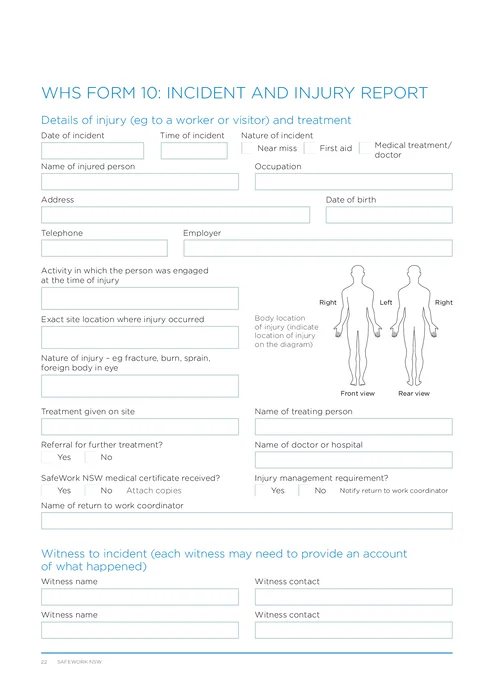
NSW WHS Incident Report PDF preview
State
NSW
Trade
Building
Authority
SafeWork NSW
Form version
HIISP
Open this form

WHS Form 10 records a workplace incident or injury for the Housing Industry Site Safety Pack: when it happened, who was involved, what injury or property damage resulted, what was done immediately, and who was told. The site supervisor or PCBU completes it after people are safe and the scene is under control. The finished PDF is the SafeWork NSW layout for the site file; it does not notify the regulator or the insurer on its own.

This is the current SafeWork NSW WHS Form 10 from the Housing Industry Site Safety Pack. Tradie Forms follows the official section order and maps your answers onto the official PDF layout.

Updating site hazards after the event rather than writing the incident record? Use NSW WHS Site Risk Assessment

This report does not notify SafeWork NSW. For a death, serious injury or illness, or dangerous incident, use the current SafeWork NSW incident notification process. Completing Form 10 is your pack record, not that duty.

Before you start

Almost every thin Form 10 comes from reconstructing the day days later instead of capturing facts while they are still clear. Have these ready once immediate care and site safety are handled.

  • People safe and the hazard controlled

    Treatment, isolation, and any scene preservation your procedures require before you sit down to write.

  • Time, location, and sequence

    When it happened, the exact spot on site, what the person was doing, and the order of events.

  • Injured person details

    Name, occupation, contact, employer, date of birth, and home address when you can get them without delaying care.

  • Witnesses

    Who saw it, with a number that reaches them later for a separate account.

  • Treatment and referrals

    What first aid was given, by whom, and any doctor, hospital, medical certificate, or return-to-work coordinator.

  • Who you already told

    Principal contractor, SafeWork NSW, and the workers compensation insurer if any of those were contacted, with times and reference numbers.

No field gates the download on this form. Completeness still matters for the site file, the principal, and any later insurer or authority request.

Injury or Incident

Records the injured person, when and how the incident happened, the injury, and treatment. Fill this section for near misses, first aid, and medical treatment cases. Write facts, not fault: what happened in order, not who was careless.

Date of IncidentDateOptional

The calendar day the incident occurred. Today and Yesterday shortcuts are there because this is usually filled the same day or the next morning. The field does not accept a future date. Take it from your phone log or site diary if you are filling later, not from guesswork.

Time of IncidentTimeOptional

The time it happened, as close as you can get, for example 09:30. Approximate is better than blank when nobody recorded the exact minute; do not invent precision you do not have.

Nature of IncidentChoiceOptional

One of Near miss, First aid, or Medical treatment. Choose the outcome that actually applied. A near miss is the same sequence without the injury; recording it is how the control gets fixed before the next one goes differently. The choice maps to the three tick boxes on page one of the official PDF.

Name of Injured PersonTextOptional

Full name as they are known on site and on their employment record. For a visitor, use the name they give and note visitor status in Occupation or Employer. Leave blank only when the report is property damage with no injured person; otherwise the pack has an incident with nobody attached.

OccupationComboboxOptional

Their trade or role on the job, such as Carpenter or Site Supervisor. Common residential trades are offered; you can type a custom value for a visitor, delivery driver, or other role.

Street addressAddressOptional

The injured person's residential address, not the job site. Address search is limited to New South Wales and fills the street line, suburb, state and postcode. Check the result with them when privacy and time allow; do not invent an address to fill the box.

StateAddressOptional

Starts as NSW. Confirm it when you type the address by hand or when the person lives interstate.

PostcodeAddressOptional

Filled by address search. Confirm it against what the person or their employer provides when typing manually.

Date of BirthDateOptional

From the person or their employer record when you need it for the pack or insurer follow-up. The field does not accept a future date. Skip medical detail beyond what the form asks for.

PhoneTelOptional

A number that reaches the injured person for follow-up, for example 0412 345 678. Prefer their mobile over a shared site phone.

EmployerTextOptional

The business that employs them on this site, such as Mitchell Building Pty Ltd. For your own employee, use your trading name as on Form 01. For a subcontractor worker, name their employer, not only the principal. Who employs them affects who else must be told.

Activity at Time of IncidentTextOptional

What they were doing in the moment, specific enough that a control can be aimed at it later. Name the task and location context, not a vague trade label.

Useful

Carrying wall framing through the northern corridor on level 1

Too vague

Working on site

Location on SiteTextOptional

The exact spot on the job, not only the street address. On multi-level or multi-lot work this is often the detail that makes the report usable later, for example Level 1, northern wing or Lot 14 rear trench.

Nature of InjuryTextOptional

What was hurt, in plain language and without diagnosing, such as Laceration to left forearm or Sprain to right ankle. The official form examples include fracture, burn, sprain, and foreign body in eye. Describe what you saw and what was treated; leave formal diagnosis to the treating practitioner.

Body location of injuryDrawingOptional

Mark the injury on the front or rear body diagram in the app. Your marks stamp onto the diagram box on page one of the finished PDF. Use the pen to indicate the area clearly; a blank diagram with a filled nature of injury leaves the pack without a visual location.

Treatment Given on SiteTextOptional

What first aid or stabilising care was given before anyone left site, for example Wound cleaned and dressed; arm elevated. Write the actions taken, not a medical opinion.

Name of Treating PersonTextOptional

Who gave that on-site treatment, usually a first aider or supervisor, such as Jordan Lee.

Referral for Further Treatment?ChoiceOptional

Yes or No. Answer Yes when they were sent to a doctor, medical centre, or hospital after site care.

Name of Doctor or HospitalTextOptional

Fill when they were referred, for example Blacktown Medical Centre or the hospital name. Leave blank when no further treatment was needed rather than inventing a clinic.

SafeWork NSW Medical Certificate Received?ChoiceOptional

Yes or No. The form notes to attach copies when applicable. A Yes without the certificate filed with the pack is incomplete for anyone following up the claim.

Injury Management Requirement?ChoiceOptional

Yes or No. The form notes to notify the return to work coordinator when applicable. Answer for this injury, not for the business in general.

Name of Return to Work CoordinatorTextOptional

Who owns return-to-work for this person when injury management applies, for example Sam Nguyen. Fill when the injury management answer is Yes, or whenever your system already has a named coordinator.

Save this section as Injured Person to prefill it on your next incident report for the same person.

Witnesses

Records people who saw the incident. Each row is one witness: name and contact. Talk to witnesses separately and early; accounts converge once people have compared notes.

You can add up to two witnesses, matching the two name and contact pairs on page one of the official PDF. Leave unused rows out rather than adding blanks. If more people saw it, keep extra statements with the job file and put the two most useful contacts on the form.

WitnessesRowsOptional

One row per witness. Each row has Name and Contact Details. Use a full name and a phone that reaches them later, for example Jordan Lee and 0413 456 789. Contact is a phone field; prefer mobile over a general office number. Two empty rows on a serious injury report look unfinished when a principal or insurer asks who saw it.

Property Incident

Use when the incident involved property, plant, or environmental damage, whether or not anyone was hurt. The official PDF places this block on page two under details of incident. Leave it blank when there was no property damage.

Date of IncidentDateOptional

The day the property damage occurred. Often the same as the injury date when both happened together. Today and Yesterday shortcuts are available; the field does not accept a future date.

Time of IncidentTimeOptional

When the damage happened, for example 09:35. Match the injury time when it was the same event, or record the separate time when damage was found later.

Street addressAddressOptional

Location of the incident for the property block. On a residential site this is usually the job address. Address search is limited to New South Wales. Check the result against the site board when the suburb has multiple active lots.

StateAddressOptional

Starts as NSW. Confirm when typing by hand.

PostcodeAddressOptional

Filled by address search. Confirm when typing manually.

Damage to PropertyTextOptional

What was damaged and how, factually enough that a principal or insurer can see the asset without standing on site. Name the item and the effect, not only that something broke.

Useful

Forklift struck the temporary fence and bent two panels beside the loading area

Too vague

Fence damaged

Name of Person ReportingTextOptional

Who received or made the property damage report, matching the official wording for the person who received the report, for example Sam Nguyen.

PhoneTelOptional

How to reach that reporting person, for example 0412 345 678.

Description

The free-text account of what happened. This is the field that decides whether the pack can support a real control change later, or only a blame story.

Description of IncidentTextOptional

The sequence in plain language: what the person was doing, what condition or object was involved, and what happened next. Keep speculation out, or label it clearly. An account that only concludes someone was not paying attention stops the investigation at the person and never reaches the condition that let it happen.

Useful

While carrying wall framing, the worker caught their forearm on a protruding metal edge and sustained a cut

Too vague

Worker was not paying attention

Immediate Actions

What was done straight after the event to stabilise people and the site. The official form examples include barricades and isolation of power.

Immediate Actions TakenTextOptional

The response steps in order: first aid, making the area safe, who was told on site, and any temporary control left in place. Write what was done, not what you wish had been done.

Useful

First aid applied on site. Area cordoned off and nail plate removed. Supervisor notified

Too vague

Dealt with

Reported To

Three reporting channels on the official form: principal contractor, authorities (SafeWork NSW), and the workers compensation insurer. Each has a yes or no choice and a details box for when, who was told, and who made the report.

This section records whether those parties were told. It does not perform the notification. Where SafeWork NSW notification is required, follow the current incident notification process; the form shows SafeWork NSW phone 13 10 50. Do not delay a required notification while finishing this PDF.

Reported to Principal Contractor?ChoiceOptional

Yes or No. Answer for this incident. On most residential sites the builder or principal expects to hear promptly when someone is hurt or plant is damaged.

Provide Details (When, Reported To and Reported By)TextOptional

For the principal contractor line: when they were told, who received the report, and who made it, for example Site supervisor notified immediately on 15 June 2026 by Sam Nguyen. Leave blank when the answer above is No.

Reported to Authorities (SafeWork NSW Phone: 13 10 50)?ChoiceOptional

Yes or No. This is a record of whether SafeWork NSW was contacted for this incident. A Yes without a real notification is worse than No, because the pack then claims a report that never happened. Check current notification requirements before assuming the incident is notifiable.

Provide Details (When, Reported To and Reported By)TextOptional

For the authorities line: time, who called, and any reference SafeWork NSW gave you, for example SafeWork NSW notified by Sam Nguyen at 10:45 am on 15 June 2026. Reference SW-260615.

Reported to Workers Compensation Insurer?ChoiceOptional

Yes or No. Answer when a worker injury may involve a claim or your insurer requires early notice. Policy and claim rules sit with the insurer and your workers compensation arrangements, not with this page.

Provide Details (When, Reported To and Reported By)TextOptional

For the insurer line: who notified them, when, and any claim or incident reference, for example Insurer notified by Sam Nguyen at 11:10 am on 15 June 2026. Claim reference WC-260615.

Completed By

Who wrote this report and when. An account with no author is hard to follow up when questions arrive weeks later.

NameTextOptional

The person completing the report, usually the supervisor or the person managing the site that day, for example Sam Nguyen. Match the name people on site would recognise.

PositionComboboxOptional

Their role, such as Site Supervisor or WHS Officer. Common site roles are offered; type a custom value when needed.

SignatureSignatureOptional

Sign when the facts above are correct for this incident, not as a blank template for later jobs. You can use a saved signature; check the preview so the stamp sits cleanly in the signature box on page two.

DateDateOptional

The date this report is completed. Today and Yesterday shortcuts are available. The field does not accept a future date. Prefer the day of the incident or the next morning over a week-later reconstruction.

Save this section as Completed By to prefill it on your next incident report you complete.

Common mistakes

  • Treating Form 10 as SafeWork NSW notification.

    The pack record and the regulator duty are separate. Completing this PDF does not tell SafeWork NSW anything. Use the current incident notification process when the incident is notifiable.

  • Writing fault instead of sequence.

    Lines such as "not paying attention" stop the review at the person. Describe what they were doing, what condition was present, and what happened next so a control can be fixed.

  • Leaving location as the street address only.

    Multi-level and multi-lot sites need the exact spot. Without it, photos and statements cannot be matched to the place later.

  • Skipping near misses because nobody was hurt.

    A near miss is the same event with a better outcome. Recording it is how the control changes before the next person is injured.

  • Marking Yes for authorities or insurer without a real contact.

    The details box should show when, who reported, and who was told. A bare Yes with empty details looks like a box ticked for appearance.

  • Leaving the body diagram blank when an injury is named.

    Nature of injury without a mark on the diagram leaves page one incomplete. Mark the front or rear view in the app so it stamps onto the PDF.

  • Editing the original account days later without a dated addition.

    Correct facts as a dated note that says what changed and why, and keep the first version with the file. Quiet rewrites undermine trust in the record.

  • Filing the report and never changing Form 04 or Form 06.

    The value of the report is the control that follows. Put the condition back into the site risk assessment and cover the change at the next toolbox talk.

Before download

  1. 0 of 8 checked

After download

Keep the finished PDF in the site safety file for that job and retain a copy with your business records. Tradie Forms does not lodge Form 10 with SafeWork NSW, the workers compensation insurer, or the principal contractor.

  • Name the file with the person or site and the date so it sits with the rest of the HIISP pack, for example WHS-10 - Alex Chen - 2026-06-15.pdf.
  • File photographs and statements with it. The report alone is harder to use later without scene photos, witness notes, and any medical certificate copies the form says to attach.
  • Complete any required notifications separately. Principal, SafeWork NSW, and insurer notice are outside this PDF. Check the current SafeWork NSW incident notification guidance for your incident type.
  • Close the loop on controls. Update the site-specific risk assessment when a condition allowed the incident, and cover the change at the next toolbox talk.
  • Do not quietly rewrite the original. Add dated corrections rather than replacing the first account once copies have gone out.

Check the current SafeWork NSW Housing Industry Site Safety Pack and incident notification requirements for your job. What the principal requires on that site sits with the principal and the authority, not with this page.

Related guides

NSW WHS Site Risk Assessment (Form 04)

Put the condition that allowed the incident back into the site hazard controls.

NSW WHS Toolbox Talk Record (Form 06)

Record the crew talk once the control change is ready to share on site.

HIISP site pack overview

How Forms 04, 05 and 06 work together, and where the incident record sits in the pack.

Official sources

The regulator publications this guide is based on. Always check the current official form before you lodge.

  • SafeWork NSW Housing Industry Site Safety Pack
  • SafeWork NSW incident notification guidance

NSW WHS Chemicals Register (Form 09)

How to complete the Housing Industry Site Safety Pack hazardous chemicals register in Tradie Forms.

QLD Form 12

How to complete Queensland Form 12 as an appointed competent person in Tradie Forms.

Was this page helpful?

On this page

Before you startInjury or IncidentWitnessesProperty IncidentDescriptionImmediate ActionsReported ToCompleted ByCommon mistakesBefore downloadAfter downloadRelated guides