Skip to content
Tradie Forms
Contact supportOpen app
Tradie Forms
IntroductionQuick startFAQ

Using the app

Form typesWorkspaceJobsStarting a formCompleting a formAI assistantPDF downloadsShare links
Presets
PDF toolsTeamsCustom forms

Form guides

Overview
NSW ARCP Class BNSW Mobile Crane Safety ChecklistNSW Asbestos Clearance (No Air)NSW WHS Organisation (Form 01)NSW WHS Roles (Form 02)NSW WHS Policy (Form 03)NSW WHS Site Risk AssessmentNSW WHS SWMS (Form 05)NSW WHS Toolbox Talk Record (Form 06)NSW WHS Training Register (Form 07)NSW WHS Test and Tag (Form 08)NSW WHS Chemicals Register (Form 09)NSW WHS Incident Report (Form 10)

Account and billing

Managing your accountBilling

Support

TroubleshootingFeedback
Section
Section
Page title
Page title
Short description for the help article
Description continues on a second line
Short description for the help article
Description continues on a second line
Intro paragraph
Intro paragraph
Intro paragraph
Intro paragraph
Intro paragraph
Intro paragraph
Section heading
Section heading
Body paragraph
Body paragraph
Body paragraph
Body paragraph
Body paragraph
Body paragraph
Note
Callout title
Callout body
Callout body
Note
Callout title
Callout body
Callout body
Another heading
Another heading
Body paragraph
Body paragraph
Body paragraph
Body paragraph
Body paragraph
Body paragraph
List item one
List item two
List item three
List item one
List item two
List item three
Was this page helpful?
Yes
Yes
No
No

Loading documentation page

On this page
On this page
TOC item
TOC item
TOC item
TOC item
TOC item
TOC item
TOC item
TOC item
TOC item
TOC item

Form guides

NSW WHS Roles (Form 02)

How to complete WHS Form 02 roles and responsibilities in Tradie Forms.

NSW WHS Roles PDF preview
NSWBuilding

SafeWork NSW

Record WHS roles and sign-offs for the Housing Industry Site Safety Pack and download the official SafeWork NSW PDF.

Open this form

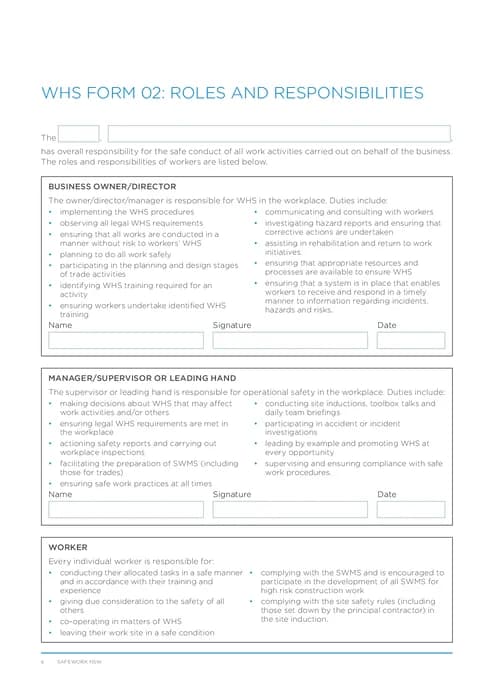
Use this guide when you complete WHS Form 02: Roles and Responsibilities from the Housing Industry Site Safety Pack in Tradie Forms.

Open the form after your business has assigned the roles for the job.

Before you start

  • Duty bullet lists for each role are printed on the PDF. You fill the overview line and sign-off fields only.
  • Have business owner and supervisor names, signatures, and dates ready.

In the app

Overview

Enter the role or title and responsible person or business for the opening sentence on the PDF.

Use the actual arrangement for this project. A name on the form should match who has accepted and can carry out the role.

Business Owner

Enter the name, signature, and date for the owner, director, or manager sign-off row.

Supervisor

Enter the name, signature, and date for the manager, supervisor, or leading hand sign-off row.

Worker

Worker duties are static text on the downloaded PDF. No fields are required in this section.

After download

Check the overview, both names, signatures and dates. Brief the people named on their responsibilities and keep the signed PDF with the rest of the site pack.

Signing this page records the allocation. It does not transfer or remove duties under the current WHS requirements.

Was this page helpful?

NSW WHS Organisation (Form 01)

How to complete WHS Form 01 organisation details in Tradie Forms.

NSW WHS Policy (Form 03)

How to sign the Housing Industry Site Safety Pack WHS policy in Tradie Forms.

On this page

Before you startIn the appOverviewBusiness OwnerSupervisorWorkerAfter download