Skip to content
Tradie Forms
Contact supportOpen app
Tradie Forms
IntroductionQuick startFAQ

Using the app

Form typesWorkspaceJobsStarting a formCompleting a formAI assistantPDF downloadsShare links
Presets
PDF toolsTeamsCustom forms

Form guides

Overview
NSW ARCP Class BNSW Mobile Crane Safety ChecklistNSW Asbestos Clearance (No Air)NSW WHS Organisation (Form 01)NSW WHS Roles (Form 02)NSW WHS Policy (Form 03)NSW WHS Site Risk AssessmentNSW WHS SWMS (Form 05)NSW WHS Toolbox Talk Record (Form 06)NSW WHS Training Register (Form 07)NSW WHS Test and Tag (Form 08)NSW WHS Chemicals Register (Form 09)NSW WHS Incident Report (Form 10)

Account and billing

Managing your accountBilling

Support

TroubleshootingFeedback
Section
Section
Page title
Page title
Short description for the help article
Description continues on a second line
Short description for the help article
Description continues on a second line
Intro paragraph
Intro paragraph
Intro paragraph
Intro paragraph
Intro paragraph
Intro paragraph
Section heading
Section heading
Body paragraph
Body paragraph
Body paragraph
Body paragraph
Body paragraph
Body paragraph
Note
Callout title
Callout body
Callout body
Note
Callout title
Callout body
Callout body
Another heading
Another heading
Body paragraph
Body paragraph
Body paragraph
Body paragraph
Body paragraph
Body paragraph
List item one
List item two
List item three
List item one
List item two
List item three
Was this page helpful?
Yes
Yes
No
No

Loading documentation page

On this page
On this page
TOC item
TOC item
TOC item
TOC item
TOC item
TOC item
TOC item
TOC item
TOC item
TOC item

Form guides

NSW Asbestos Clearance (No Air)

How to complete the SafeWork NSW SW08272 non-friable asbestos clearance certificate in Tradie Forms.

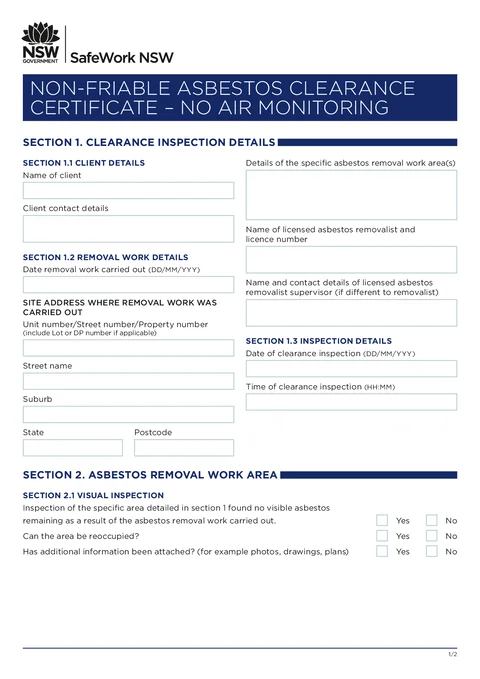
NSW Asbestos Clearance (No Air) PDF preview
NSWBuilding

SafeWork NSW

Complete the SafeWork NSW SW08272 non-friable asbestos clearance certificate on site and download the finished PDF on site.

Open this form

Use this guide when you fill the Non-friable Asbestos Clearance Certificate - No Air Monitoring (SW08272) in Tradie Forms. The web form follows the SafeWork NSW PDF layout for this clearance certificate.

Open the form after the Class B removal work is complete and the competent person is ready to carry out the clearance inspection.

Before you start

  • You need client details, removal work timing and site address, and licensed removalist information from the job.
  • The clearance inspection date and time should match when you visually inspected the work area.
  • The person issuing the clearance completes the declaration with qualifications, signature, and date.
  • This edition is without air monitoring. Use the separate SafeWork NSW form if your clearance requires air monitoring results.

Completing the fields is not the clearance inspection. The competent person must inspect the area and be satisfied with the result before signing.

In the app

Client

Enter the client name and client contact details (phone, email, or other contact as you would record on the paper form).

Save client details as a saved detail on Solo or Team to prefill on your next clearance for the same client.

Removal Work

Enter the date removal work was carried out.

Use address search for the site address where removal work was carried out, or type the property number, street name, suburb, state, and postcode manually. Include lot or DP numbers in the property number field when they apply.

Describe the specific asbestos removal work area(s) in the text box.

Record the licensed asbestos removalist name and licence number. Add supervisor name and contact when the on-site supervisor differs from the removalist.

Inspection

Enter the date of clearance inspection and time of clearance inspection when you carried out the visual clearance inspection.

Visual Inspection

Answer each yes/no question:

  • Whether the inspection found no visible asbestos remaining in the work area.
  • Whether the area can be reoccupied.
  • Whether additional information (photos, drawings, plans) has been attached.

Answer from the inspection result. If the area is not clear or cannot be reoccupied, do not issue a positive clearance certificate.

Declaration

Read the declaration text, then enter your name, ABN, and contact number.

Describe your qualifications and experience as the competent person issuing this clearance.

Sign on the signature line and enter the declaration date.

Save declarant details as a saved detail when you issue clearances regularly.

After download

  1. Check the removalist, site, inspection date and declaration against the job records.
  2. Make sure every attachment referred to in the certificate is included.
  3. Give the certificate to the licensed removalist and other required recipients.
  4. File it with the removal notification, ARCP, SWMS and related job records.
  5. Start a new form for each separate clearance inspection.

The work area should not be reoccupied until the required clearance inspection has been completed and the clearance certificate issued.

Was this page helpful?

NSW Mobile Crane Safety Checklist

How to complete SafeWork NSW's Mobile Crane Safety for PCBUs checklist in Tradie Forms.

NSW WHS Organisation (Form 01)

How to complete WHS Form 01 organisation details in Tradie Forms.

On this page

Before you startIn the appClientRemoval WorkInspectionVisual InspectionDeclarationAfter download