Skip to content
Tradie Forms
Contact supportOpen app
Tradie Forms
Overview
NSW ARCP Class BNSW Mobile Crane Safety ChecklistNSW Asbestos Clearance (No Air)NSW WHS Organisation (Form 01)NSW WHS Roles (Form 02)NSW WHS Policy (Form 03)NSW WHS Site Risk AssessmentNSW WHS SWMS (Form 05)NSW WHS Toolbox Talk Record (Form 06)NSW WHS Training Register (Form 07)NSW WHS Test and Tag (Form 08)NSW WHS Chemicals Register (Form 09)NSW WHS Incident Report (Form 10)
Section
Section
Page title
Page title
Short description for the help article
Description continues on a second line
Short description for the help article
Description continues on a second line
Intro paragraph
Intro paragraph
Intro paragraph
Intro paragraph
Intro paragraph
Intro paragraph
Section heading
Section heading
Body paragraph
Body paragraph
Body paragraph
Body paragraph
Body paragraph
Body paragraph
Note
Callout title
Callout body
Callout body
Note
Callout title
Callout body
Callout body
Another heading
Another heading
Body paragraph
Body paragraph
Body paragraph
Body paragraph
Body paragraph
Body paragraph
List item one
List item two
List item three
List item one
List item two
List item three
Was this page helpful?
Yes
Yes
No
No

Documentation page
On this page
On this page
TOC item
TOC item
TOC item
TOC item
TOC item
TOC item
TOC item
TOC item
TOC item
TOC item
Section
Section
Page title
Page title
Short description for the help article
Description continues on a second line
Short description for the help article
Description continues on a second line
Intro paragraph
Intro paragraph
Intro paragraph
Intro paragraph
Intro paragraph
Intro paragraph
Section heading
Section heading
Body paragraph
Body paragraph
Body paragraph
Body paragraph
Body paragraph
Body paragraph
Note
Callout title
Callout body
Callout body
Note
Callout title
Callout body
Callout body
Another heading
Another heading
Body paragraph
Body paragraph
Body paragraph
Body paragraph
Body paragraph
Body paragraph
List item one
List item two
List item three
List item one
List item two
List item three
Was this page helpful?
Yes
Yes
No
No

Documentation page

On this page
On this page
TOC item
TOC item
TOC item
TOC item
TOC item
TOC item
TOC item
TOC item
TOC item
TOC item
  1. Form guides
  2. Building
  3. NSW

NSW WHS Test and Tag (Form 08)

Reviewed 28 July 2026

How to complete the Housing Industry Site Safety Pack electrical test and tag register in Tradie Forms.

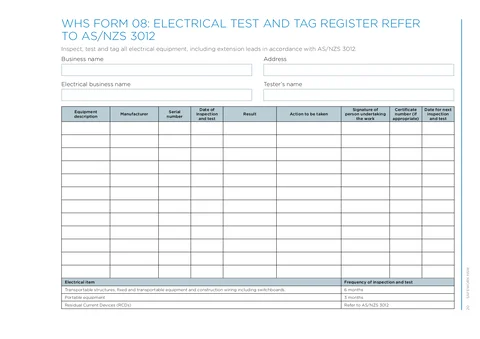
NSW WHS Test and Tag Register PDF preview
State
NSW
Trade
Building
Authority
SafeWork NSW
Form version
HIISP
Open this form

WHS Form 08 records each item of electrical equipment inspected and tagged on a residential construction site. It is Template 8 in the SafeWork NSW Housing Industry Site Safety Pack, filled by the business keeping the site file with results from a competent tester. The finished PDF is the official SafeWork NSW layout for the site pack.

This is the current SafeWork NSW WHS Form 08 from the Housing Industry Site Safety Pack. Tradie Forms follows the official section order and maps your answers onto the official PDF layout.

Need a general appliance register outside the Housing Industry Site Safety Pack, with more rows and full AS/NZS 3760-style fields? Use Test and Tag Register

This register does not replace the physical tag or inspection and testing by a competent person. Tags and rows must tell the same story, and failed equipment must come out of service.

Before you start

Almost every Form 08 problem comes from typing the register later from memory instead of from the items and test record in front of you. Have these ready.

  • The equipment on this site

    Leads, tools, portable RCDs and other electrical plant that will go on this register, with serial or asset numbers you can read off the item.

  • A competent person's test results

    Pass or fail, any certificate reference, and the next inspection date that will go on the physical tag.

  • Business keeping the register

    Trading name and business address for the principal contractor or site business that owns this pack entry.

  • Electrical business and tester

    The licensed electrical contractor doing the test and tag, and the name of the person who tested each item.

  • A decision on interval

    On construction, demolition and mining plant the usual portable-equipment cycle is three months under AS/NZS 3012. Do not carry a soft office interval onto a house site.

Business Name gates the download. Equipment rows are optional to the form, but a register with no rows is useless on site.

Business

Captures who keeps the register, where the business sits, who did the electrical testing, and who signed the rows. Fill this once for the site so every equipment row sits under the same header.

Business NameTextRequired

The site business or principal contractor keeping this register for the project, as the official form labels it. Use the same spelling as Forms 01 and 05 for this pack so the principal's file reads as one contractor. Example: Mitchell Building Pty Ltd.

Street addressAddressOptional

The business address for the register header, not every work face on the block. Address search is limited to New South Wales and fills the street line, suburb, state and postcode into the single address line on the PDF. Check the result against letterhead if the business has moved recently.

StateAddressOptional

Starts as NSW. Confirm it stays NSW when you type the address by hand. Address search sets it from the search result.

PostcodeAddressOptional

Filled by address search. Confirm it against the business record when typing manually.

Electrical Business NameTextOptional

The licensed electrical contractor performing the test and tag work. Repeat the business name when the same company does its own testing. Keep this different from Business Name when a separate sparkie or test-and-tag operator runs the round, so the pack shows who tested versus who keeps the site file.

Tester's NameTextOptional

The person who carried out the inspection and test, for example Jordan Lee. This is the name that has to stand behind the results and signatures in the rows. Only a competent person should test and be named here.

Save this section as Business to prefill it on your next test and tag register for this business.

Equipment

Records each item tested and tagged for the site pack. One row is one piece of electrical equipment: one lead, one tool, one portable RCD, not a whole gang box in a single line.

You can add up to 12 equipment rows, matching the twelve slots on the official one-page PDF. There is no extra page when the list is long; the form stops at twelve. Leave unused rows out rather than adding blanks. If you have more than twelve items for this round, complete a second Form 08 for the overflow, or use the national test and tag register when you need a multi-page fleet list outside the HISSP layout.

Add a row with Add Equipment Row as you finish each item. Fill the row while the item is in your hands so serial numbers, results and next dates match the tag you stick on. Remove a row if you added it by mistake; the form does not offer a duplicate action on these cards.

On the finished PDF the header and all twelve table slots sit on a single page. Dates print in Australian format. Each row has its own signature box. Check the preview so signatures sit cleanly and long free-text entries are still readable in the cell.

equipmentRowsCardRowsOptional

Each Equipment Item card is one tested item. Columns on the card, and on the official table, are:

Description of Equipment - what the item is, specific enough to pick it from a rack next quarter. Include length, type or location when several similar leads share the site, for example Extension lead 15m, site shed north.

Manufacturer - the make on the plate or moulding, such as HPM or Clipsal.

Serial Number - the serial or asset number on the item or existing tag. Without it, identical leads cannot be matched next round.

Date of Inspection - the day the item was inspected and tested. Today and Yesterday shortcuts are there for on-site rounds. The field does not accept a future date.

Result - Pass or Fail, or a short custom value when your site procedure uses one. A blank result is unfinished.

Action - what happened after the test. Suggested values are Tag applied, Removed from service, Repaired and retested, and Quarantined pending repair. On a fail, record the real action and remove the item from service; a fail with no action looks open.

Signature - the person who tested that item, usually the tester named in Business. Sign the row when the result and action are correct, not as a blank stamp. You can use a saved signature; check the preview for each row's signature box.

Certificate Number - only when a certificate or job reference applies to the test, for example T&T-2026-041. Leave blank rather than inventing a number; the official form labels this as if appropriate.

Next Inspection Date - the date the item is due again, matching the durable tag. On a house construction site portable equipment is typically three months out. The field only accepts today or a future date. On a fail that is out of service, prefer a clear action over a next date that implies the item is still in the fleet.

Useful

Extension lead 15m, site shed north; HPM; EL-482910; Pass; Tag applied; next due three months out

Too vague

Lead; Pass; Tagged

Every tag on a tool needs a matching row here with the same identity trail and next test date. Record failed and removed items as well as passes; a pass-only list hides the work the register is meant to prove.

Reference

This section is guidance only. There are no fields to fill. The in-app notice and the foot of the official PDF both point at AS/NZS 3012 inspection frequency for construction work.

The printed table on the PDF summarises typical intervals: transportable structures, fixed and transportable equipment and construction wiring including switchboards every 6 months; portable equipment every 3 months; residual current devices by reference to AS/NZS 3012. Use that table when you set Next Inspection Date, then confirm against the current SafeWork NSW guidance and the requirements that apply to this site. Do not set a twelve-month next date on construction portable gear by office habit.

Common mistakes

  • Setting a soft office interval on a house site.

    Portable equipment on construction and demolition work is typically on a three-month cycle under AS/NZS 3012. A twelve-month next date puts the tag and the register out of step with the site.

  • Writing the register later from a pile of tags.

    Serials swap, fails lose their isolation note, and the PDF no longer matches the tools. Complete each row while the item is still in front of you.

  • Vague descriptions with no serial.

    Ten orange leads all entered as Extension lead cannot be found next quarter. Name the length or location and capture the serial or asset number on the item.

  • Fail with no action, or a pass tag left on a fail.

    A fail that still looks available for use is the hazard the register is meant to close. Record Removed from service or Quarantined pending repair, and take the item off the work face.

  • Rows that do not match the tags on site.

    Fourteen tagged tools and ten register rows means the record is incomplete. Every tag needs a row with the same next test date.

  • Mixing up Business Name and Electrical Business Name.

    The pack needs who keeps the site file and who did the testing. When a separate electrical contractor ran the round, put their name in Electrical Business Name rather than repeating the builder only.

  • Padding the list with gear you did not test.

    On multi-trade sites it is easy to claim tools still in another ute. Only add items you inspected and tested, and open another Form 08 if you genuinely have more than twelve.

Before download

  1. 0 of 7 checked

After download

Keep the finished PDF in the site safety file on site and retain a copy with your business records. Tradie Forms does not lodge Form 08 with SafeWork NSW or any other authority.

  • Name the file with the business and date so it sits with Forms 01 to 10 for the same site, for example WHS-08 - Mitchell Building - 2026-06-01.pdf.
  • Hand a copy to the principal when the site pack requires it, and keep your own copy with the test certificate references you used.
  • Keep the record until the equipment is next tested, permanently removed or disposed of, in line with current SafeWork NSW electrical inspection and testing guidance.
  • Remove failed or unsafe equipment from service and follow the workplace electrical safety procedure. The PDF alone does not quarantine a lead.
  • Reuse the Business saved detail on the next round for the same business, then re-check the tester name and site address before you add new rows.

Check the current SafeWork NSW Housing Industry Site Safety Pack and electrical risks guidance for your job type. What the principal requires on that site sits with the principal and the authority, not with this page.

Related guides

NSW WHS Form 08 walkthrough

Who tests, three-month construction intervals, and how the register backs every tag.

Test and tag and AS/NZS 3760

Standards context for in-service inspection, tagging and intervals.

National test and tag register

Multi-page fleet register when you are not filling the HISSP Form 08 layout.

Official sources

The regulator publications this guide is based on. Always check the current official form before you lodge.

  • SafeWork NSW Housing Industry Site Safety Pack
  • SafeWork NSW electrical risks guidance

NSW WHS Training Register (Form 07)

How to complete the Housing Industry Site Safety Pack worker training register in Tradie Forms.

NSW WHS Chemicals Register (Form 09)

How to complete the Housing Industry Site Safety Pack hazardous chemicals register in Tradie Forms.

Was this page helpful?

On this page

Before you startBusinessEquipmentReferenceCommon mistakesBefore downloadAfter downloadRelated guides