Loading documentation page
Form guides
How to complete the Housing Industry Site Safety Pack site-specific risk assessment in Tradie Forms.

SafeWork NSW
Complete the Housing Industry Site Safety Pack site-specific risk assessment and download the official SafeWork NSW PDF.
Open this formUse this guide when you complete WHS Form 04: Site Specific Risk Assessment from the Housing Industry Site Safety Pack in Tradie Forms.
Open the form while the current site conditions are fresh.
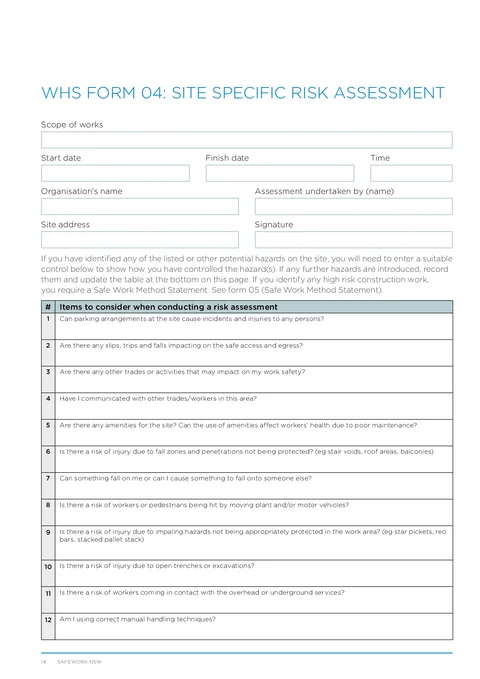
Enter the scope of works, start date, finish date, and time for this assessment.
Enter the organisation name, assessor name, and site address. Sign as the assessor before download.
Save organisation details on Solo or Team to prefill the next assessment.
Add rows when new hazards are introduced during the job. Each row covers date, hazard identified, actions taken, and by whom.
On the printed PDF this log runs down the left column while assessment details run on the right.
You can add up to 24 rows, matching the printed table on the official PDF.
Work through the twelve checklist items. Enter control measures for every hazard you identified on site.
The full question text appears on the downloaded PDF.
Write the control that will actually be used, who needs to know and any action still open. A blank field should not be taken to mean that a hazard was checked.
Check the site, scope, dates, assessor, signature, hazard log and all relevant controls. Brief workers on the controls and keep the PDF available with the site file.
Update the assessment and hazard log when conditions, plant, materials, work methods or nearby activities change. Prepare a site-specific SWMS before high risk construction work starts.