Skip to content
Tradie Forms
Contact supportOpen app
Tradie Forms
IntroductionQuick startFAQ

Using the app

Form typesWorkspaceJobsStarting a formCompleting a formAI assistantPDF downloadsShare links
Presets
PDF toolsTeamsCustom forms

Form guides

Overview
QLD Form 12QLD Form 15QLD Form 16QLD Form 21QLD Form 30 QBCC Licensee Aspect CertificateQLD Form 43QLD Form 26QLD Form 36

Account and billing

Managing your accountBilling

Support

TroubleshootingFeedback
Section
Section
Page title
Page title
Short description for the help article
Description continues on a second line
Short description for the help article
Description continues on a second line
Intro paragraph
Intro paragraph
Intro paragraph
Intro paragraph
Intro paragraph
Intro paragraph
Section heading
Section heading
Body paragraph
Body paragraph
Body paragraph
Body paragraph
Body paragraph
Body paragraph
Note
Callout title
Callout body
Callout body
Note
Callout title
Callout body
Callout body
Another heading
Another heading
Body paragraph
Body paragraph
Body paragraph
Body paragraph
Body paragraph
Body paragraph
List item one
List item two
List item three
List item one
List item two
List item three
Was this page helpful?
Yes
Yes
No
No

Loading documentation page

On this page
On this page
TOC item
TOC item
TOC item
TOC item
TOC item
TOC item
TOC item
TOC item
TOC item
TOC item

Form guides

QLD Form 12

How to complete Queensland Form 12 as an appointed competent person in Tradie Forms.

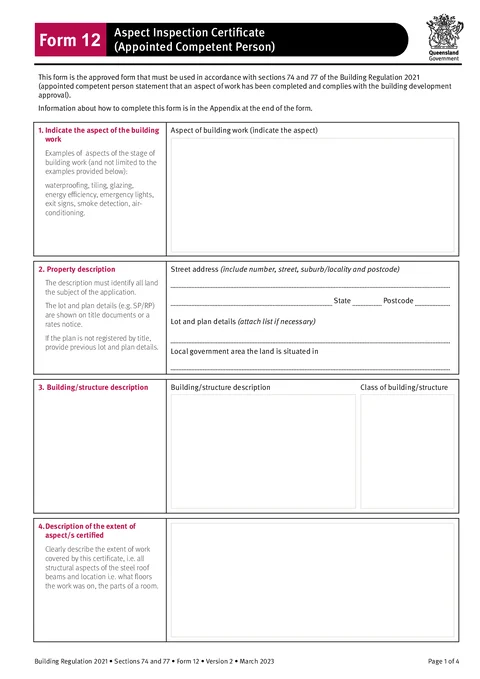
QLD Form 12 PDF preview
QLDBuilding

Queensland Government

Aspect inspection certificate for an appointed competent person under the Building Regulation 2021. Finish on site and download the official Queensland PDF.

Open this form

Use this guide when you fill Form 12 - Aspect Inspection Certificate (Appointed Competent Person) in Tradie Forms. The web form follows the Queensland PDF layout for this certificate.

Open Form 12 after the building certifier has appointed you for the aspect inspection.

Form 12 covers the aspect work you inspected. Give it to the building certifier so they can use it when deciding whether the relevant stage is complete.

Before you start

  • Confirm you are the appointed competent person for this aspect inspection.
  • Have the property address, lot and plan, and local government area.
  • Know the building or structure description and NCC class.
  • Have certifier details and the building development approval number.
  • Be ready to describe the basis for certification and any reference documentation.

In the app

Aspect

Enter the aspect of building work you inspected, for example waterproofing, tiling, glazing, or smoke detection.

Property

Use address search for the street address, or type street, suburb, state, and postcode manually.

Add lot and plan details from the title or rates notice, and the local government area.

Building

Describe the building or structure and its class under the National Construction Code.

Extent

Describe the extent and location of the aspect work covered by this certificate.

Basis

Explain the basis for the certificate and which standards, codes, or publications you relied on.

References

List reference documentation, such as numbered structural engineering plans.

Certifier

Enter the building certifier's name, certifier reference number, and building development approval number.

Competent Person

Enter your name, company, contact person, phone numbers, email, and postal address.

Add licence or registration details when they apply, and the date you received the inspection request from the building certifier.

Save competent person details as a saved detail on Solo or Team to prefill your next Form 12.

Signature

Sign and enter the date as the appointed competent person.

Check before download

  1. The aspect, property, building description, and NCC class identify the right work.
  2. The extent says exactly what you inspected and where.
  3. The basis and reference documents support the certification you are making.
  4. The building certifier and approval references match the job.
  5. Your licence or registration details are included where they apply.
  6. Your name, signature, and date are complete.

After download

  • Give the signed PDF to the building certifier.
  • Keep a copy for your records.
  • Check any project-specific document naming or attachment requirements before handover.

For field examples and common mix-ups, read the Queensland Form 12 aspect inspection guide.

Was this page helpful?

NSW WHS Incident Report (Form 10)

How to complete the Housing Industry Site Safety Pack incident and injury report in Tradie Forms.

QLD Form 15

How to complete Queensland Form 15 as an appointed competent person in Tradie Forms.

On this page

Before you startIn the appAspectPropertyBuildingExtentBasisReferencesCertifierCompetent PersonSignatureCheck before downloadAfter download