Skip to content
Tradie Forms
Contact supportOpen app
Tradie Forms
IntroductionQuick startFAQ

Using the app

Form typesWorkspaceJobsStarting a formCompleting a formAI assistantPDF downloadsShare links
Presets
PDF toolsTeamsCustom forms

Form guides

Overview
Defect NoticeEmergency Lighting Test RegisterRCD Test RecordSmoke Alarm Service RecordSwitchboard ReportTest and Tag RegisterBattery Storage Commissioning RecordEV Charger Commissioning RecordSolar PV Commissioning Record

Account and billing

Managing your accountBilling

Support

TroubleshootingFeedback
Section
Section
Page title
Page title
Short description for the help article
Description continues on a second line
Short description for the help article
Description continues on a second line
Intro paragraph
Intro paragraph
Intro paragraph
Intro paragraph
Intro paragraph
Intro paragraph
Section heading
Section heading
Body paragraph
Body paragraph
Body paragraph
Body paragraph
Body paragraph
Body paragraph
Note
Callout title
Callout body
Callout body
Note
Callout title
Callout body
Callout body
Another heading
Another heading
Body paragraph
Body paragraph
Body paragraph
Body paragraph
Body paragraph
Body paragraph
List item one
List item two
List item three
List item one
List item two
List item three
Was this page helpful?
Yes
Yes
No
No

Loading documentation page

On this page
On this page
TOC item
TOC item
TOC item
TOC item
TOC item
TOC item
TOC item
TOC item
TOC item
TOC item

Form guides

Switchboard Report

Help for electricians completing a switchboard condition report in Tradie Forms.

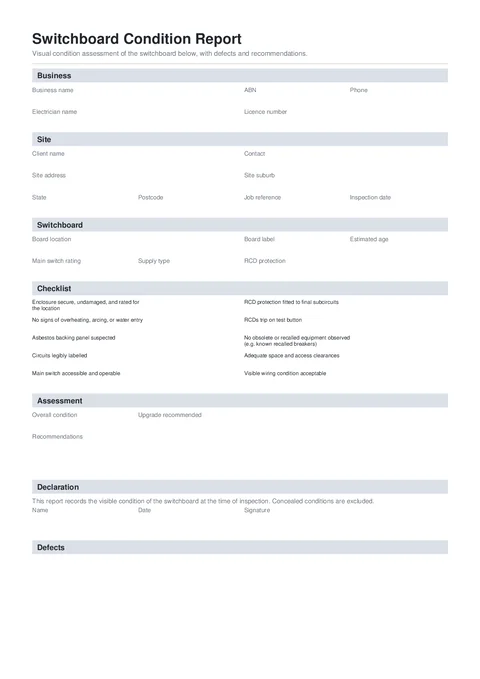
Switchboard Report PDF preview
NationalElectrical

Tradie Forms

Record a switchboard visual assessment, attach photos to defects, and give the client clear upgrade recommendations in a signed PDF.

Open this form

The Switchboard Condition Report records a visual assessment of an existing switchboard, the defects observed, and the work you recommend to the client.

This is a Tradie Forms designed visual assessment. It is not an AS/NZS 3019 periodic verification report, a compliance certificate, or certification of the whole installation.

Open the Switchboard Condition Report when the client, site, and board are ready.

Use this form only for the visual assessment it describes. Complete the testing, verification, certificates, and defect notifications required for the actual work separately.

Required to download

Business and electrician names, client, inspection date, board location, all ten checks, assessment, recommendations when triggered, and signed declaration.

Photos and defects

Defect rows are optional. If you add one, complete its description, location, risk and any recommendation required by the risk rating.

Before you start

  • Confirm the client, site, board location and inspection date.
  • Have the board label, supply details and available installation records ready.
  • Take clear photos before covers or labels are changed.
  • Record only conditions you inspected. Keep test results and compliance records separately.
  • Confirm whether the job also needs a regulator notice, compliance certificate or periodic verification report.

Business

Add the business and electrician details that appear at the top of the report.

  • Business Logo is optional and appears top right on the downloaded report.
  • Business Name and Electrician Name are required.
  • Add the ABN, Licence Number, and Phone where they help the client identify and contact you.

Save the business section on Solo or Team to prefill it next time.

Site

  • Client Name and Inspection Date are required.
  • Add a Contact and Job Reference to keep follow-up work with the right person and job.
  • Search the Site Address to fill the suburb, state, and postcode.

Switchboard

Enter the Board Location so the client and the next electrician can identify the board. Add the board label, estimated age, main switch rating, supply type, and RCD coverage where known.

The age is an estimate. Choose Unknown if the board age cannot be reasonably identified.

Checklist

Answer all 10 visual checks with OK, Attention, or Defect.

  • Use Attention for an item that needs client awareness or further investigation.
  • Use Defect for a defect observed and add a short note.
  • For a suspected asbestos backing panel, do not drill or disturb it. Choose Attention or Defect and record what you observed.
  • Add each checklist item marked Defect to the Defects section so its risk, recommendation, and photos appear together.

The checklist records visible conditions only. Complete any testing and verification required for the actual work separately.

Defects

Add one row for each defect observed.

  • Defect describes the condition in plain language.
  • Location identifies where it was found.
  • Risk Rating is Low, Medium, High, or Extreme.
  • Recommendation says what should happen next. High and Extreme defects need a recommendation before download.
  • Add up to 3 photos per defect. The first appears beside the defect. Extra photos are added as evidence pages.

A clean board can have no defect rows. Make sure every checklist item marked Defect has a matching row before download.

Assessment

Choose the Overall Condition and whether an Upgrade is Recommended.

Add the recommended work when the board is Poor or Unsafe, or when you recommend an upgrade. Keep the scope concrete, such as replacing recalled breakers or upgrading to full RCD protection.

Declaration

Add your Name, Date, and Signature. The declaration confirms that the report records visible conditions at the time of inspection. Concealed conditions are excluded.

Before download

  • Check the client, address, inspection date, and exact board location.
  • Answer all ten checklist items and add a note for every Defect.
  • Make sure every defect row is complete and its photos show the correct board.
  • Check the overall condition and upgrade answer match the recorded findings.
  • Add recommendations when the board is Poor or Unsafe, or an upgrade is recommended.
  • Sign the declaration and review the PDF.

After download

Give the signed report to the client and keep a copy with the job and any quote. Use the relevant compliance certificate, defect-notification process, and test records where the work requires them. Use AS/NZS 3019:2022 when a periodic assessment is required.

For inspection and wording examples, read the switchboard condition report template guide.

Was this page helpful?

Smoke Alarm Service Record

Help for electricians completing a smoke alarm service record in Tradie Forms.

Test and Tag Register

Help for electricians and competent persons completing a test and tag register in Tradie Forms.

On this page

Before you startBusinessSiteSwitchboardChecklistDefectsAssessmentDeclarationBefore downloadAfter download