Skip to content
Tradie Forms
Contact supportOpen app
Tradie Forms
IntroductionQuick startFAQ

Using the app

Form typesWorkspaceJobsStarting a formCompleting a formAI assistantPDF downloadsShare links
Presets
PDF toolsTeamsCustom forms

Form guides

Overview
Defect NoticeEmergency Lighting Test RegisterRCD Test RecordSmoke Alarm Service RecordSwitchboard ReportTest and Tag RegisterBattery Storage Commissioning RecordEV Charger Commissioning RecordSolar PV Commissioning Record

Account and billing

Managing your accountBilling

Support

TroubleshootingFeedback
Section
Section
Page title
Page title
Short description for the help article
Description continues on a second line
Short description for the help article
Description continues on a second line
Intro paragraph
Intro paragraph
Intro paragraph
Intro paragraph
Intro paragraph
Intro paragraph
Section heading
Section heading
Body paragraph
Body paragraph
Body paragraph
Body paragraph
Body paragraph
Body paragraph
Note
Callout title
Callout body
Callout body
Note
Callout title
Callout body
Callout body
Another heading
Another heading
Body paragraph
Body paragraph
Body paragraph
Body paragraph
Body paragraph
Body paragraph
List item one
List item two
List item three
List item one
List item two
List item three
Was this page helpful?
Yes
Yes
No
No

Loading documentation page

On this page
On this page
TOC item
TOC item
TOC item
TOC item
TOC item
TOC item
TOC item
TOC item
TOC item
TOC item

Form guides

Defect Notice

Help for electricians completing an electrical defect notice in Tradie Forms.

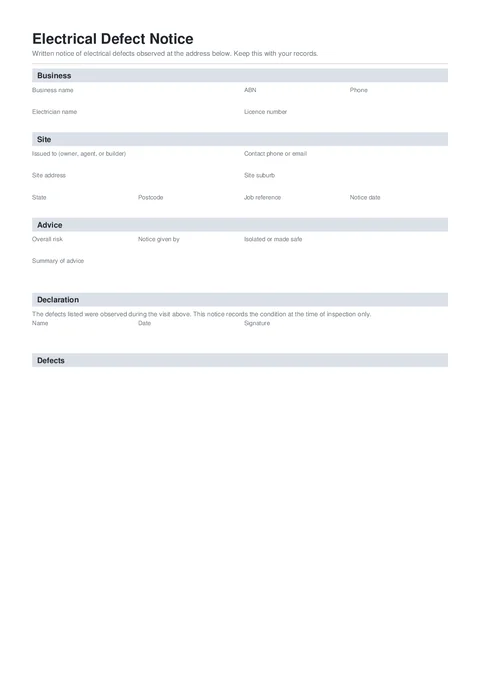
Defect Notice PDF preview
NationalElectrical

Tradie Forms

Put electrical defects in writing before you leave site. Record the location, risk, recommendation, and photos, then hand the client a signed PDF.

Open this form

The Electrical Defect Notice records defects found during a visit, the risk rating, any photo evidence, and the advice given to the owner, agent, or builder.

This is a Tradie Forms designed notice, not a regulator certificate. Requirements differ between states and jobs. Check the current rules that apply before issuing or lodging any electrical document.

Open the Electrical Defect Notice after confirming this record suits the job and jurisdiction.

This notice does not replace a state or territory defect notice, electrical safety certificate, distributor notice, or urgent reporting process where one is required.

Required to download

Business and electrician names, recipient, notice date, at least one complete defect, overall risk, made-safe status, declaration and signature.

Check local requirements

Confirm who must receive the notice, the required form, timeframes, and any separate regulator or network reporting.

Before you start

  • Confirm whether the job needs an authority, network or jurisdiction-specific notice instead.
  • Have the recipient, site and job reference ready.
  • Record the condition, exact location and risk of each defect while you are on site.
  • Note what was isolated or made safe and the advice given before you leave.
  • Keep the photos and test records that support the notice.

Business

Add the business and electrician details that appear at the top of the notice.

  • Business Logo is optional. It appears top right on the downloaded notice.
  • Business Name and Electrician Name are required.
  • Add the ABN, Licence Number, and Phone where they help the client identify and contact you.

Save the business section on Solo or Team to prefill it on the next notice.

Site

  • Issued To is the person responsible for the installation, such as the owner, agent, or builder.
  • Contact Phone or Email helps with repair follow-up.
  • Job Reference keeps the notice with the right work order or quote.
  • Notice Date is the date you gave the notice.
  • Search the Site Address to fill the suburb, state, and postcode.

Defects

Add one card for each defect observed.

  • Defect describes the condition in plain language.
  • Location tells the client exactly where it was found.
  • Risk Rating is Low, Medium, High, or Extreme.
  • Recommendation says what should happen next. High and Extreme defects need a recommendation before download.
  • Add up to 3 photos per defect. The first appears beside the defect in the notice. Extra photos are added as evidence pages.

The notice records the condition observed during the visit. It does not certify that no other defects exist.

Advice

  • Overall Risk should match the highest risk across the listed defects.
  • Isolated or Made Safe records how the installation was left.
  • Notice Given By records whether you gave it in person, by phone, by email, or left it at the premises.
  • Summary of Advice gives the client the main next step, including any circuits isolated or work that should happen before re-energising.

Review a High or Extreme notice carefully if the site was left in service.

Declaration

Add your Name, Date, and Signature. The declaration confirms that the listed defects were observed during the visit and records the condition at that time.

Before download

  • Check the recipient and site address.
  • Make sure each defect says what was observed and exactly where.
  • Check the overall risk is not lower than the highest defect risk.
  • Record what was isolated or made safe and what remained in service.
  • Make sure every High or Extreme defect has a clear recommendation.
  • Check the current local notice and reporting process separately.

After download

Give the signed notice to the responsible person and keep a copy against the job. Follow any separate delivery, lodgement, notification, or certification process required in the jurisdiction.

Energy Safe Victoria publishes a sample installation defect letter for Victorian electricians. For work elsewhere, check the relevant state or territory regulator.

For practical wording examples, read the electrical defect notice template guide.

Was this page helpful?

VIC Asbestos Notification

Overview and section help for the WorkSafe Victoria asbestos removal notification form

Emergency Lighting Test Register

Help for electricians completing an emergency lighting test register in Tradie Forms.

On this page

Before you startBusinessSiteDefectsAdviceDeclarationBefore downloadAfter download