Loading documentation page
Form guides
Help for electricians completing an EV charger commissioning record in Tradie Forms.

Tradie Forms
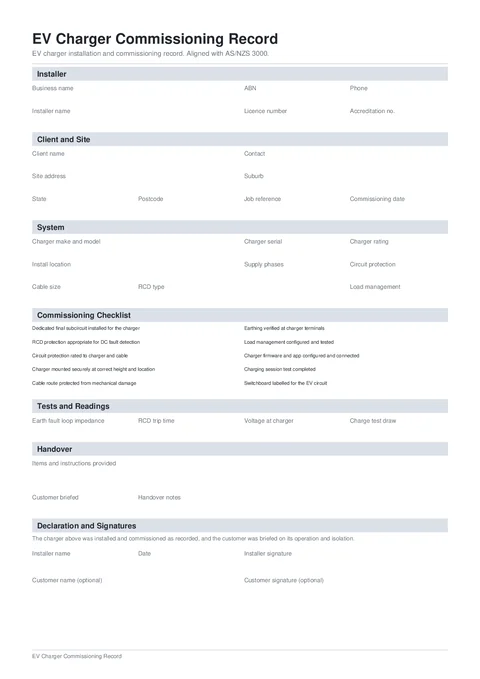
Record an EV charger installation, protection, tests, customer handover, and signatures in one commissioning PDF aligned with AS/NZS 3000.
Open this formThe EV Charger Commissioning Record keeps the charger, circuit protection, commissioning checks, readings, handover, and signatures in one PDF.
This is a Tradie Forms designed record. It is not a certificate of electrical safety and does not choose the correct protection for the installation.
Open the EV Charger Commissioning Record when the charger is ready for final testing.
Add the business and installer details shown at the top of the record. Business and installer names are required. Add the ABN, electrical licence, phone, and optional accreditation number where relevant.
The optional logo appears at the top right of the PDF. Save this section on Solo or Team to prefill it next time.
Enter the client and commissioning date. Add a contact and job reference, then search the Site Address to fill the address, suburb, state, and postcode together.
Create one record per charger on a multi-charger site.
Answer all 10 checks with Yes, No, or N/A.
The form records the protection and setup you assessed. It does not validate the design.
Record:
Use the units shown by your test equipment so the finished PDF is clear.
Tick the instructions and documents provided. Confirm whether the customer was briefed and add notes for any follow-up.
The checklist covers operating instructions, app setup, warranty documents, isolation, and load-management behaviour.
Add the installer name, date, and signature. These are required before download.
The customer name and signature are optional. Capture the signature on site, or send the PDF with a share link for later signing.
Give the PDF to the customer and keep a copy with the job, warranty records, test results, and the electrical compliance certificate required where the work was done.