Skip to content
Tradie Forms
Contact supportOpen app
Tradie Forms
IntroductionQuick startFAQ

Using the app

Form typesWorkspaceJobsStarting a formCompleting a formAI assistantPDF downloadsShare links
Presets
PDF toolsTeamsCustom forms

Form guides

Overview
Defect NoticeEmergency Lighting Test RegisterRCD Test RecordSmoke Alarm Service RecordSwitchboard ReportTest and Tag RegisterBattery Storage Commissioning RecordEV Charger Commissioning RecordSolar PV Commissioning Record

Account and billing

Managing your accountBilling

Support

TroubleshootingFeedback
Section
Section
Page title
Page title
Short description for the help article
Description continues on a second line
Short description for the help article
Description continues on a second line
Intro paragraph
Intro paragraph
Intro paragraph
Intro paragraph
Intro paragraph
Intro paragraph
Section heading
Section heading
Body paragraph
Body paragraph
Body paragraph
Body paragraph
Body paragraph
Body paragraph
Note
Callout title
Callout body
Callout body
Note
Callout title
Callout body
Callout body
Another heading
Another heading
Body paragraph
Body paragraph
Body paragraph
Body paragraph
Body paragraph
Body paragraph
List item one
List item two
List item three
List item one
List item two
List item three
Was this page helpful?
Yes
Yes
No
No

Loading documentation page

On this page
On this page
TOC item
TOC item
TOC item
TOC item
TOC item
TOC item
TOC item
TOC item
TOC item
TOC item

Form guides

Smoke Alarm Service Record

Help for electricians completing a smoke alarm service record in Tradie Forms.

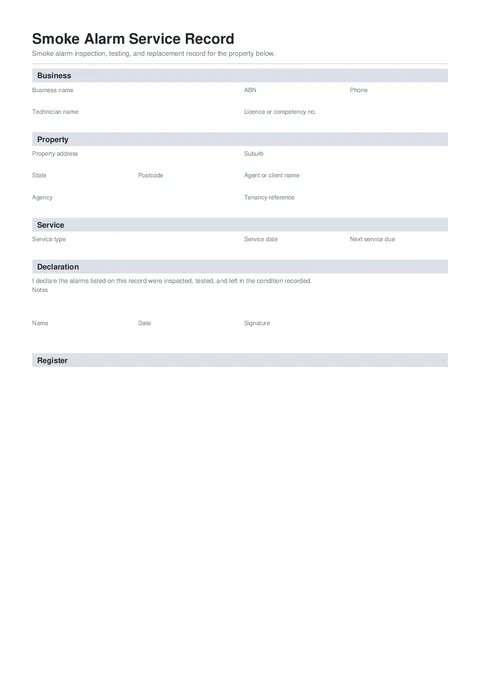
Smoke Alarm Record PDF preview
NationalElectrical

Tradie Forms

Record smoke alarm inspection, testing, and replacement for a property. Capture each alarm, result, and failed-item action, then download a signed PDF for agents and landlords.

Open this form

The smoke alarm service record records inspection, testing, and replacement of smoke alarms at a property. Add each alarm as you test it, record the result, and download a signed PDF for the agent, landlord, or owner.

This is a Tradie Forms designed record, not a government form. State rental rules differ, so record the legislation or standard you worked under.

Open the Smoke Alarm Service Record after checking the rules that apply to the property.

This record does not decide whether an alarm layout or property complies. Check the current rules for the property’s state or territory, building type, and tenancy before relying on the record.

Before you start

  • Have your licence or competency details handy if you record them on service records.
  • Know the property address and any agent or tenancy reference.
  • Confirm the service type (annual, tenancy change, installation, or callout).
  • Check the legislation or standard that applies to the property.
  • Have the manufacturer date or replace-by marking for each alarm where it can be read.

Business

Your business and technician details. These fill the record header.

  • Business Logo - optional. Upload your logo and it shows top right on the downloaded record.

Required fields

Business Name and Technician Name are required before download.

Saved details

Save your business details on Solo or Team so every new record starts filled in.

  • Business Name and ABN - your trading details.
  • Technician Name - the person who did the service.
  • Licence or Competency No. - optional; include it when the client or site requires it.
  • Phone - contact number for follow-up.

Property

Where the service was done, and who the record is for.

  • Property Address - search the address and the suburb, state, and postcode fill automatically.
  • Agent or Client Name - often the property manager rather than the tenant.
  • Agency - optional agency name.
  • Tenancy Reference - optional job or tenancy file reference.

Service

  • Service Type - annual service, tenancy change, new installation, fault callout, or other.
  • Service Date - the date of this visit. Tap Today on site.
  • Next Service Due - optional overall next service date for the property.
  • Legislation or Standard - the rule set this service was performed under. AS 3786 covers the alarms themselves.
  • Default Next Service Interval - suggests the next-due date for new alarm rows.

The form does not choose a state requirement for you. Enter the basis you actually used and check each suggested date.

Declaration

Sign off the record before download.

  • Notes - anything the agent or landlord should know, like alarms replaced on site.
  • Name and Date - who is signing and when.
  • Signature - sign on screen, or drop in your saved signature.

Register

One card per alarm. New rows carry the previous test date only. Location is not carried forward because every alarm is in a different place.

  • Alarm Location - required. Make it specific enough to find the same alarm again.
  • Make and Model - optional.
  • Result, Test Date, and Next Due - passed alarms need a next-due date.
  • Alarm details - type, power source, and interconnection result are required. Replace-by Date is optional when the marking cannot be read.
  • Failed alarms - select the action taken and add the failure details.

Use Duplicate for similar alarms. It copies the make and model, type, power source, replace-by date, and interconnection result. It clears the room, result, dates, actions, and notes.

Use the replacement date shown by the manufacturer or required by the applicable rules. If the marking is unreadable, leave the date blank rather than guessing and explain the condition in the notes where useful.

The PDF shows each alarm as a stacked record instead of a wide table. Long registers continue across pages with one consistent footer and page count.

Before download

  • Check the property, service type, service date, and rule set.
  • Confirm every alarm has a location, type, power source, interconnection result, overall result, and test date.
  • Add a next-due date to every pass.
  • Add an action and failure details to every fail.
  • Check replacement dates against the alarm marking and current local rules.
  • Sign the declaration and review the PDF.

After download

Give a copy to the agent, landlord, or owner and keep one with the property or tenancy file. Follow any separate certificate, notice, or record-keeping process required in the jurisdiction.

For a fuller field and handover walkthrough, read the smoke alarm service record template guide.

Was this page helpful?

RCD Test Record

Help for electricians completing an RCD test record in Tradie Forms.

Switchboard Report

Help for electricians completing a switchboard condition report in Tradie Forms.

On this page

Before you startBusinessPropertyServiceDeclarationRegisterBefore downloadAfter download