Skip to content
Tradie Forms
Contact supportOpen app
Tradie Forms
IntroductionQuick startFAQ

Using the app

Form typesWorkspaceJobsStarting a formCompleting a formAI assistantPDF downloadsShare links
Presets
PDF toolsTeamsCustom forms

Form guides

Overview
VIC Asbestos Notification

Account and billing

Managing your accountBilling

Support

TroubleshootingFeedback
Section
Section
Page title
Page title
Short description for the help article
Description continues on a second line
Short description for the help article
Description continues on a second line
Intro paragraph
Intro paragraph
Intro paragraph
Intro paragraph
Intro paragraph
Intro paragraph
Section heading
Section heading
Body paragraph
Body paragraph
Body paragraph
Body paragraph
Body paragraph
Body paragraph
Note
Callout title
Callout body
Callout body
Note
Callout title
Callout body
Callout body
Another heading
Another heading
Body paragraph
Body paragraph
Body paragraph
Body paragraph
Body paragraph
Body paragraph
List item one
List item two
List item three
List item one
List item two
List item three
Was this page helpful?
Yes
Yes
No
No

Loading documentation page

On this page
On this page
TOC item
TOC item
TOC item
TOC item
TOC item
TOC item
TOC item
TOC item
TOC item
TOC item

Form guides

VIC Asbestos Notification

Overview and section help for the WorkSafe Victoria asbestos removal notification form

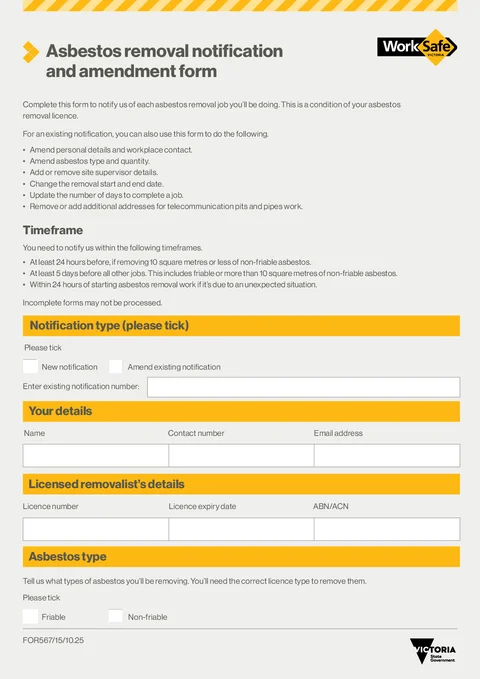
VIC Asbestos Removal Notification PDF preview
VICBuilding

WorkSafe Victoria

Notify WorkSafe Victoria before licensed asbestos removal work. Finish on site and download the official FOR567 PDF for email or fax lodgement.

Open this form

VIC Asbestos Removal Notification follows the WorkSafe Victoria FOR567 PDF layout for licensed asbestos removal notifications and amendments.

Before you start

Have these ready:

  • Licensed removalist licence number and expiry date
  • Asbestos type and material details for the job
  • Site supervisor names and mobile numbers
  • Removal start date and workplace address
  • Client or organisation contact details
  • Current WorkSafe Victoria notification timing and lodgement instructions

WorkSafe Victoria's current timing is:

  • At least 24 hours before removing 10 square metres or less of non-friable asbestos
  • At least 5 days before all other jobs, including friable asbestos or more than 10 square metres of non-friable asbestos
  • Within 24 hours after starting work caused by an unexpected situation

After download

Preview the PDF, then use the current WorkSafe Victoria instructions for sending or lodging the notification.

Tradie Forms prepares the PDF. You remain responsible for checking current WorkSafe Victoria requirements before starting or changing asbestos removal work.

Notification Type

In the app

  • Choose New Notification when you are preparing a fresh notification.
  • Choose Amend Existing Notification when you are changing a notification already sent to WorkSafe Victoria.
  • If you are amending, enter the existing notification number.

Tips

  • Check the original notification or WorkSafe reference before entering an amendment number.
  • If you are unsure whether the change needs a new notification or an amendment, check the current WorkSafe Victoria instructions before downloading.

Your Details

In the app

  • Enter the name of the person completing the notification.
  • Add a contact number and email address so WorkSafe can follow up if needed.
  • Use Save details if the same person completes notifications often.

Tips

  • Use the contact details that should receive questions about this notification.
  • Check the email carefully before download. A typo can make follow-up harder.

Licensed Removalist

In the app

  • Enter the licensed asbestos removalist licence number.
  • Add the licence expiry date.
  • Enter the ABN/ACN when available.
  • Save the removalist details on Solo or Team if you reuse the same licence details often.

Tips

  • Check the licence number and expiry date against your current records.
  • Use the removalist details for the business actually carrying out the work.

Asbestos Type

In the app

  • Tick Friable if the job includes friable asbestos removal.
  • Tick Non-Friable if the job includes non-friable asbestos removal.
  • You can tick both if the job includes both types.

Tips

  • The next sections shown in the app depend on this choice.
  • Check the asbestos type against your site assessment and current licence scope before download.

Friable Removal

In the app

  • Tick each friable material type being removed.
  • If none of the listed options fits, tick Other and describe the material in Further Friable Materials.

Tips

  • This section appears only when Friable is selected in Asbestos Type.
  • Use wording that matches your job records, photos, and removal plan.

Enclosure Method

In the app

  • Tick the enclosure method used for friable removal work.
  • If you select Other, describe the enclosure method.
  • If you select None, explain why no enclosure is needed.

Tips

  • This section appears only when Friable is selected.
  • Keep the explanation short but clear enough for the WorkSafe notification.

Friable Quantity

In the app

  • Enter the estimated total friable asbestos quantity in cubic metres.

Tips

  • This section appears only when Friable is selected.
  • Use the estimate from your job assessment or removal plan, then check the PDF preview.

Non-Friable Removal

In the app

  • Tick each non-friable material type being removed.
  • If none of the listed options fits, tick Other and describe the material in Further Non-Friable Materials.

Tips

  • This section appears only when Non-Friable is selected in Asbestos Type.
  • Match the material wording to your site records and removal plan.

Non-Friable Quantity

In the app

  • Enter the estimated total non-friable asbestos quantity in square metres.

Tips

  • This section appears only when Non-Friable is selected.
  • Check current WorkSafe Victoria timing requirements if the quantity affects how and when you need to notify.

Site Supervisors

In the app

  • Add each site supervisor for the removal work.
  • For each row, enter the supervisor name and mobile number.
  • Add up to five supervisor rows.

Tips

  • Use numbers that will be answered during the removal work.
  • If supervisors change, update the notification details before download or amendment.

Workers

In the app

  • Enter the number of workers who will remove asbestos on this job.

Tips

  • Check the number against the crew planned for the removal work.
  • If worker training or experience details have changed since your last WorkSafe update, check the current WorkSafe process before you rely on the notification.

Removal Schedule

In the app

  • Enter the removal start date and end date.
  • Add the start time.
  • Enter how many days the removal is expected to take.
  • Select whether the work involves an unexpected situation.
  • If an unexpected situation applies, describe what happened.

Tips

  • Count calendar days as the app helper describes. Friday to Monday is four days, not two.
  • Check current WorkSafe Victoria timing rules before starting work.

Workplace Type

In the app

  • Tick the workplace type that best matches the removal site.
  • If you choose Other, describe the workplace type.

Tips

  • Pick the site type, not your business type.
  • Keep the other description plain and specific, for example a school building, retail tenancy, or industrial shed.

Workplace Contact

In the app

  • Enter the client or organisation name.
  • Add the contact name and contact number.
  • Import from ServiceM8, Fergus, or Xero where the field shows the link icon .
  • Save workplace contact details on Solo or Team if you reuse the same client details often.

Tips

  • Use the contact who can answer questions about the workplace or access.
  • Check imported contact details before download, especially when Xero contact addresses are billing details.

Removal Location

In the app

  • Enter the removal site workplace name.
  • Fill the Victorian street address.
  • Use address search on Solo or Team, or type street, suburb, state, and postcode manually.
  • Import a site address from ServiceM8, Fergus, or Xero where supported.

Tips

  • Check unit, level, lot, or tenancy details after address search.
  • Make sure the site address is the removal location, not just the billing address.

Location Details

In the app

  • Describe the exact place on site where asbestos will be removed.
  • Add telecommunications pit or pipe addresses when that applies to the job.

Tips

  • Be specific enough for someone arriving on site to find the work area.
  • Examples: roof eaves on the north side, boiler room in Building A, or loungeroom ceiling in a domestic home.

Privacy

In the app

This section shows the privacy and collection notice included with the WorkSafe Victoria form.

There are no job fields to complete here.

Tips

  • Read the privacy notice before signing the declaration.
  • Use the downloaded PDF or the current WorkSafe Victoria source form for the full statement.

Declaration

In the app

  • Read the declaration and privacy statement.
  • Tick the confirmation checkbox.
  • Enter the name of the person completing this form.
  • Add the signature and date.

Tips

  • Use the signature of the person making the declaration.
  • Check all earlier sections before signing.

Submit

In the app

This section shows the WorkSafe Victoria submission information included with the source form.

There are no job fields to complete here.

Tips

  • Check the current WorkSafe Victoria page or source form before sending the notification.
  • Preview the downloaded PDF and confirm the contact details are current before lodging.

Open the VIC Asbestos Notification

Prepare a new notification or amend an existing one.

Was this page helpful?

QLD Form 36

How to complete Queensland Form 36 when no pool safety certificate is in effect.

Defect Notice

Help for electricians completing an electrical defect notice in Tradie Forms.

On this page

Before you startAfter downloadNotification TypeIn the appTipsYour DetailsIn the appTipsLicensed RemovalistIn the appTipsAsbestos TypeIn the appTipsFriable RemovalIn the appTipsEnclosure MethodIn the appTipsFriable QuantityIn the appTipsNon-Friable RemovalIn the appTipsNon-Friable QuantityIn the appTipsSite SupervisorsIn the appTipsWorkersIn the appTipsRemoval ScheduleIn the appTipsWorkplace TypeIn the appTipsWorkplace ContactIn the appTipsRemoval LocationIn the appTipsLocation DetailsIn the appTipsPrivacyIn the appTipsDeclarationIn the appTipsSubmitIn the appTips