Skip to content
Tradie Forms
Contact supportOpen app
Tradie Forms
IntroductionQuick startFAQ

Using the app

Form typesWorkspaceJobsStarting a formCompleting a formAI assistantPDF downloadsShare links
Presets
PDF toolsTeamsCustom forms

Form guides

Overview
Job Safety AnalysisService ReportTake 5 Safety Check

Account and billing

Managing your accountBilling

Support

TroubleshootingFeedback
Section
Section
Page title
Page title
Short description for the help article
Description continues on a second line
Short description for the help article
Description continues on a second line
Intro paragraph
Intro paragraph
Intro paragraph
Intro paragraph
Intro paragraph
Intro paragraph
Section heading
Section heading
Body paragraph
Body paragraph
Body paragraph
Body paragraph
Body paragraph
Body paragraph
Note
Callout title
Callout body
Callout body
Note
Callout title
Callout body
Callout body
Another heading
Another heading
Body paragraph
Body paragraph
Body paragraph
Body paragraph
Body paragraph
Body paragraph
List item one
List item two
List item three
List item one
List item two
List item three
Was this page helpful?
Yes
Yes
No
No

Loading documentation page

On this page
On this page
TOC item
TOC item
TOC item
TOC item
TOC item
TOC item
TOC item
TOC item
TOC item
TOC item

Form guides

Take 5 Safety Check

Help completing a Take 5 pre-task safety check in Tradie Forms.

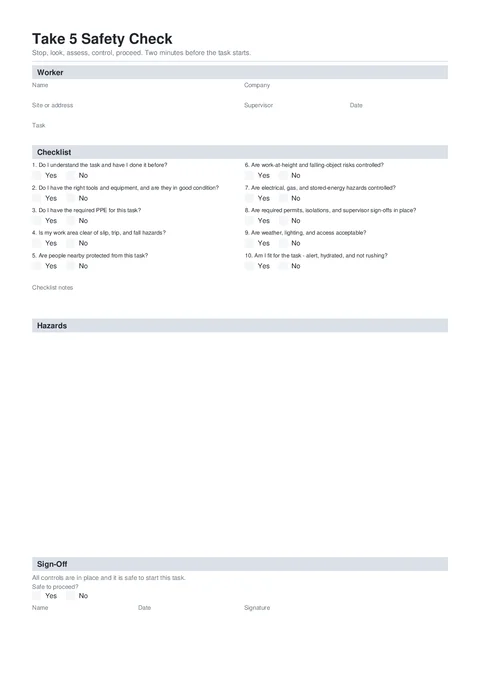
Take 5 PDF preview
NationalBuilding

Tradie Forms

Stop, look, assess, control, proceed. Run a two-minute pre-task safety check on your phone and download a signed Take 5 PDF.

Open this form

The Take 5 Safety Check is a short pre-task check: stop, look, assess, control, proceed. Answer ten questions, note any hazards, sign off, and download a signed PDF before you start.

This is a Tradie Forms designed form. No official Take 5 form exists, so the PDF is a clean one-page record that can grow if you add many hazards.

Open the Take 5 before the task starts.

A Take 5 does not replace a SWMS when the work is high-risk construction work. Follow the SWMS and the site process that apply to the task.

Before you start

  • Know what task you are about to do.
  • Know where you are working (for example level 2 riser cupboard).
  • Have two minutes before tools come out.
  • Check the current task, work area, plant, weather, access, and people nearby. Do not reuse answers from a different job without checking them.

Worker

Who is doing the task and where.

  • Business Logo - optional. Shows top right on the downloaded record.
  • Name - required. Who is filling this Take 5.
  • Company - optional employer or trading name.
  • Site or Address - free text for where you are standing, not a full postal address.
  • Supervisor - optional.
  • Date and Task - required. Tap Today for the date.

Checklist

Ten fixed yes or no questions. Answer every one.

If you answer No, add a short note. That note prints under Checklist notes on the PDF. Use the hazards table for the control that fixes the problem.

You can mark remaining unanswered questions as Yes when they apply.

Do not change a No to Yes just to complete the form. Record the problem, put the control in place, then answer based on the condition after the control.

Hazards

Optional table for hazards that need a control before you start.

  • Hazard, Risk (Low to Extreme), and Control.
  • Add a row when a check is No, or when you see a risk that needs a written control.
  • Make the control specific. For example, "set a 2 m exclusion zone with cones" is clearer than "be careful".

Empty hazards are fine when every check is Yes and nothing else needs recording.

Sign-Off

Confirm it is safe to start.

  • Safe to Proceed? - Yes, controls in place, or No, do not start.
  • If No, say what needs to happen first.
  • Name, Date, and Signature - required before download.

Before download

  • Answer all ten checklist questions.
  • Add a note for every No answer.
  • Check each hazard row has a hazard, risk rating, and control.
  • Choose No, do not start if the controls are not in place.
  • Check the site, task, date, name, and signature.

After download

Keep the record where your business or site process requires it. If the task, work area, crew, or conditions change, stop and review the risks again. Start a new Take 5 when the existing record no longer describes the work.

For a fuller task breakdown, use the Job Safety Analysis. Check Safe Work Australia’s construction risk guidance and your local regulator for SWMS requirements.

For more help choosing the right safety record, read SWMS vs JSA vs Take 5.

Was this page helpful?

Service Report

Help completing a customer service report in Tradie Forms.

NSW ARCP Class B

Overview and section help for the SafeWork NSW Class B ARCP

On this page

Before you startWorkerChecklistHazardsSign-OffBefore downloadAfter download