Documentation page
Help issuing and closing a Permit to Work in Tradie Forms.

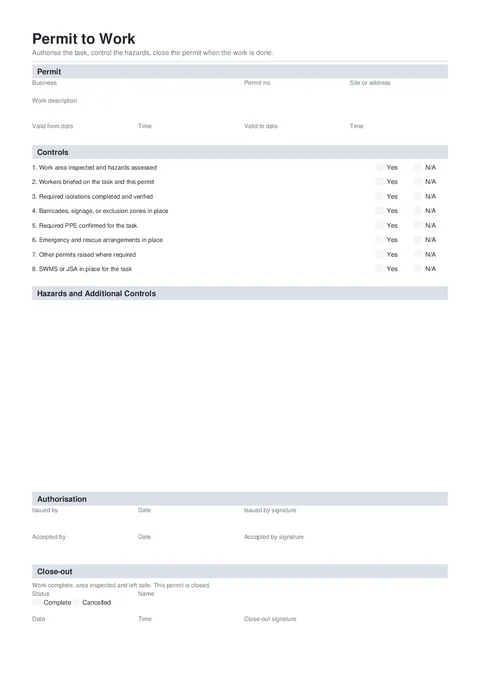
A Permit to Work authorises a defined task at a defined place for a set time. Fill it with the worker before the task starts. Download the issued copy, keep the draft, then reopen it after the work to record the close-out.
This is a Tradie Forms designed record, not a government form. Check the client, principal contractor, and site procedure before use. A permit does not replace a SWMS, JSA, isolation procedure, or specialised permit the work still needs.
The exact work area
Use a practical location such as Roof plant room or Level 2 switch room, with the site address when useful.
The authorised task
A short, specific description of the work covered by this permit. Leave unrelated tasks out.
The validity window
The date and time the permit starts and the date and time it expires.
The task controls
The SWMS or JSA, isolations, PPE, barriers, emergency arrangements, and any other permit needed.
The two signatories
The person issuing the permit and the worker or supervisor accepting the work.
Set the scope and validity before anyone signs.
Upload your business logo if you want it on the finished PDF.
The business issuing or controlling the permit.
Your site or business reference, such as PTW-2026-041.
Name the exact work area. A full postal address is not required.
State the task this permit authorises. Keep it narrow enough that the worker can tell when the scope changes.
Replace damaged roof sheeting beside the northern plant platform.
Roof work
The day the permit becomes active.
Use a clear 24-hour time such as 7:00 or 07:00.
The permit cannot end before its start date.
The time the permit expires, such as 15:30.
Save this section as Business to prefill it on your next permit.
Answer all eight checks. Items 1, 2, and 8 must be Yes. Use N/A only on the other controls when they genuinely do not apply.
Check the area assessment, worker briefing, isolations, barricades, PPE, emergency arrangements, other permits, and the SWMS or JSA with the worker before issue.
Add hazards and controls that are not already clear from the checklist. Long lists continue onto extra PDF pages.
Each row needs both the hazard and the matching control. Write what can cause harm, then the action that reduces that risk.
Both signatures are required on the issued copy.
The person authorised to issue the permit for the site or business.
The date the permit is issued. The issuer can use a saved signature.
Sign after checking the scope, validity, and controls with the worker.
The person doing or supervising the authorised work.
The date the worker accepts the permit.
Capture this signature on the spot. It does not prefill from the issuer's saved signature.
Leave this section empty on the issued copy. After the work, reopen the saved draft and complete the close-out.
Choose Work complete, area left safe or Permit cancelled. Once selected, the close-out name, date, and signature become required.
The person checking and closing or cancelling the permit.
The day the permit ended.
The time the permit ended. This stays useful even though only the name, date, and signature are conditionally required.
Required once a close-out status is selected.
Writing a broad scope.
General maintenance does not define the authorised task. Name the equipment, work, and area.
Using N/A on a critical control.
The area assessment, worker briefing, and SWMS or JSA must all be confirmed Yes.
Treating the permit as the risk assessment.
Keep the SWMS or JSA and any isolation or specialised permit with the job.
Never returning for close-out.
Keep the draft open until the work area is checked and the final permit is downloaded.
Give the issued copy to the worker or supervisor and keep it with the job. When the work ends, reopen the draft, add the close-out, download the final PDF, and keep both copies together.
Hot Works Permit
Help issuing and closing a Hot Works Permit in Tradie Forms.
Invoice
Create an itemised invoice PDF with automatic GST totals and optional payment details.