Skip to content
Tradie Forms
Contact supportOpen app
Tradie Forms
Overview
Job Safety AnalysisService ReportTake 5 Safety CheckSite DiaryJob HandoverHot Works PermitPermit to WorkInvoiceQuote
Section
Section
Page title
Page title
Short description for the help article
Description continues on a second line
Short description for the help article
Description continues on a second line
Intro paragraph
Intro paragraph
Intro paragraph
Intro paragraph
Intro paragraph
Intro paragraph
Section heading
Section heading
Body paragraph
Body paragraph
Body paragraph
Body paragraph
Body paragraph
Body paragraph
Note
Callout title
Callout body
Callout body
Note
Callout title
Callout body
Callout body
Another heading
Another heading
Body paragraph
Body paragraph
Body paragraph
Body paragraph
Body paragraph
Body paragraph
List item one
List item two
List item three
List item one
List item two
List item three
Was this page helpful?
Yes
Yes
No
No

Documentation page
On this page
On this page
TOC item
TOC item
TOC item
TOC item
TOC item
TOC item
TOC item
TOC item
TOC item
TOC item
  1. Form guides
  2. Building
  3. National

Hot Works Permit

Reviewed 2 August 2026

Help issuing and closing a Hot Works Permit in Tradie Forms.

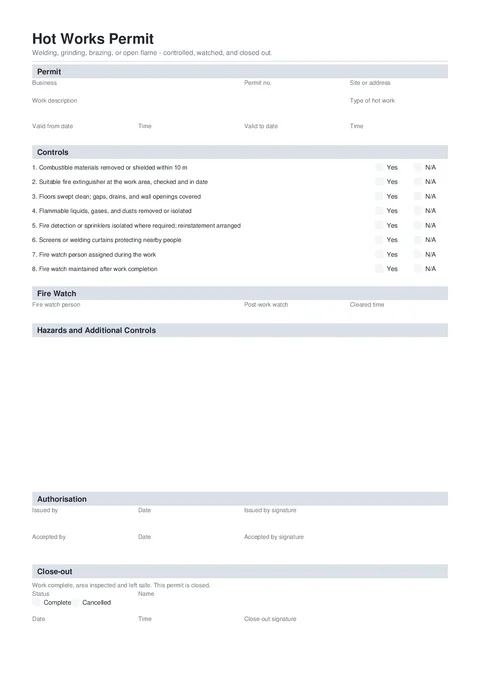
Hot Works Permit PDF preview
State
National
Trade
Building, Plumbing, Electrical
Authority
Tradie Forms
Form version
2026.1
Open this form

A Hot Works Permit records work that creates flame, heat, or sparks, the controls in place, and the fire watch. Fill it before work starts. Download the issued copy, keep the draft, then reopen it after the post-work fire watch to record the cleared time and close-out.

This is a Tradie Forms designed record based on common Australian hot work practice. It is not a government form and does not certify compliance with AS 1674.1. Check the site, client, insurer, and work procedure for the permit and fire-watch rules that apply.

Need general task authorisation without the hot works and fire-watch controls? Use Permit to Work

Do not start until the combustible-material, extinguisher, and fire-watch controls are confirmed Yes. A completed close-out also needs the actual fire-watch cleared time.

Before you start

  • The hot work and exact area

    Know whether the task is welding, oxy cutting or heating, grinding or cutting, brazing or soldering, or another open-flame task.

  • The fire controls

    Check combustibles, extinguishers, openings, flammables, fire systems, screens, and people nearby.

  • The fire watch

    Name the person watching during the work and confirm whether the site requires a 30 or 60 minute post-work watch.

  • The validity window

    Set the date and time the permit starts and expires.

  • The two signatories

    The authorised issuer and the person doing or supervising the hot work.

Permit

Define the hot work, location, and time window before anyone signs.

Business Logo (Shown top right on the downloaded permit)PhotoOptional

Upload your business logo if you want it on the finished PDF.

Business NameTextRequired

The business issuing or controlling the permit.

Permit NumberTextOptional

Your site or business reference, such as HWP-2026-018.

Site or AddressTextRequired

Name the exact work area, such as a ceiling space, plant room, workshop bay, or roof zone.

Work DescriptionTextareaRequired

State the task, equipment, and area covered by the permit.

Useful

Braze copper pipework for the relocated hot water service in the Unit 4 ceiling space.

Too vague

Plumbing hot work

Type of Hot WorkSelectRequired

Choose Welding, Oxy cutting or heating, Grinding or cutting discs, Brazing or soldering, or Other open flame.

Valid From DateDateRequired

The day the permit becomes active.

Valid From TimeTextRequired

Use a clear time such as 13:00.

Valid To DateDateRequired

The permit cannot end before its start date.

Valid To TimeTextRequired

The time the authorised hot work ends, such as 15:30.

Save this section as Business to prefill it on your next hot works permit.

Controls

Answer all eight checks. Items 1, 2, 7, and 8 must be Yes. Use N/A only on the other controls when they genuinely do not apply.

Hot Works ControlsChecklistItemsOptional

Confirm combustibles are removed or shielded, an extinguisher is ready, openings and flammables are controlled, fire systems are managed, screens protect people nearby, and the fire watch covers the work and post-work period.

Fire Watch

Name the watch person before issue. Add the cleared time only after the full post-work watch ends.

Fire Watch NameTextRequired

The person watching the area during the hot work and required post-work period.

Post-work WatchSelectOptional

Choose 30 or 60 minutes. The form defaults to 60 minutes. Follow any stricter site, client, insurer, or procedure rule.

Fire Watch Cleared TimeTextOptional

Leave blank on the issued copy. When the watch ends, enter the actual time, such as 16:30. It becomes required when Close-out Status is Work complete.

Hazards

Add hazards and controls that are not already clear from the checklist. Long lists continue onto extra PDF pages.

Hazards and Additional ControlsTableRowsOptional

Each row needs both the hazard and the matching control. Include site-specific fuel, heat transfer, access, ventilation, or people risks here.

Authorisation

Both signatures are required on the issued copy.

Issued By NameTextRequired

The person authorised to issue hot works permits for the site or business.

Issued By DateDateRequired

The issue date. The issuer can use a saved signature.

Issued By SignatureSignatureRequired

Sign after checking the work, controls, and fire watch with the worker.

Accepted By NameTextRequired

The person doing or supervising the hot work.

Accepted By DateDateRequired

The date the worker accepts the permit.

Accepted By SignatureSignatureRequired

Capture on the spot. It does not prefill from the issuer's saved signature.

Close-out

Leave this section empty on the issued copy. After the work and post-work watch, reopen the draft and close or cancel the permit.

Close-out StatusRadioGroupOptional

Choose Work complete, area left safe or Permit cancelled. Once selected, the close-out name, date, and signature become required.

Close-out NameTextOptional

The person checking and closing or cancelling the permit.

Close-out DateDateOptional

The day the permit ended.

Close-out TimeTextOptional

The time the permit was closed or cancelled.

Close-out SignatureSignatureOptional

Required once a close-out status is selected. A completed status also requires Fire Watch Cleared Time.

Common mistakes

  • Treating the last spark as the end of the permit.

    The fire watch must continue for the selected period. Record the actual cleared time before marking the work complete.

  • Using N/A on a critical fire control.

    Combustible control, the extinguisher, and both fire-watch checks must be confirmed Yes.

  • Ignoring heat travel beyond the work face.

    Check gaps, wall openings, drains, concealed spaces, and the opposite side of the surface where heat or sparks may travel.

  • Assuming one watch period fits every site.

    Use the site's required period when it is stricter than the options or process in this template.

Before download

  1. 0 of 6 checked

After download

Give the issued copy to the worker and fire watch. Keep the draft. After the selected watch period, inspect the area, add the cleared time and close-out, download the final PDF, and keep both copies with the job or site records.

Related guides

Permit to Work

Use the shared permit lifecycle for controlled work that does not need hot works fire-watch fields.

Job Safety Analysis

Record job steps, hazards, risk ratings, and controls before the task starts.

Job Handover

Help completing a Job Completion and Handover Record in Tradie Forms.

Permit to Work

Help issuing and closing a Permit to Work in Tradie Forms.

Was this page helpful?

On this page

Before you startPermitControlsFire WatchHazardsAuthorisationClose-outCommon mistakesBefore downloadAfter downloadRelated guides