Skip to content
Tradie Forms
Contact supportOpen app
Tradie Forms
Overview
Job Safety AnalysisService ReportTake 5 Safety CheckSite DiaryJob HandoverHot Works PermitPermit to WorkInvoiceQuote
Section
Section
Page title
Page title
Short description for the help article
Description continues on a second line
Short description for the help article
Description continues on a second line
Intro paragraph
Intro paragraph
Intro paragraph
Intro paragraph
Intro paragraph
Intro paragraph
Section heading
Section heading
Body paragraph
Body paragraph
Body paragraph
Body paragraph
Body paragraph
Body paragraph
Note
Callout title
Callout body
Callout body
Note
Callout title
Callout body
Callout body
Another heading
Another heading
Body paragraph
Body paragraph
Body paragraph
Body paragraph
Body paragraph
Body paragraph
List item one
List item two
List item three
List item one
List item two
List item three
Was this page helpful?
Yes
Yes
No
No

Documentation page
On this page
On this page
TOC item
TOC item
TOC item
TOC item
TOC item
TOC item
TOC item
TOC item
TOC item
TOC item
  1. Form guides
  2. Building
  3. National

Site Diary

Reviewed 2 August 2026

Help completing a Site Diary and Daily Prestart in Tradie Forms.

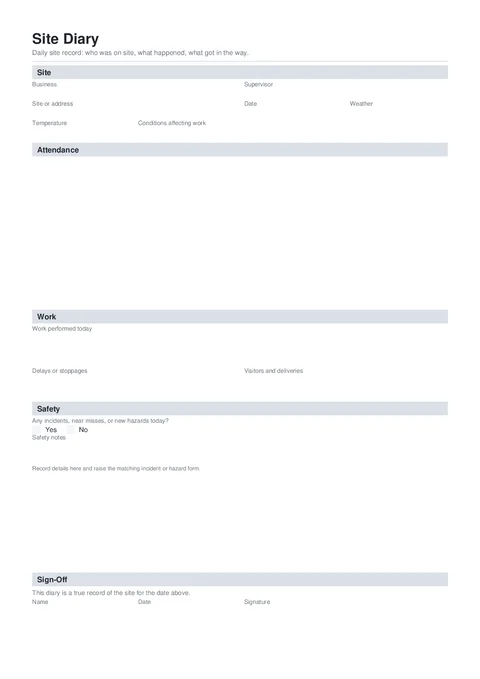
Site Diary PDF preview
State
National
Trade
All trades
Authority
Tradie Forms
Form version
2026.1
Open this form

A site diary is the daily record of who was on site, what work happened, and what affected the day. Fill one diary per site per day, while the crew, conditions, delays, and deliveries are still easy to confirm. Sign it, check the PDF, and keep it with the job file.

This is a Tradie Forms designed record, not a government form. It records the day. It does not replace a JSA, Take 5, incident report, variation notice, or any contract notice the job also requires.

Need to break a task into steps, hazards, risk ratings, and controls before work starts? Use JSA

Need a short safety check before starting the task? Use Take 5

A diary entry can support the job record, but it does not replace a notice required by your contract or a full incident or hazard report. Send those separately when they apply.

Before you start

Have the day's real details ready. Do not rebuild them from memory at the end of the week.

  • The site and diary date

    The site name, lot, address, or project reference the crew and client already use.

  • Who attended

    Names, company or trade, and approximate start and finish times for people on site.

  • Work completed

    The actual work done today, including areas, stages, or systems that make the note useful later.

  • Delays and conditions

    Weather, access, late deliveries, unavailable plant, instructions, or other events that affected work.

  • Visitors and deliveries

    Inspectors, engineers, clients, suppliers, and major deliveries worth keeping with the daily record.

  • Safety cross-references

    The separate incident or hazard record number when something happened today.

Site

Business, supervisor, site, date, weather, and conditions for this diary.

Business Logo (Shown top right on the downloaded diary)PhotoOptional

Upload your business logo if you want it on the finished PDF.

Business NameTextRequired

Your trading name as the client or principal contractor should recognise it.

SupervisorTextRequired

The person responsible for the site record that day.

Site or AddressTextRequired

Use the project name, lot, or address the job file already uses, for example Lot 14, Riverbank Estate.

Diary DateDateRequired

The day covered by this record. Use Today or Yesterday on site. Future dates are blocked.

WeatherSelectOptional

Choose the closest condition: Fine, Overcast, Rain, Wind, Extreme heat, or Frost.

TemperatureTextOptional

A useful approximate temperature, for example 28°C, when heat, cold, or curing conditions matter.

Conditions Affecting WorkTextOptional

A short factual note, for example Rain stopped external works 10am-12pm.

Save this section as Business to prefill it on your next site diary.

Attendance

Use Add person for each person you want on the daily record. The list can be empty for a rained-out or no-access day. Long lists continue onto extra PDF pages.

AttendanceTableRowsOptional

Each row needs Name and Company or Trade. Add Time On and Time Off when the job needs an attendance trail. This is a diary list, not a site induction or per-person sign-on.

Work

Write the day so someone who was not there can still follow it.

Work Performed TodayTextareaRequired

Name the work, location, and stage completed. First-floor frames stood and braced; roof trusses delivered is more useful than Worked on framing.

Delays or StoppagesTextareaOptional

Say what caused the delay, when it happened, and what work it affected. Keep contract notices separate when the job requires them.

Visitors and DeliveriesTextareaOptional

Record important visitors, inspections, and major deliveries. Leave out routine crew already listed under Attendance.

Safety

Choose whether there were incidents, near misses, or new hazards today. When you choose Yes, add a short cross-reference in Safety Notes.

Incidents, Near Misses, or New Hazards TodayRadioGroupRequired

Choose No incidents or new hazards or Yes, recorded below.

Safety NotesTextareaRequired when you select Yes

Briefly identify what happened and the separate report, for example Near miss raised as incident report IR-104. Do not use this small field as the full incident investigation.

Sign-Off

Confirm the diary is a true record for the date shown.

NameTextRequired

The supervisor or tradie signing the daily record.

DateDateRequired

The sign-off date. Check it tells the same story as the diary date.

SignatureSignatureRequired

Draw, upload, or use your saved signature after the attendance and daily notes are final.

Common mistakes

  • Writing the whole week on Friday.

    Dates, visitors, and short delays get mixed up. Complete one diary per site per day before the details disappear.

  • Using vague work notes.

    General works does not help the client, office, or contract administrator. Name the stage, area, and useful result.

  • Listing a delay without its effect.

    Record what caused it, the time or duration, and what work stopped. Send any required contract notice separately.

  • Treating attendance as an induction register.

    This list records who was on site. Use the site's induction or sign-on process when individual declarations or signatures are required.

  • Putting a full incident report in Safety Notes.

    Cross-reference the separate incident or hazard form. The diary keeps the daily link, not the investigation.

Before download

  1. 0 of 6 checked

After download

Keep the signed PDF with the job record and any matching photos, dockets, instructions, incident reports, variation notices, or delay notices. Give it to the client or principal contractor when the contract or site process asks for daily records.

  • File it by site and date. Site Diary - Riverbank Estate - 2026-08-02.pdf is easy to find later.
  • Keep supporting records together. Match delay notes with delivery dockets, instructions, photos, and any formal notice.
  • Do not rewrite a signed day silently. If you need to correct the record, make the correction clear and keep the original trail.

Related guides

Job Safety Analysis

Break a task into steps, hazards, risk, and controls before work starts.

Take 5 Safety Check

Complete a short pre-task safety check before starting work.

Take 5 Safety Check

Help completing a Take 5 pre-task safety check in Tradie Forms.

Job Handover

Help completing a Job Completion and Handover Record in Tradie Forms.

Was this page helpful?

On this page

Before you startSiteAttendanceWorkSafetySign-OffCommon mistakesBefore downloadAfter downloadRelated guides