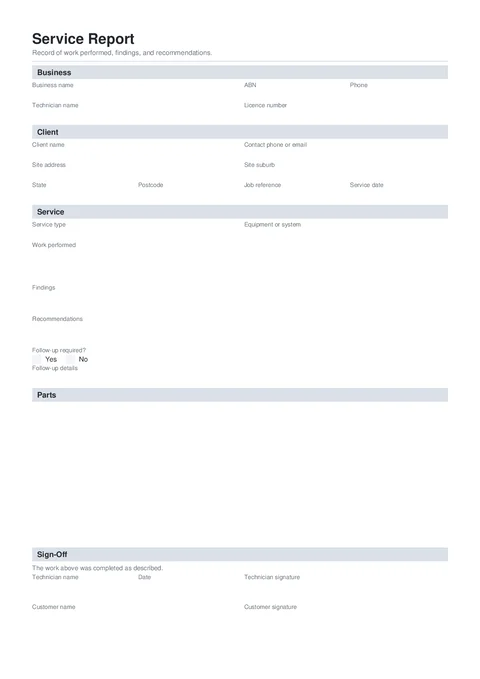
Help completing a customer service report in Tradie Forms.
NationalBuilding
Tradie Forms
Hand the client a clean service report before you leave. Record work performed, findings, recommendations, and optional customer sign-off.
Open this formThe Service Report is a customer-facing record of work performed, findings, and recommendations. Fill it on site, sign as the technician, optionally capture the customer signature, and download a clean PDF before you leave.
This is a Tradie Forms designed handover form, not a compliance certificate. There is no official layout to match.
Open the Service Report when you have the client and job details ready.
Required to download
Business and technician names, client, service date and type, work performed,
follow-up choice, technician sign-off and signature.
Useful job evidence
Add findings, recommendations, parts, and before and after photos when they
help explain the work.
- Know the client and site for the visit.
- Note the equipment or system you worked on.
- Have a clear line on what you did, what you found, and any follow-up.
- Take before and after photos in the form if the condition or completed work will be easier to understand visually.
Your business and technician details.
- Business Logo - optional. Shows top right on the downloaded report.
- Business Name and ABN - required business name.
- Technician Name - required.
- Licence Number - optional.
- Phone - contact for follow-up.
Who you did the work for and where.
- Client Name - required.
- Contact Phone or Email - optional.
- Job Reference - optional work order or site reference.
- Site Address - search the address; suburb, state, and postcode fill automatically.
- Service Date - required. Tap Today on site.
What you did and what the client should know next.
- Service Type - maintenance, repair, installation, inspection, fault callout, or other.
- Equipment or System - optional make and model.
- Work Performed - required. What you completed on this visit.
- Findings - condition, faults, or test results worth recording.
- Recommendations - what the client should do next, and by when.
- Follow-up Required - Yes or No. If Yes, add follow-up details.
- Before Photo and After Photo - optional. Each photo is added as a full-page appendix to the PDF.
Keep Work Performed factual. Put unresolved conditions in Findings and the next action in Recommendations. This makes the handover easier to scan.
Optional parts or materials fitted on this visit.
- Item, Qty, and Notes.
- Leave empty when no parts were used. You can add up to 50 rows. Long lists continue onto extra pages on the PDF.
- Technician Name, Date, and Technician Signature - required before download.
- Customer Name and Customer Signature - optional. Capture on the phone, or send a signature request link from a cloud-saved draft on Solo or Team.
- Check the client, site, service date, and job reference.
- Make sure Follow-up Required matches the recommendations.
- If follow-up is Yes, state who will do what next.
- Check that photos show the correct job and do not include unrelated personal information.
- Read the PDF preview and fix any clipped or unclear wording.
Give a copy to the client and keep one with the job record. This form does not replace a compliance certificate, commissioning record, or regulator form required for the work.
Use the Job Safety Analysis when the job also needs a step-by-step hazard and control record.