Skip to content
Tradie Forms
Contact supportOpen app
Tradie Forms
IntroductionQuick startFAQ

Using the app

Form typesWorkspaceJobsStarting a formCompleting a formAI assistantPDF downloadsShare links
Presets
PDF toolsTeamsCustom forms

Form guides

Overview
Job Safety AnalysisService ReportTake 5 Safety Check

Account and billing

Managing your accountBilling

Support

TroubleshootingFeedback
Section
Section
Page title
Page title
Short description for the help article
Description continues on a second line
Short description for the help article
Description continues on a second line
Intro paragraph
Intro paragraph
Intro paragraph
Intro paragraph
Intro paragraph
Intro paragraph
Section heading
Section heading
Body paragraph
Body paragraph
Body paragraph
Body paragraph
Body paragraph
Body paragraph
Note
Callout title
Callout body
Callout body
Note
Callout title
Callout body
Callout body
Another heading
Another heading
Body paragraph
Body paragraph
Body paragraph
Body paragraph
Body paragraph
Body paragraph
List item one
List item two
List item three
List item one
List item two
List item three
Was this page helpful?
Yes
Yes
No
No

Loading documentation page

On this page
On this page
TOC item
TOC item
TOC item
TOC item
TOC item
TOC item
TOC item
TOC item
TOC item
TOC item

Form guides

Job Safety Analysis

Help completing a Job Safety Analysis (JSA) in Tradie Forms.

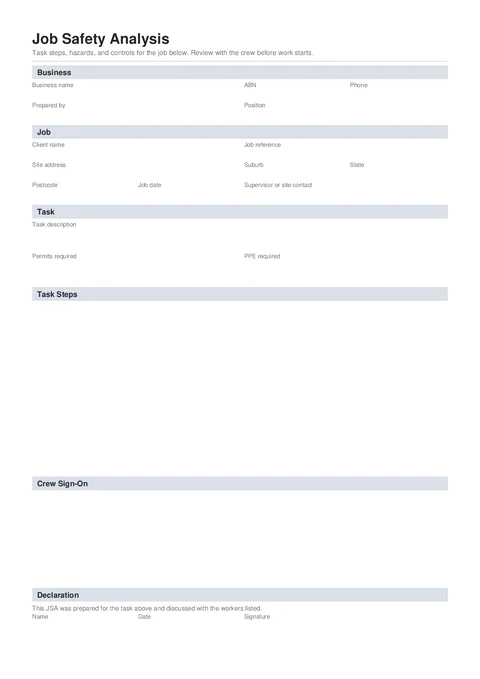
JSA PDF preview
NationalBuilding

Tradie Forms

Write a job safety analysis on site. Capture task steps, hazards, risk ratings, and controls, then download a signed PDF for the crew and the site.

Open this form

The Job Safety Analysis (JSA) breaks a task into steps and records hazards, risk ratings, and controls. Fill it with the crew before work starts, then download the signed PDF for the site file.

This is a Tradie Forms-designed record, not a government form. A site, client or principal contractor may have its own JSA requirements, so check what they expect before you start.

Open the Job Safety Analysis when the crew, task and site details are ready.

A JSA does not replace a Safe Work Method Statement (SWMS) when high risk construction work applies. Check the high risk construction work triggers and your state or territory requirements.

Before you start

  • Know the task you are about to do and how you will break it into steps.
  • Note any permits or PPE the site requires before starting.
  • Have the client and site details, and who is supervising on the day.
  • Gather the crew who will review the steps and sign on.
  • Check whether the site needs its own JSA layout or a SWMS as well.

Business

Your business and who prepared the JSA. These fill the record header.

  • Business Logo - optional. Upload your logo and it shows top right on the downloaded record.

Required fields

Business Name and Prepared By are required before download.

Saved details

Save your business details on Solo or Team so every new JSA starts filled in.

  • Business Name and ABN - your trading details.
  • Prepared By - the person who wrote this JSA.
  • Position - optional role title.
  • Phone - contact number for the site or office.

Job

Who and where the task is for.

  • Client Name - the builder, PC, or customer.
  • Job Reference - optional job, work order, or site reference.
  • Site Address - search the address and the suburb, state, and postcode fill automatically.
  • Job Date - the day this JSA covers. Tap Today on site.
  • Supervisor or Site Contact - who is looking after the crew on the day.

Task

What you are about to do.

  • Task Description - a clear sentence for the work, for example install a split system to the first-floor bedroom.
  • Permits Required - optional. List permits that must be in place before starting.
  • PPE Required - tick every item the crew needs for this task. Selected items print as a comma-separated list on the PDF.
  • Other PPE - shown when you tick Other. Say what the extra PPE is, for example a face shield. It prints alongside the ticked items.

Steps

One row per job step. Break the work into the order it will happen.

  • Job Step - what happens in this step.
  • Hazards - what can hurt someone.
  • Risk - Low, Medium, High, or Extreme for that step.
  • Controls - how you will manage the hazards.
  • Who - optional initials or name for who owns the controls.

Use Add step and reorder rows so the list matches how the job will run. At least one full step is required before download. Long lists continue onto extra pages on the PDF.

Write the hazard as the thing or situation that could cause harm. Write the control as something the crew can put in place and check. Fall from an unprotected edge is more useful than injury. Install edge protection before access is more useful than take care.

Safe Work Australia’s risk guidance uses four steps: identify hazards, assess risks, control risks, then review the controls. Elimination and higher-order controls come before relying only on procedures or PPE.

Crew

Workers who reviewed the JSA before starting. Add each worker after the walk-through, not from an old attendance list. Up to 30 sign-on rows can be added.

  • Name, Company, Date, and Signature are available for each person.
  • A worker signature records sign-on. It does not replace the conversation about the task, hazards and controls.
  • Add late starters when they arrive and brief them before they join the task.

Declaration

Sign off before download.

  • Name and Date - who is signing and when.
  • Signature - sign on screen, or drop in your saved signature.

The declaration text confirms the JSA was prepared for the task and discussed with the workers listed. Check that the preparer, crew and declaration dates tell the same story before signing.

Check before download

  1. The client, address and job date match this job
  2. The task description says what the crew is actually doing
  3. Every step has a specific hazard, risk rating and usable control
  4. Permits, PPE and controls are available before the relevant step starts
  5. The sign-on list matches the crew who received the briefing
  6. A SWMS is in place as well if high risk construction work applies
  7. The declaration name, date and signature are complete

After download

Give a copy to the site contact if required and keep one with the job record. If the work method, crew, site conditions or controls change, stop and review the JSA before continuing. Update the record and collect fresh sign-on where the change affects the crew.

For NSW work, you can prepare the SafeWork NSW WHS-05 SWMS when that template suits the job. Check the requirements that apply in the job’s state or territory.

Was this page helpful?

Overview

Form help by trade, state, and template

Service Report

Help completing a customer service report in Tradie Forms.

On this page

Before you startBusinessJobTaskStepsCrewDeclarationCheck before downloadAfter download