Skip to content
Tradie Forms
Contact supportOpen app
Tradie Forms
Overview
Job Safety AnalysisService ReportTake 5 Safety CheckSite DiaryJob HandoverHot Works PermitPermit to WorkInvoiceQuote
Section
Section
Page title
Page title
Short description for the help article
Description continues on a second line
Short description for the help article
Description continues on a second line
Intro paragraph
Intro paragraph
Intro paragraph
Intro paragraph
Intro paragraph
Intro paragraph
Section heading
Section heading
Body paragraph
Body paragraph
Body paragraph
Body paragraph
Body paragraph
Body paragraph
Note
Callout title
Callout body
Callout body
Note
Callout title
Callout body
Callout body
Another heading
Another heading
Body paragraph
Body paragraph
Body paragraph
Body paragraph
Body paragraph
Body paragraph
List item one
List item two
List item three
List item one
List item two
List item three
Was this page helpful?
Yes
Yes
No
No

Documentation page
On this page
On this page
TOC item
TOC item
TOC item
TOC item
TOC item
TOC item
TOC item
TOC item
TOC item
TOC item
  1. Form guides
  2. Building
  3. National

Job Handover

Reviewed 2 August 2026

Help completing a Job Completion and Handover Record in Tradie Forms.

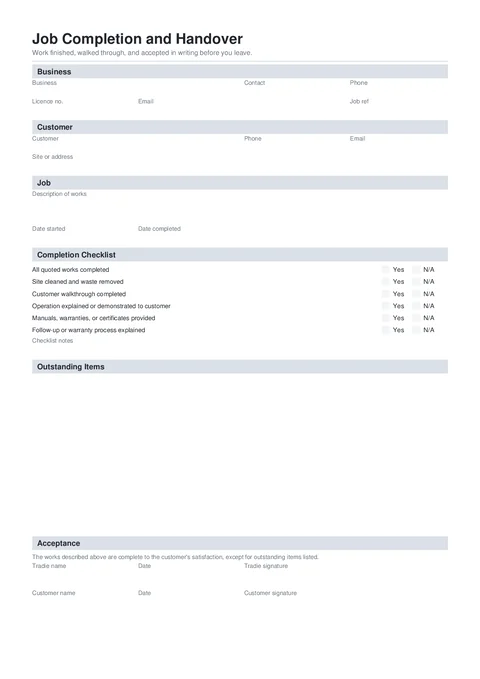
Job Handover PDF preview
State
National
Trade
All trades
Authority
Tradie Forms
Form version
2026.1
Open this form

A job handover records what was completed, which practical handover steps were done, and what remains outstanding. Fill it after the walkthrough, before the final job file is closed. The tradie signs the record. Customer name, date, and signature are optional.

This is a Tradie Forms designed customer record, not a government form or compliance certificate. Keep any required certificates, commissioning records, warranties, contract notices, and invoices as separate documents.

Recording a maintenance or service visit with findings and recommendations rather than a completed job handover? Use Service Report

This handover does not replace a compliance certificate, commissioning record, practical completion notice, or contract document the job still requires.

Before you start

Have the final scope and loose ends in front of you before the walkthrough.

  • The completed scope

    The quote, work order, approved variations, and a plain description of what was actually completed.

  • Customer and site details

    The person receiving the handover and the address where the work was done.

  • Handover documents

    Manuals, warranties, compliance certificates, commissioning records, and care instructions being provided separately.

  • Outstanding items

    Each unfinished or third-party item, who owns it, and a realistic target date.

  • Who can accept the work

    The homeowner, customer, agent, builder, or site representative available for the walkthrough.

Business

Your business details and the job reference the customer will recognise.

Business Logo (Shown top right on the downloaded handover)PhotoOptional

Upload your business logo if you want it on the finished PDF.

Business NameTextRequired

Your trading name as it appears on the quote or invoice.

Contact NameTextOptional

The person the customer should contact about the handover or outstanding work.

PhoneTelOptional

The contact number for follow-up.

Licence NumberTextOptional

A licence, registration, or competency number when it belongs on the customer record.

EmailEmailOptional

The address the customer should use for handover questions.

Job ReferenceTextOptional

The work order, purchase order, or internal job number used on the quote and invoice.

Save this section as Business to prefill it on your next job handover.

Customer

Who receives the handover and where the work was completed.

Customer NameTextRequired

The homeowner, client, agent, builder, or site representative the PDF is for.

PhoneTelOptional

A contact number for the handover and outstanding items.

EmailEmailOptional

The address the final PDF, warranties, or follow-up can be sent to.

Street addressAddressOptional

Search the Australian address where the work was completed. Confirm it against the work order before moving on.

StateAddressOptional

Filled by address search. Confirm it when entering the address by hand.

PostcodeAddressOptional

Filled by address search. Check it against the job record when typing manually.

Job

Describe the completed work in plain language and set the completion date.

Description of WorksTextareaRequired

Summarise what was completed, including the main rooms, systems, or stages. Keep pricing and invoice amounts out of this field.

Useful

Completed bathroom renovation plumbing, including new shower, vanity, toilet, floor waste, and hot and cold water connections.

Too vague

Bathroom done

Date StartedDateOptional

The first day of the job or defined stage when it helps explain the handover period.

Date CompletedDateRequired

The day the described work reached handover. Future dates are blocked.

Completion Checklist

Answer every item Yes or N/A. Use N/A only when the item genuinely does not apply to this job. Add an item note when the answer needs context.

Completion ChecklistChecklistItemsOptional

The six checks cover quoted work, cleaning, the walkthrough, operation or demonstration, manuals or certificates, and the follow-up or warranty process. Unfinished work belongs in Outstanding Items, not under an inaccurate Yes.

Outstanding Items

Leave this empty for a clean handover. Otherwise add one row per loose end. Long lists continue onto extra pages in the PDF.

Outstanding ItemsTableRowsOptional

Item says what remains. Who Resolves is Us, Customer, or Third party. By When is a clear target such as Fri 14 Aug. Every row needs the item and owner before it counts.

Acceptance

The tradie signs the handover. Customer acceptance is optional, so the PDF can still be completed when the customer will sign later.

Tradie NameTextRequired

The person signing for the business after checking the scope, checklist, and outstanding items.

DateDateRequired

The tradie sign-off date. Check it aligns with the completion date.

Tradie SignatureSignatureRequired

Draw, upload, or use your saved signature after the handover record is final.

Customer NameTextOptional

The person accepting the work. Leave blank if they will sign later.

Customer DateDateOptional

The day the customer accepted the handover.

Customer SignatureSignatureOptional

Capture on the phone when the customer is ready, or leave blank and send the PDF for signing later.

Common mistakes

  • Copying the quote instead of describing completed work.

    A quote can include options or work removed by variation. Write what was actually completed and keep the quote and variations beside the handover.

  • Marking every checklist item Yes automatically.

    Walk through the site and documents. Use N/A when an item does not apply, and put unfinished work in the outstanding list.

  • Writing one vague outstanding item.

    Finish bits has no owner or target. Name the item, who resolves it, and when it is expected.

  • Using customer acceptance as a compliance certificate.

    A signature does not replace testing, certification, commissioning, or regulator paperwork required for the work.

  • Adding invoice amounts to the handover.

    Keep money in the quote, contract, variations, and invoice. This PDF records the work and acceptance.

Before download

  1. 0 of 7 checked

After download

Give the customer a copy and keep one with the quote, variations, compliance or commissioning records, warranties, photos, and invoice.

  • Name the file by customer and date. Job Handover - Jordan Lee - 2026-08-02.pdf is easy to find later.
  • Track every loose end. Carry outstanding items into the booking or job system so the handover list does not become a dead end.
  • Send the missing documents. Provide manuals, warranties, and certificates named during the walkthrough.
  • Keep customer acceptance optional. If they sign later, retain the final signed copy with the original handover trail.

Related guides

Service Report

Record a maintenance or service visit, findings, recommendations, parts, and optional customer sign-off.

PDF downloads

Preview, download, regenerate, and send finished PDFs.

Site Diary

Help completing a Site Diary and Daily Prestart in Tradie Forms.

Hot Works Permit

Help issuing and closing a Hot Works Permit in Tradie Forms.

Was this page helpful?

On this page

Before you startBusinessCustomerJobCompletion ChecklistOutstanding ItemsAcceptanceCommon mistakesBefore downloadAfter downloadRelated guides