Skip to content
Tradie Forms
Contact supportOpen app
Tradie Forms
IntroductionQuick startFAQ

Using the app

Form typesWorkspaceJobsStarting a formCompleting a formAI assistantPDF downloadsShare links
Presets
PDF toolsTeamsCustom forms

Form guides

Overview
QLD CoTC

Account and billing

Managing your accountBilling

Support

TroubleshootingFeedback
Section
Section
Page title
Page title
Short description for the help article
Description continues on a second line
Short description for the help article
Description continues on a second line
Intro paragraph
Intro paragraph
Intro paragraph
Intro paragraph
Intro paragraph
Intro paragraph
Section heading
Section heading
Body paragraph
Body paragraph
Body paragraph
Body paragraph
Body paragraph
Body paragraph
Note
Callout title
Callout body
Callout body
Note
Callout title
Callout body
Callout body
Another heading
Another heading
Body paragraph
Body paragraph
Body paragraph
Body paragraph
Body paragraph
Body paragraph
List item one
List item two
List item three
List item one
List item two
List item three
Was this page helpful?
Yes
Yes
No
No

Loading documentation page

On this page
On this page
TOC item
TOC item
TOC item
TOC item
TOC item
TOC item
TOC item
TOC item
TOC item
TOC item

Form guides

QLD CoTC

How to complete the WorkSafe Queensland electrical testing certificate in Tradie Forms.

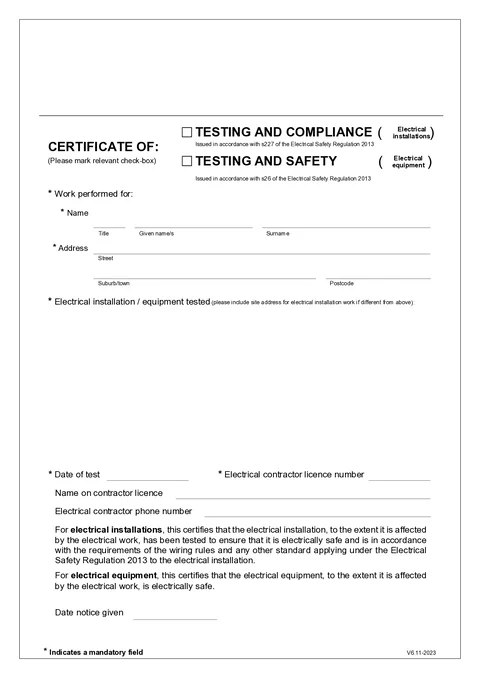
QLD CoTC PDF preview
QLDElectrical

WorkSafe Queensland

Fill the Queensland electrical certificate of testing and compliance or testing and safety on site, then download the WorkSafe PDF layout.

Open this form

Use this guide when you fill the QLD Certificate of Testing and Compliance (CoTC) in Tradie Forms. The web form follows the official WorkSafe Queensland template (V6.11-2023).

Open the QLD certificate after the testing is complete and you know who engaged the electrical contractor.

Give the certificate to the person or organisation that engaged the electrical contractor, which may be a builder rather than the property owner.

Before you start

  • You need an electrical contractor licence for the work being certified.
  • Choose the right certificate type for the job: installations use testing and compliance; equipment uses testing and safety.
  • Have the customer name and address, what was tested, and your licence number ready.
  • Confirm the certificate completion and record-keeping requirements that apply to your work.

In the app

Certificate Type

Tick Testing and Compliance for electrical installation work (s227 of the Electrical Safety Regulation 2013).

Tick Testing and Safety for electrical equipment work (s26 of the Electrical Safety Regulation 2013).

Select one type before download.

Work Performed For

Enter the customer title, given names, and surname. Use the person or business receiving the certificate.

Use address search on Solo or Team to find the Queensland street address, or type street, suburb, and postcode manually.

Electrical Installation / Equipment Tested

Describe what was tested. If the site address differs from the customer address above, include it here.

Good descriptions name the switchboard, circuit, appliance, equipment, tenancy, unit, level, or area that was tested.

Test and Contractor Details

Enter the date of test and your electrical contractor licence number.

Add the name on contractor licence and phone when you have them. Save these details on Solo or Team to prefill on your next job.

Certification and Notice

The certification text matches your certificate type selection. You do not edit this wording in the app. It appears on the downloaded certificate.

Enter date notice given when you handed the certificate to the customer. This field is optional on the PDF but helps your records.

Check before download

  1. The certificate type matches installation work or electrical equipment work.
  2. The customer is the person or organisation that engaged the contractor.
  3. The customer address and work-tested description identify the job clearly.
  4. The test date and electrical contractor licence number are correct.
  5. The fixed certification wording matches the selected certificate type.
  6. Record the notice date when the certificate is given.

After download

  • Give the certificate to the customer as soon as possible after completing the work.
  • Keep a copy for at least five years.
  • No regulator lodgement is part of this customer-certificate process.

For an on-site walkthrough, read the Queensland electrical certificate guide.

Tradie Forms is not affiliated with WorkSafe Queensland.

Was this page helpful?

Solar PV Commissioning Record

Help for electricians completing a solar PV commissioning record in Tradie Forms.

NT CoC Addendum

Help for NT electricians completing the NT WorkSafe certificate of compliance addendum for ESS, EV, solar, and inverter work.

On this page

Before you startIn the appCertificate TypeWork Performed ForElectrical Installation / Equipment TestedTest and Contractor DetailsCertification and NoticeCheck before downloadAfter download