Loading documentation page
Form guides
How to complete Tasmania Form 21 for plumbing work in Tradie Forms.

Consumer, Building and Occupational Services (Tasmania)
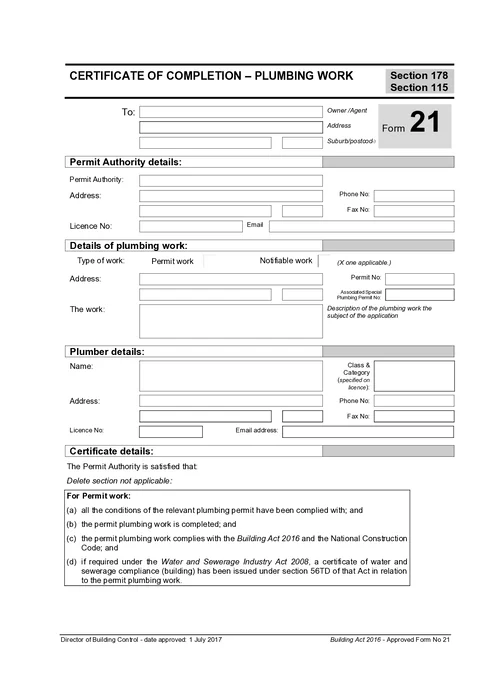
Tasmania Form 21 certificate of completion for plumbing work under the Building Act 2016.
Open this formUse this guide when you fill Form 21: Certificate of Completion - Plumbing Work in Tradie Forms. This is the permit authority's completion certificate, not the plumber's Form 71B standard of work certificate.
Enter the owner or agent name and address shown in the To block at the top of the form.
Use address search on Solo or Team to find the Tasmanian address, or type street, suburb, and postcode manually.
Enter the permit authority name, address, phone, fax, licence number (when applicable), and email.
Save these as a saved detail on Solo or Team to prefill on your next Form 21.
Select Permit Work or Notifiable Work, then enter the property address and description of work. Enter the permit number for permit work and the associated special plumbing permit number when applicable.
Use address search to fill Tasmanian suburb and postcode quickly, or type the address manually for rural or unusual sites.
Enter the plumber name, class and category, address, phone, fax, licence number, and email address.
Save plumber details as a saved detail on Solo or Team to prefill on your next Form 21.
Read the certificate wording shown for your work type. It follows the official PDF, including the instruction to delete the section that does not apply.
No fields are entered in this section. It helps you confirm the correct legal basis before sign-off.
Enter the permit authority print name, signature, date, and title.
The permit number on page 2 of the PDF is filled from the permit number you entered in the Work section.
Sign only after checking the preview against the completed work.
Prepare the permit authority's completion certificate.
See who completes each certificate and where it fits in the job.