Documentation page
Documentation page
How to complete Tasmania Form 71B for plumbing work in Tradie Forms.

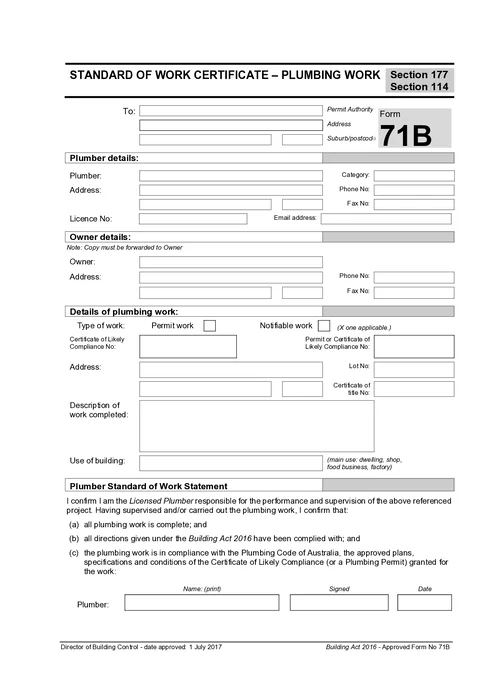
Form 71B is the plumber's standard of work certificate for permit or notifiable plumbing work in Tasmania. You complete it, send it to the permit authority, and forward a copy to the owner so the authority can move to final inspection and a certificate of completion. For notifiable work, CBOS guidance sets a 5 business day window after the work finishes, with an as-constructed drainage plan when the job involved drainage.
This is the current CBOS Form 71B Standard of Work Certificate. Tradie Forms follows the official section order and maps your answers onto the official PDF layout.
Almost every Form 71B problem comes from filling it from the last job file or the site contact's details instead of from this approval and this owner. Have these in front of you.
The current approval or permit
The source for work type, permit or certificate of likely compliance numbers, and which council is the permit authority.
Owner name and postal address
The legal owner for the owner copy, not the tenant, builder or agent who met you on site.
Work site address and title details
Street address, lot number and certificate of title when the approval or rates notice carries them.
Your current plumber licence
Licence number, business name, category and contact details as they stand after any renewal.
A clear description of what was finished
Fixtures, drainage, water service or systems actually completed, written so someone who was not on site can read it cold.
As-constructed drainage plan when relevant
Travels with the certificate when the job involved sanitary drainage or stormwater.
Fields that gate download include the permit authority name and address, plumber name and licence number, owner name and address, work type, work site address, work description, the standard of work declaration, print name and date.
Identifies who receives the certificate so the final inspection can be arranged. Use the council or permit authority named on the approval for this site, not the last job's council.
The permit authority or council receiving this certificate, written as the entity. Use Hobart City Council, not an individual officer. If you work across several Tasmanian councils, check the name against the current approval before you prefill a saved block.
The authority's postal or office address. Address search is limited to Tasmania and fills the street line, suburb, state and postcode. State defaults to TAS when left alone. Confirm the result against the approval or the council letterhead you already have on the job.
Fills from address search. Edit it when you type the address manually and the postcode is blank or wrong for that office.
Save this section as Permit Authority to prefill it on your next Form 71B for the same council.
Records the licensed plumber responsible for the work. These details must match the licence that authorises the certification.
The licensed plumber or plumbing business name as it should appear on the certificate. Match the name tied to the licence, not a job nickname or trading shorthand the owner would not recognise on the PDF.
Licence category for the work, such as Plumber, Drainer, Gasfitter, or a combined category. Pick from the list or type a custom value when your licence wording differs.
Your current occupational licence number. Take it from the licence card or the CBOS record after any renewal, not from an old job PDF or invoice footer that may still carry a superseded number.
A number the permit authority can use if the certificate needs a quick query.
Business email for the same follow-up. Fax is available when your office still uses it; leave it blank otherwise.
Business address fields on this section are optional. Fill them when the authority expects a postal address on the certificate. Address search is limited to Tasmania.
Save this section as Plumber to prefill it on your next Form 71B.
Captures the owner who must receive a copy of the certificate. The form itself carries a note that a copy must be forwarded to the owner, so this block is not optional admin.
The legal owner named on the title, rates notice or approval. If the person on site was a tenant, builder, project manager or agent, confirm the owner name separately before you leave.
Owner contact number when you have it. Useful when the permit authority or your office needs to re-send the copy.
Where the owner copy should go. This often differs from the work site. Address search is limited to Tasmania and fills the street line, suburb, state and postcode. Do not paste the site address here by default.
Fills from address search. Edit it when the owner address is typed manually.
Records which approval pathway this completed job followed. The tick has to match the approval, not what feels close enough on the day.
Choose Permit Work when the job needed a plumbing permit before start, or Notifiable Work when the job was authorised through a notice and certificate of likely compliance. Both pathways finish with Form 71B. Check the approval documents if the classification is unclear rather than guessing on site.
Ties the finished certificate back to the approval that authorised the work. Fill these when the job carries a certificate of likely compliance or permit reference; leave them blank cleanly when they do not apply.
The CLC number from the current approval document for this job. Copy it from that document, not from an old email chain or a similar job for the same builder, because reference numbers on repeat jobs blur together fast.
The permit number or further CLC reference the authority used for this work. Same rule: take it from the current approval, not a quote or invoice.
Identifies where the certified work was done. On rural sites, units, subdivisions and multi-stage jobs, put in enough detail that the permit authority or the next plumber can find the right work later.
The work site address. Address search is limited to Tasmania and fills the street line, suburb, state and postcode. Check the result against the approval, because search returns the current postal address and a permit can predate a street renaming or a subdivision.
Fills from address search. Edit it when you type the address manually for a rural or new-estate site.
Lot number from the approval, title or rates notice. On new estates the street address may not exist cleanly in every system yet, so lot number is often the reliable identifier. Fill it whenever the approval carries it.
Title reference when you have it, such as 12345/6. Pair it with the lot number on multi-lot or staged sites so one certificate cannot be read as covering the wrong title.
Describes what was completed and how the building is used. The description is what the owner, the permit authority and a plumbing surveyor read before final inspection, so it has to stand alone months later.
Name the work and where it happened, not just the trade. Include fixtures, drainage, water service or systems that help someone who was not on site understand what was certified. On a staged site this is also what tells one certificate from the next.
Install sanitary plumbing and drainage to rear bathroom addition, connected to existing stack
Plumbing work completed
How the building is used, such as Single dwelling, Multi-unit residential, Commercial or Industrial. Pick from the list or type a custom value when none of the options fit cleanly.
Records who certifies the standard of the work and when. Sign only after the work described above is actually complete and the preview matches the job.
Read the declaration in full before you tick it. It confirms you are the licensed plumber responsible for the work, that the plumbing is complete, that directions under the Building Act 2016 have been complied with, and that the work complies with the Plumbing Code of Australia and the approved plans, specifications and conditions of the certificate of likely compliance or plumbing permit. Tick it only when that wording matches what you are certifying.
Your name printed as it should appear beside the signature. Use the licensed person's name, not only a company trading name.
The licensed plumber's signature for this certificate. Sign after you have checked the preview against the completed work. A saved signature can prefill the pad; still confirm it is the right person for this job.
The date you certify the work. Today and Yesterday shortcuts are there because this is usually finished on site or the next morning. The field does not accept a future date.
Taking the owner details from the site contact.
Tenants, builders and agents are often who you meet. The owner copy has to land with the legal owner. Confirm name and address against the title, rates notice or approval.
Prefilling the last job's permit authority.
Saved council blocks only help when they match this site. Check the authority on the current approval before you send the certificate to the wrong council.
Selecting notifiable work when the approval is permit work.
Or the reverse. The tick has to match the pathway that authorised the job. Guessing holds up the final inspection when the file does not line up.
Copying CLC or permit numbers from a similar job.
Repeat work for the same builder reuses job language and blurs references. Take numbers from the current approval document for this address.
Writing plumbing work completed as the description.
That tells the owner and the surveyor nothing. Name the systems and the location so the certificate still makes sense without the permit file.
Accepting the declaration before the work is finished.
Outstanding fixtures or drainage still incomplete means the declaration wording does not match the job. Finish the work, or narrow the description to what is actually complete, before you tick it.
Using a licence number from an old saved detail after renewal.
Superseded numbers get the certificate queried. Check the licence after every renewal before you prefill.
The CBOS guide to approved plumbing forms has the plumber completing Form 71B, sending it to the council permit authority, and sending a copy to the owner. Do both rather than assuming one will pass it on.
Form 71B - 8 Battery Point Rd - bathroom addition.pdf beats a generic address-only name when the same property has more than one certificate.Once the certificate lands, the permit authority arranges a final inspection and, when satisfied, issues a certificate of completion. That completion certificate is a separate document from Form 71B.
Check the current CBOS and permit authority requirements for your job. Tradie Forms does not lodge this certificate with a regulator portal.
Timing, who gets a copy, and how the certificate leads to completion.
A fuller run through recipient, owner, work type and description.
Which certificate is the plumber's and which is the authority's.
The regulator publications this guide is based on. Always check the current official form before you lodge.
TAS Form 60
How to complete Tasmania Form 60 for plumbing work in Tradie Forms.
TAS Gratuitous Work Certificate
How to complete the Tasmania gratuitous work certificate for plumbers and gas-fitters in Tradie Forms.