Loading documentation page
Form guides
How to complete the Victorian pesticide application record in Tradie Forms.

Victorian Department of Health
Victorian pesticide application record for licensed pest controllers. Finish on site and download the official Health Victoria PDF.
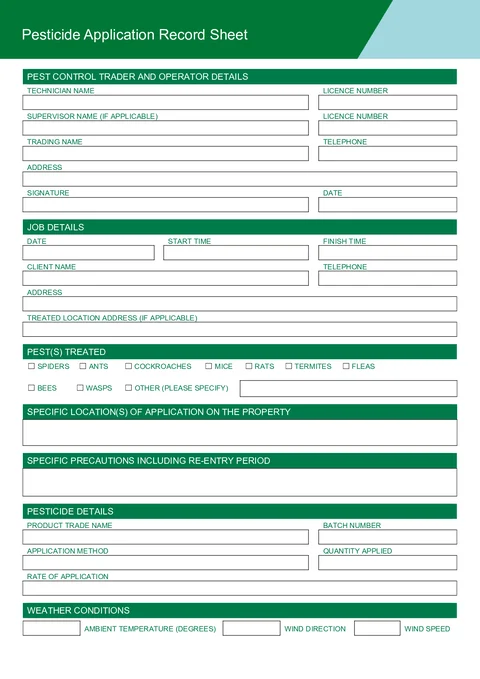
Open this formUse this guide when you fill the Pesticide Application Record Sheet in Tradie Forms. The web form follows the official Health Victoria template for licensed pest controllers.
Enter technician name, licence number, supervisor details when a trainee worked under supervision, trading name, and telephone.
Use address search to find the operator address, or type street, suburb, and postcode manually.
Sign and enter the date for this record.
Save operator details as a saved detail on Solo or Team to prefill on your next record.
Enter job date, start time, and finish time.
Add client name and telephone. Use address search for the client address, or type it manually.
When the treated location differs from the client address, fill treated location address in the separate address block.
Save client details as a saved detail when you treat the same customer again.
Tick each pest treated on this job. Select Other (Please Specify) and describe the pest when it is not listed.
Describe where on the property you applied the pesticide, for example external perimeter, subfloor, or roof void.
Record precautions and re-entry advice for the client, for example keeping pets inside or when they can re-enter treated areas.
Enter product trade name, batch number, application method, quantity applied, and rate of application.
Record ambient temperature, wind direction, and wind speed at the time of application when the treatment was outdoors or weather matters for the record.
Record one pesticide product used on the job.