Skip to content
Tradie Forms
Contact supportOpen app
Tradie Forms
IntroductionQuick startFAQ

Using the app

Form typesWorkspaceJobsStarting a formCompleting a formAI assistantPDF downloadsShare links
Presets
PDF toolsTeamsCustom forms

Form guides

Overview
WA Pest Business Inspection

Account and billing

Managing your accountBilling

Support

TroubleshootingFeedback
Section
Section
Page title
Page title
Short description for the help article
Description continues on a second line
Short description for the help article
Description continues on a second line
Intro paragraph
Intro paragraph
Intro paragraph
Intro paragraph
Intro paragraph
Intro paragraph
Section heading
Section heading
Body paragraph
Body paragraph
Body paragraph
Body paragraph
Body paragraph
Body paragraph
Note
Callout title
Callout body
Callout body
Note
Callout title
Callout body
Callout body
Another heading
Another heading
Body paragraph
Body paragraph
Body paragraph
Body paragraph
Body paragraph
Body paragraph
List item one
List item two
List item three
List item one
List item two
List item three
Was this page helpful?
Yes
Yes
No
No

Loading documentation page

On this page
On this page
TOC item
TOC item
TOC item
TOC item
TOC item
TOC item
TOC item
TOC item
TOC item
TOC item

Form guides

WA Pest Business Inspection

Help for completing the WA Health pest management business registration inspection checklist in Tradie Forms.

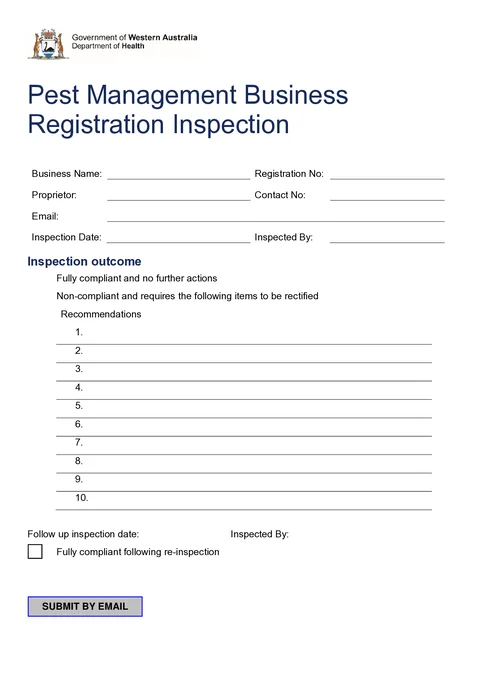
WA Pest Business Inspection PDF preview
WAPest control

Western Australian Department of Health

WA Health pest management business registration inspection checklist. Finish on site and download the official Department of Health PDF.

Open this form

Use this guide when filling the WA Health Pest Management Business Registration Inspection checklist in Tradie Forms. WA Health provides the checklist for businesses to self-assess facilities and vehicles before registration inspection.

Before you start

  • Have your pest management business registration number and inspector details ready.
  • Walk the site with the checklist sections open so you can mark Yes, No, or N/A as you inspect.
  • The official PDF holds six vehicle rows and six employee rows. Attach another sheet if you need more.

In the app

Business

Enter the registered business name, registration number, proprietor, contact number, and email. Save these as reusable business details if you inspect the same company regularly.

Inspection

Record the inspection date and the inspector name for this visit.

Inspection Outcome

Add recommendations when items need to be rectified. Use the follow-up block when a re-inspection is scheduled or when the site is fully compliant after follow-up.

Pesticide Operations

Tick each pesticide operation the business carries out, including termite work, fumigation, and feral vertebrate control where applicable.

Vehicles

Add each fleet vehicle with registration and type across the six PDF table rows.

Employees

List licensed technicians and provisional staff across the six PDF table rows.

Additional Comments

Add any extra notes that do not fit the checklist tables.

Chemical Storage

Mark Yes, No, or N/A for each chemical storage facility criterion, including SDS access, bunding, signage, and PPE storage away from chemicals.

Washdown

Mark Yes, No, or N/A for washdown and rinsate collection facilities.

Rinsate and Disposal

Mark Yes, No, or N/A for rinsate reuse and container disposal practices, including drumMuster or licensed waste collection.

Vehicle and Equipment

Mark Yes, No, or N/A for onboard labelling, warning signs, chemical storage, spray equipment, spill kits, and first aid on vehicles.

PPE and Hygiene

Mark Yes, No, or N/A for respirators, protective clothing, potable water, and hygiene supplies. Refer to safety data sheets for PPE requirements.

After download

  • Check the business and registration details, inspection date, and inspector name.
  • Confirm all relevant vehicles and employees fit within the six available rows. Attach a clearly labelled extra sheet when needed.
  • Review every No answer and record the action required.
  • Use N/A only when an item genuinely does not apply to the business, facility, vehicle, or operation.
  • Complete the follow-up outcome when rectification or re-inspection occurs.
  • Preview the PDF, keep a business copy, and provide it when the current WA Health registration process asks for it.

Open the WA Pest Business Inspection

Complete the facilities and vehicle self-assessment.

Was this page helpful?

VIC Pesticide Record

How to complete the Victorian pesticide application record in Tradie Forms.

NSW Combined Notice

NSW Combined Notice of Work and Certificate of Compliance - sections, copies, and authority

On this page

Before you startIn the appBusinessInspectionInspection OutcomePesticide OperationsVehiclesEmployeesAdditional CommentsChemical StorageWashdownRinsate and DisposalVehicle and EquipmentPPE and HygieneAfter download