Skip to content
Tradie Forms
Contact supportOpen app
Tradie Forms
IntroductionQuick startFAQ

Using the app

Form typesWorkspaceJobsStarting a formCompleting a formAI assistantPDF downloadsShare links
Presets
PDF toolsTeamsCustom forms

Form guides

Overview
QLD Form 71QLD Form 72

Account and billing

Managing your accountBilling

Support

TroubleshootingFeedback
Section
Section
Page title
Page title
Short description for the help article
Description continues on a second line
Short description for the help article
Description continues on a second line
Intro paragraph
Intro paragraph
Intro paragraph
Intro paragraph
Intro paragraph
Intro paragraph
Section heading
Section heading
Body paragraph
Body paragraph
Body paragraph
Body paragraph
Body paragraph
Body paragraph
Note
Callout title
Callout body
Callout body
Note
Callout title
Callout body
Callout body
Another heading
Another heading
Body paragraph
Body paragraph
Body paragraph
Body paragraph
Body paragraph
Body paragraph
List item one
List item two
List item three
List item one
List item two
List item three
Was this page helpful?
Yes
Yes
No
No

Loading documentation page

On this page
On this page
TOC item
TOC item
TOC item
TOC item
TOC item
TOC item
TOC item
TOC item
TOC item
TOC item

Form guides

QLD Form 72

Overview and section help for Queensland Form 72 periodic testing and maintenance

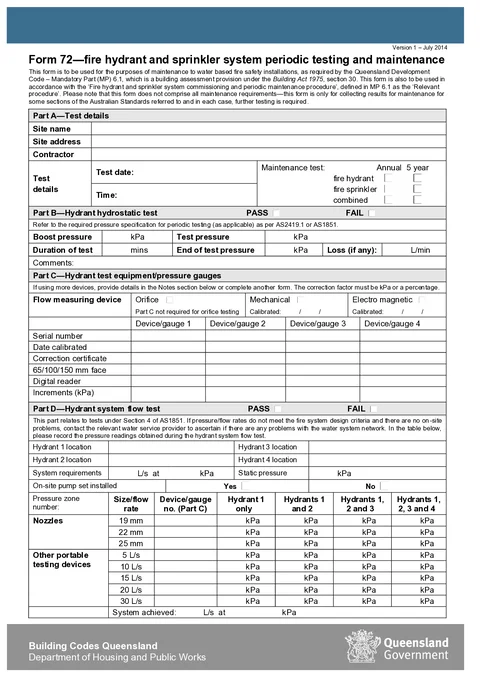
QLD Form 72 PDF preview
QLDFire safety

Queensland Government

Record periodic fire hydrant and sprinkler system testing and maintenance under Queensland Development Code MP 6.1 and download the official Form 72 PDF.

Open this form

QLD Form 72 records periodic testing and maintenance for fire hydrant and sprinkler systems under Queensland Development Code MP 6.1.

Open Form 72 when the maintenance readings and test-equipment records are ready.

Choose Annual or 5 year to match the maintenance test carried out. Complete only the hydrant, sprinkler, or combined sections that were actually tested.

Before you start

Have these ready:

  • Site name and address
  • Contractor name
  • Maintenance test type (annual or 5 year) and test date
  • Which systems were tested (hydrant, sprinkler, or combined)
  • Hydrostatic, flow, booster, and sprinkler test readings
  • Equipment and gauge calibration details
  • Compliance outcomes and licensee signature

Check the current requirements for handing the completed form to the building owner or occupier.

Test Details

Record the job context before you enter test results.

What to enter

  • Site name and street address
  • Contractor name
  • Maintenance test type (annual or 5 year)
  • Test date and time
  • Whether fire hydrant, sprinkler, or combined testing applies

Tips

Use saved contractor details if you maintain the same sites regularly. Tick sprinkler or combined only when those systems were part of this maintenance visit.

Hydrant Hydrostatic

Record the hydrant hydrostatic test against AS2419.1 or AS1851 pressure specifications.

What to enter

  • Pass or fail outcome
  • Boost pressure, test pressure, duration, end pressure, and any loss
  • Comments explaining defects, limitations, or follow-up work

Tips

Match the units shown on the form (kPa and L/min). Add comments if the test could not be completed to specification.

Hydrant Equipment

Document the test equipment used for hydrant flow and pressure readings.

What to enter

  • Flow measuring device type (orifice, mechanical, or electro magnetic)
  • Calibration date under the mechanical column when a mechanical device is used
  • Calibration date under the electro magnetic column when an electro magnetic device is used
  • Serial numbers, calibration dates, correction certificates, face size, digital reader, and increments for up to four device/gauges in the table

Tips

Part C is not required for orifice testing. If you use more than four devices, note extras in comments or complete another Form 72.

Hydrant Flow

Record hydrant system flow test results under AS1851 Section 4.

What to enter

  • Pass or fail outcome
  • Hydrant locations and system requirement readings
  • Whether an on-site pump set is installed
  • Pressure readings for each nozzle size and flow rate row
  • System achieved flow rate and pressure

Tips

Contact the water service provider if readings do not meet design criteria and there are no on-site faults to explain the result.

Pump Booster

Record pump appliance booster test results under AS2419.1 and AS1851.

What to enter

  • Pass or fail outcome
  • Hydrant locations and height of the highest hydrant above the booster
  • System requirements, pump inlet and discharge pressures, boost pressure, and frictional loss
  • Comments

Tips

Use the same hydrant location descriptions you would expect the building owner to recognise during a future inspection.

Sprinkler Hydrostatic

Record the sprinkler hydrostatic test against AS2118.1, AS2118.4, and AS2118.6.

What to enter

  • Pass or fail outcome
  • Test pressure (kPa) and time held (mins)
  • Comments

Tips

Note any pressure drop or follow-up repairs in the comments so the owner has a clear maintenance record.

Sprinkler Flow

Record sprinkler system flow test results for the relevant AS2118 and AS1851 sections.

What to enter

  • System specifications and overall test results summary
  • Two test points with required and actual flow and pressure, each with pass or fail
  • Running test installation gauge pressure
  • Comments

Tips

Multiple test points may be required on larger systems. Use comments to list additional points tested if they do not fit the two rows on the form.

Compliance

Declare compliance outcomes after completing the maintenance tests.

What to enter

  • Whether critical defects were identified
  • Whether repairs or corrective actions were taken
  • Overall system pass or fail

Tips

If critical defects were found, check the current notice and reporting requirements for the owner or occupier. Attach repair details to your licensee report when corrective work was done.

Signature

Sign off the Form 72 as the appropriately qualified licensee.

What to enter

  • Licensee name
  • Signature
  • Licence number (QBCC or PIC)
  • Licensee report number

Tips

Use saved licensee details to prefill repeat fields on your next Form 72. Confirm the declaration text matches your understanding of the test results before download.

Check before download

  1. The site, contractor, maintenance type, date, time, and systems tested are correct.
  2. Every section used has a clear pass or fail and the required readings.
  3. Units, hydrant locations, nozzle sizes, and test points match the maintenance record.
  4. Every device or gauge used has the available serial and calibration details.
  5. Comments explain incomplete tests, losses, defects, repairs, or limitations.
  6. The compliance outcome agrees with the section results.
  7. The licensee name, signature, licence number, and report number are complete.

After download

Give the completed PDF to the building owner or occupier and keep a copy with the maintenance readings, equipment records, and licensee report. Follow any separate critical-defect or corrective-action process that applies.

For worked examples, read the Queensland Form 72 maintenance guide.

Was this page helpful?

QLD Form 71

Overview and section help for Queensland Form 71 fire hydrant and sprinkler commissioning

NT Gas Works Notification

Overview, section list, and checks for the NT WorkSafe gas works notification

On this page

Before you startTest DetailsWhat to enterTipsHydrant HydrostaticWhat to enterTipsHydrant EquipmentWhat to enterTipsHydrant FlowWhat to enterTipsPump BoosterWhat to enterTipsSprinkler HydrostaticWhat to enterTipsSprinkler FlowWhat to enterTipsComplianceWhat to enterTipsSignatureWhat to enterTipsCheck before downloadAfter download