Skip to content
Tradie Forms
Contact supportOpen app
Tradie Forms
IntroductionQuick startFAQ

Using the app

Form typesWorkspaceJobsStarting a formCompleting a formAI assistantPDF downloadsShare links
Presets
PDF toolsTeamsCustom forms

Form guides

Overview
NSW Fire Safety CertificateNSW Fire Safety Statement

Account and billing

Managing your accountBilling

Support

TroubleshootingFeedback
Section
Section
Page title
Page title
Short description for the help article
Description continues on a second line
Short description for the help article
Description continues on a second line
Intro paragraph
Intro paragraph
Intro paragraph
Intro paragraph
Intro paragraph
Intro paragraph
Section heading
Section heading
Body paragraph
Body paragraph
Body paragraph
Body paragraph
Body paragraph
Body paragraph
Note
Callout title
Callout body
Callout body
Note
Callout title
Callout body
Callout body
Another heading
Another heading
Body paragraph
Body paragraph
Body paragraph
Body paragraph
Body paragraph
Body paragraph
List item one
List item two
List item three
List item one
List item two
List item three
Was this page helpful?
Yes
Yes
No
No

Loading documentation page

On this page
On this page
TOC item
TOC item
TOC item
TOC item
TOC item
TOC item
TOC item
TOC item
TOC item
TOC item

Form guides

NSW Fire Safety Statement

Help for completing the NSW Fire Safety Statement in Tradie Forms.

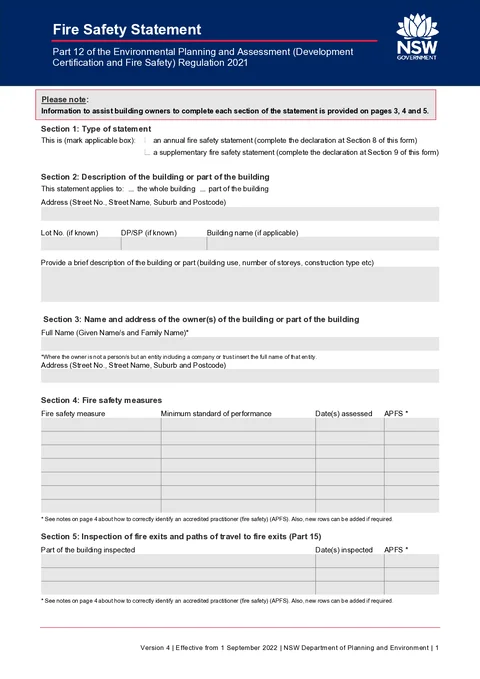
NSW Fire Safety Statement PDF preview
NSWFire safety

NSW Department of Planning and Environment

Complete the NSW Fire Safety Statement (Version 4) in the NSW Part 12 order and download a filled PDF for council, Fire and Rescue NSW, and building display.

Open this form

Complete the NSW Fire Safety Statement on the PDF layout and download a filled document. Open the form when you have the current fire safety schedule and practitioner records ready.

Tradie Forms prepares the PDF. It does not submit the statement to Fire and Rescue NSW or council.

Before you start

  • Know whether you need an annual statement or a supplementary statement for critical measures.
  • Have the current fire safety schedule and APFS assessment details handy.
  • Confirm the issue date and the current council and Fire and Rescue NSW submission process.
  • Pages 3, 4 and 5 of the downloaded PDF are owner guidance only. You do not fill those pages in the app.

Work through nine sections in PDF order in the app. The building address you enter in Section 2 is copied into the footer on every page of the downloaded PDF.

Section 1: Statement Type

Choose the statement type that matches what you are lodging.

What to select

  • Annual - the yearly statement for essential measures. Complete Section 8 and the Section 5 fire exit inspections.
  • Supplementary - for critical fire safety measures on the schedule between annual statements. Complete Section 9 in the app.

Only the declaration section for your selected type is shown while you fill the form.

Section 2: Building

Describe the building or part of the building this statement covers.

Building scope

Select whole building or part of the building to match the fire safety schedule.

Address and identifiers

Use address search for the street, suburb, and postcode. Add lot, DP/SP, and building name when you know them.

Description

Give a short summary of building use, storeys, and construction type so the property is easy to identify on the downloaded PDF.

Section 3: Building Owner

Record the owner or entity responsible for the building.

Full name

Enter the full name of each owner. If the owner is a company, trust, or owners corporation, use the full legal entity name.

Address

Use address search for the owner postal address shown on the official PDF.

Section 4: Fire Safety Measures

List each fire safety measure from the building fire safety schedule.

For each row

  • Fire safety measure - the measure name from the schedule.
  • Minimum standard of performance - the standard listed on the schedule.
  • Date(s) assessed - the assessment date or dates for the measure.
  • APFS - accreditation number of the practitioner who assessed the measure.

Add up to seven rows in the app to match the official PDF table.

The app reminds you that measure assessment dates must fall within the period printed on the current statement form. Check the dates against the official form before issue.

Section 5: Inspections

Section 5 applies to annual fire safety statements only.

For each row

  • Part of the building inspected - the area checked under Part 15.
  • Date(s) inspected - the inspection date or dates.
  • APFS - accreditation number of the practitioner who carried out the inspection.

Add up to three rows to match the official PDF table.

The app reminds you that fire exit inspection dates must fall within the period printed on the current statement form. Check the dates against the official form before issue.

Section 6: Accredited Practitioner

Record each accredited practitioner (fire safety) engaged to assess measures or inspect fire exits.

For each practitioner

  • Full name, address, and phone.
  • APFS accreditation number from the FPAA register.
  • Signature - each practitioner can sign in the app using the signature field.

Add up to five rows to match the official PDF table.

Section 7: Declarant Contact Details

Enter contact details for the person who will sign the declaration.

Important

Check the current NSW rules for who can sign the declaration. Make sure the person signing is allowed to make the declaration for the job.

Use a saved Declarant saved detail to prefill repeat jobs if you are on Solo.

Section 8: Annual Declaration

Complete this section when you selected annual at the top of the form.

What to enter

  • Declarant full name - usually the same person as Section 7.
  • Owner or owner's agent.
  • Signature - draw or upload on your phone; it stamps onto the official PDF line.
  • Date issued - the date the statement is issued.

Section 9: Supplementary Declaration

Complete this section when you selected supplementary at the top of the form.

What to enter

  • Declarant full name - usually the same person as Section 7.
  • Owner or owner's agent.
  • Signature - draw or upload on your phone; it stamps onto the official PDF line.
  • Date issued - the date the statement is issued.

After download

  1. Preview every page and check the building address, schedule entries, APFS numbers, dates and signatures.
  2. Download the statement and keep it with the current fire safety schedule.
  3. Submit the statement to the local council using its current process.
  4. Submit it to Fire and Rescue NSW using the current online statement form.
  5. Display the statement and current schedule in the building as required.

Downloading the PDF does not lodge it. Council and Fire and Rescue NSW are separate submissions.

Was this page helpful?

NSW Fire Safety Certificate

Help for completing the NSW Fire Safety Certificate in Tradie Forms.

QLD Form 71

Overview and section help for Queensland Form 71 fire hydrant and sprinkler commissioning

On this page

Before you startSection 1: Statement TypeWhat to selectSection 2: BuildingBuilding scopeAddress and identifiersDescriptionSection 3: Building OwnerFull nameAddressSection 4: Fire Safety MeasuresFor each rowSection 5: InspectionsFor each rowSection 6: Accredited PractitionerFor each practitionerSection 7: Declarant Contact DetailsImportantSection 8: Annual DeclarationWhat to enterSection 9: Supplementary DeclarationWhat to enterAfter download