Loading documentation page
Form guides
Help for completing the NSW Fire Safety Certificate in Tradie Forms.

NSW Department of Planning and Environment
Complete the NSW Fire Safety Certificate in the NSW Part 11 order and download a filled PDF for lodgement or display.
Open this formComplete the NSW Fire Safety Certificate on the PDF layout and download a filled document. Open the form when you have the current fire safety schedule and assessment details ready.
Tradie Forms prepares the PDF. It does not send the certificate to Fire and Rescue NSW, council, a certifier or the building owner.
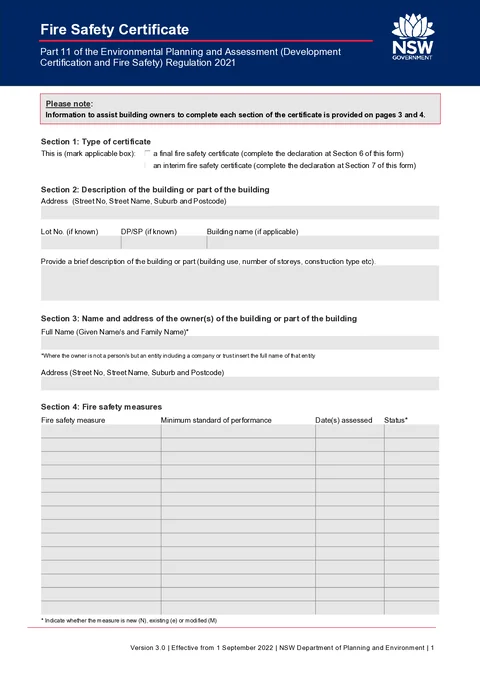
Work through seven sections in PDF order in the app. The building address you enter in Section 2 is copied into the footer on every page of the downloaded PDF.
Choose the certificate type that matches the work being certified.
Only the declaration section for your selected type is shown while you fill the form.
Enter the building or part being certified.
Search for the street address or enter it manually. Suburb, state, and postcode should match the site. This address is repeated in the footer on every page of the downloaded PDF.
Add lot or plan details when you know them. Building name is optional.
Briefly describe building use, storeys, and construction type. This helps identify the certified part of the property.
Enter the owner of the building or part being certified.
Use the full legal name. For a company, trust, or other entity, enter the entity name exactly as it should appear on the certificate.
Enter the owner's postal address. This can differ from the building address in Section 2.
List each essential fire safety measure from the current fire safety schedule.
Tap Add Measure for each row you need, up to fourteen measures. Leave unused PDF rows blank if you have fewer measures.
N new, e existing, or M modified.Do not guess a measure, standard or status. Match the schedule and the assessor's records.
Enter contact details for the person who will sign the declaration in Section 6 or 7.
Save declarant details to prefill name, organisation, title, address, phone, and email on the next certificate.
Add organisation and position when the declarant is signing as an owner's agent or on behalf of a company.
Complete this section only when you selected final in Section 1.
Enter the full name that appears in the declaration sentence.
Select owner or owner's agent.
Sign on the stamp pad or upload a signature image. Set the date issued for the certificate.
Complete this section only when you selected interim in Section 1.
Enter the full name that appears in the declaration sentence.
Select owner or owner's agent.
Sign on the stamp pad or upload a signature image. Set the date issued for the certificate.