Skip to content
Tradie Forms
Contact supportOpen app
Tradie Forms
IntroductionQuick startFAQ

Using the app

Form typesWorkspaceJobsStarting a formCompleting a formAI assistantPDF downloadsShare links
Presets
PDF toolsTeamsCustom formsInstall the app

Account and billing

Managing your accountBilling

Support

TroubleshootingFeedback
Section
Section
Page title
Page title
Short description for the help article
Description continues on a second line
Short description for the help article
Description continues on a second line
Intro paragraph
Intro paragraph
Intro paragraph
Intro paragraph
Intro paragraph
Intro paragraph
Section heading
Section heading
Body paragraph
Body paragraph
Body paragraph
Body paragraph
Body paragraph
Body paragraph
Note
Callout title
Callout body
Callout body
Note
Callout title
Callout body
Callout body
Another heading
Another heading
Body paragraph
Body paragraph
Body paragraph
Body paragraph
Body paragraph
Body paragraph
List item one
List item two
List item three
List item one
List item two
List item three
Was this page helpful?
Yes
Yes
No
No

Documentation page
On this page
On this page
TOC item
TOC item
TOC item
TOC item
TOC item
TOC item
TOC item
TOC item
TOC item
TOC item
Section
Section
Page title
Page title
Short description for the help article
Description continues on a second line
Short description for the help article
Description continues on a second line
Intro paragraph
Intro paragraph
Intro paragraph
Intro paragraph
Intro paragraph
Intro paragraph
Section heading
Section heading
Body paragraph
Body paragraph
Body paragraph
Body paragraph
Body paragraph
Body paragraph
Note
Callout title
Callout body
Callout body
Note
Callout title
Callout body
Callout body
Another heading
Another heading
Body paragraph
Body paragraph
Body paragraph
Body paragraph
Body paragraph
Body paragraph
List item one
List item two
List item three
List item one
List item two
List item three
Was this page helpful?
Yes
Yes
No
No

Documentation page

On this page
On this page
TOC item
TOC item
TOC item
TOC item
TOC item
TOC item
TOC item
TOC item
TOC item
TOC item
  1. Form guides
  2. Electrical
  3. Vic

VIC Electrical Safety Check

Reviewed 28 July 2026

How to complete the Energy Safe Victoria electrical safety check report in Tradie Forms.

Records the residential tenancy electrical safety check for a Victorian rental: which parts of the installation you covered, visual and test results, smoke alarms, observations, and the licensed electrician's sign-off. Energy Safe Victoria guidance says rental providers must have switchboards, wiring, and fittings checked every 2 years by a licensed electrician under section 4 of AS/NZS 3019:2022, and the electrician must give a written report of the check. You leave with a completed Energy Safe Victoria report for the rental provider and your job file.

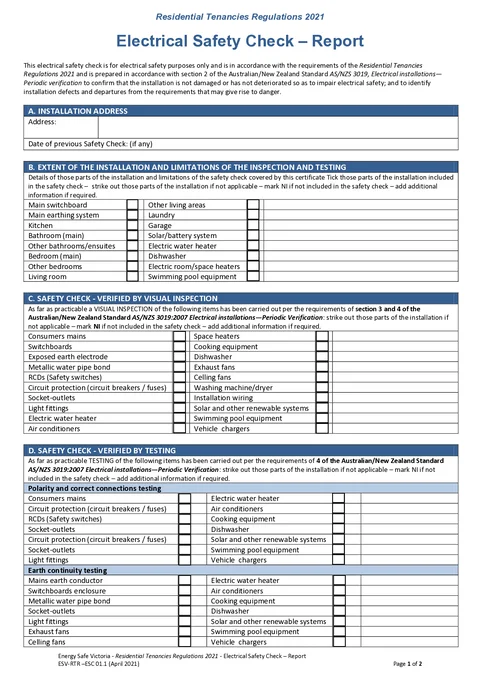
This is the current Energy Safe Victoria Electrical Safety Check - Report. Tradie Forms follows the official section order and maps your answers onto the official PDF layout.

This report is not a Certificate of Electrical Safety (COES). Energy Safe Victoria says a COES is not the correct form for the tenancy safety check, but a COES must be issued when electrical repair or maintenance work is carried out after the check.

Before you start

Most weak reports are written after leaving the property without the test results or a clear note of what was not checked. Have these in hand before you open the form.

  • The tenancy address and access

    The rental property you are checking, including every area the agent or rental provider expects covered.

  • The previous safety check date, if known

    From the last report, the agent file, or the rental provider, so the interval between checks is visible on this report.

  • RCD and instrument readings

    Push-button outcomes and trip times taken while the instrument still shows them, not reconstructed later.

  • Smoke alarm findings

    Whether alarms are correctly installed and working, plus the next smoke alarm check due date when it differs from the electrical recheck.

  • A clear call on scope

    Which rooms, systems, and equipment you will include, and what is out of scope for this visit, so the report does not imply a full check you did not do.

  • Your licence or registration details

    Name and licence or registration number as they should appear on the signed report.

Seven fields gate the download: street address, postcode, electrician name, licence or registration number, inspection date, next inspection due date, and signing date.

Installation Address

Identifies the residential tenancy this safety check covers. Match the rental property the agent or rental provider engaged you for, not a nearby unit or a postal-only address.

Street addressAddressRequired

Use address search for the tenancy. It fills the street line, suburb, state, and postcode. Confirm the result against the job sheet or agent brief when the postal address differs from the street entry the renter uses, or when the site is a multi-unit complex.

StateAddressOptional

Defaults to VIC if you leave it alone. Keep it as Victoria for these tenancy checks unless address search correctly returns a different state for a border property you are still recording here.

PostcodeAddressRequired

Filled by address search with the street line. A wrong postcode makes the report hard to file against the right tenancy in the agent's portfolio.

Date of Previous Safety Check (if Any)DateOptional

The date of the last electrical safety check for this tenancy when you have it. Take it from the previous report or the rental provider's record, not from memory. Leave it blank when no earlier check is available rather than guessing. No future date is accepted.

Extent of the Installation

Records which parts of the installation are included in this safety check. Energy Safe Victoria says the written report must show the parts of the tenancy covered and any part not covered, so this matrix is how the recipient sees the scope.

Tick Parts Included in the Safety Check only for areas and systems you actually included: main switchboard, main earthing system, kitchen, bathrooms, bedrooms, living areas, laundry, garage, solar or battery, electric water heater, dishwasher, room or space heaters, and swimming pool equipment. Leave a row clear when that part was not included. A clear tick on a room you never entered overstates the check.

If access was refused or a system was isolated and out of scope, leave those rows clear and say so under Observations so the rental provider cannot treat the report as whole-premises coverage.

Visual Inspection

Records which items were included in the visual inspection for this visit.

Tick Visual Inspection Items only for equipment you visually inspected: consumers mains, switchboards, earth electrode, metallic water pipe bond, RCDs, circuit protection, outlets, lights, fixed appliances, fans, laundry gear, installation wiring, renewables, pool equipment, and vehicle chargers. Leave a row clear when that item was not part of this visual pass.

Defects and recommendations do not live in this matrix. Note them under Observations so the rental provider gets a clear action list rather than an implied pass from a tick alone.

Polarity Testing

Records which items were tested for polarity and correct connections.

Tick Polarity and Correct Connections Testing for each item you tested. The official form lists some categories more than once (for example circuit protection and socket-outlets). Use the rows that match the circuits or points you actually tested, and leave the rest clear. Do not tick a row because the item exists on site; tick it only when you performed the polarity check.

Failures or doubtful results belong in Observations with enough detail for the repair job, not as an unexplained clear or tick.

Earth Continuity

Records which items were tested for earth continuity.

Tick Earth Continuity Testing for each item you tested: mains earth conductor, switchboard enclosure, metallic water pipe bond, outlets, lights, fans, fixed appliances, renewables, pool equipment, and vehicle chargers. Leave unused rows clear.

As with polarity, this section shows what was tested, not the measured values. Put fail detail and recommended action in Observations.

RCD Testing

Records push-button and time-test results for residual current devices on this check. The official PDF has a fixed table of ten rows, not a free-growing register.

The first six rows are fixed circuit labels: three Power outlets, two Lighting, and one Other. The last four rows are free Other circuit lines where you name the circuit yourself. Leave a row blank when you did not test that slot rather than inventing a pass.

For each row you use, record:

  • Push Button Test as Pass, Fail, or N/A from the mechanical test button while you are at the board.
  • Time Test as the measured trip time from the instrument, such as 24 ms. Leave it blank when you did not run a trip-time test on that device. Enter what the instrument reported rather than rounding from memory later.

Enter results while the board and instrument are still in front of you. Failures that need repair or isolation should also appear under Observations so the rental provider sees the action without reconstructing the table.

Smoke Alarms

Records whether smoke alarms are correctly installed and working, and when the next smoke alarm check is due. Energy Safe Victoria notes smoke alarms have their own inspection and testing interval, so this date is separate from the electrical safety check recheck.

All Smoke Alarms Are Correctly Installed and WorkingChoiceOptional

Yes or No for the property after you have checked the alarms that apply to this tenancy. Choose No when any required alarm is missing, wrongly placed, or fails test, and spell out the defect under Observations so the rental provider knows what to fix.

Next Smoke Alarm Check Due ByDateOptional

The next smoke alarm service or check due date for this property. Do not copy the electrical Next Inspection Due By date here unless they genuinely fall on the same day. The form will not accept a past date.

Observations

Records findings and recommended actions for the rental provider. This is where defects, limitations of scope, and repair priorities live.

Observations and RecommendationsTextareaOptional

Write for the rental provider or agent who was not on site. Name the location, the problem, and the action you recommend. Include parts of the tenancy you could not check when that matters to the next booking.

Useful

Bedroom 2 power point has a cracked faceplate. Replace before the next tenancy. Garage sub-board not accessed; confirm coverage on the next visit.

Too vague

Some issues noted. See switchboard.

The PDF observations field holds a large block of text (about 1,400 characters in the form mapping). If you write a long list, check the preview so nothing important is cut off before you issue the report.

Certification

Records who completed the electrical safety check, when it was done, when the next electrical check is due, and the signature that authenticates the report. Energy Safe Victoria says reports are compiled and signed or otherwise authenticated by the electrician who carried out the check.

Electrical Safety Check Completed ByTextRequired

The licensed electrician who did the check, as the name should appear on the report the rental provider keeps. Use the name on your licence card, not a business nickname.

Licence/Registration NumberTextRequired

Your current licence or registration number, such as REC 12345. Take it from the current card or registration record, not from an old PDF after a renewal.

Inspection DateDateRequired

The date you carried out this safety check on site. Today and Yesterday shortcuts are available because this is usually filled at the property or the next morning. No future date is accepted.

Next Inspection Due ByDateRequired

The next electrical safety check due date for this tenancy. For the standard residential tenancy cycle, that is commonly two years from the inspection date under the current Energy Safe Victoria guidance, but set the date that applies to this job. Do not put the smoke alarm interval here. The form will not accept a past date.

SignatureSignatureOptional

Sign after the extent, tests, smoke alarms, and observations match what you did on site. Draw on screen, upload an image, or use your saved signature. The signature lands on the certification area of the finished PDF.

DateDateRequired

The date you sign the report. Often the same calendar day as the inspection, but it is a separate field from Inspection Date. Today and Yesterday shortcuts are available. No future date is accepted.

Save this section as Electrician Details to prefill it on your next electrical safety check.

Common mistakes

  • Treating this report as a Certificate of Electrical Safety.

    Energy Safe Victoria says a COES is not the correct record for the tenancy electrical safety check. Use this report for the check, and issue a COES when repair or maintenance work is carried out.

  • Ticking rooms or systems you did not enter or test.

    The report must show what was covered and what was not. Clear ticks on out-of-scope areas read as a full-premises check the rental provider will rely on later.

  • Leaving extent blank when access was limited.

    An empty matrix does not explain a locked garage or refused room. Tick only what you included, and state the limitation under Observations.

  • Writing observations the agent cannot act on.

    Needs work does not tell the rental provider what to book. Name the location, defect, and recommended action so repairs can be ordered without calling you back for a translation.

  • Copying trip times later from memory or a photo of the screen.

    Milliseconds get rounded and circuits get swapped. Enter push-button and time-test results while the instrument still shows them, or leave time test blank when you only ran the button test.

  • Using the electrical next-due date for smoke alarms.

    Smoke alarms have their own interval. Putting the two-year electrical recheck on the smoke alarm line understates how soon alarms need attention.

  • Signing before RCD rows and observations are finished.

    The signature authenticates the report the rental provider files. Close the test table and the defect list first, then sign.

Before download

  1. 0 of 7 checked

After download

Give the written report to the rental provider or the person who requested the check. Energy Safe Victoria says the rental provider must keep a record of the most recent electrical safety check until the next check is recorded, and must give a copy to the renter within seven days of a written request.

  • Name the file with the property and date. Electrical safety check - 12 Swan St Richmond - 2026-07-13.pdf is easier to find in two years than a generic download name.
  • File it with your job notes and any photos. The PDF is the durable report; your notes explain access limits and conversations the matrix cannot.
  • Issue a COES when repair or maintenance work follows. This safety check report does not replace the certificate required for that work.
  • Carry next-due dates into the next booking. Electrical recheck and smoke alarm due dates often differ; track both so neither is missed.

Check Energy Safe Victoria's current residential tenancy guidance and Consumer Affairs Victoria for the requirements that apply to this tenancy.

Tradie Forms helps prepare the report. The electrician remains responsible for the inspection, testing, results, and any Certificate of Electrical Safety required for repair work.

Related guides

RCD Test Record

A dedicated push-button and trip-time register when the job is RCD testing rather than a full tenancy safety check.

Smoke Alarm Service Record

Room-by-room smoke alarm inspection and testing when that service is separate from the electrical safety check.

Switchboard Condition Report

Visual board assessment and defects when the visit is a condition report rather than the ESV tenancy check.

Official sources

The regulator publications this guide is based on. Always check the current official form before you lodge.

  • Energy Safe Victoria electrical safety check report
  • Energy Safe Victoria residential tenancy electrical guidance

Was this page helpful?

On this page

Before you startInstallation AddressExtent of the InstallationVisual InspectionPolarity TestingEarth ContinuityRCD TestingSmoke AlarmsObservationsCertificationCommon mistakesBefore downloadAfter downloadRelated guides