Skip to content
Tradie Forms
Contact supportOpen app
Tradie Forms
IntroductionQuick startFAQ

Using the app

Form typesWorkspaceJobsStarting a formCompleting a formAI assistantPDF downloadsShare links
Presets
PDF toolsTeamsCustom forms

Form guides

Overview
NT CoC AddendumNT Emergency Repairs CoC

Account and billing

Managing your accountBilling

Support

TroubleshootingFeedback
Section
Section
Page title
Page title
Short description for the help article
Description continues on a second line
Short description for the help article
Description continues on a second line
Intro paragraph
Intro paragraph
Intro paragraph
Intro paragraph
Intro paragraph
Intro paragraph
Section heading
Section heading
Body paragraph
Body paragraph
Body paragraph
Body paragraph
Body paragraph
Body paragraph
Note
Callout title
Callout body
Callout body
Note
Callout title
Callout body
Callout body
Another heading
Another heading
Body paragraph
Body paragraph
Body paragraph
Body paragraph
Body paragraph
Body paragraph
List item one
List item two
List item three
List item one
List item two
List item three
Was this page helpful?
Yes
Yes
No
No

Loading documentation page

On this page
On this page
TOC item
TOC item
TOC item
TOC item
TOC item
TOC item
TOC item
TOC item
TOC item
TOC item

Form guides

NT Emergency Repairs CoC

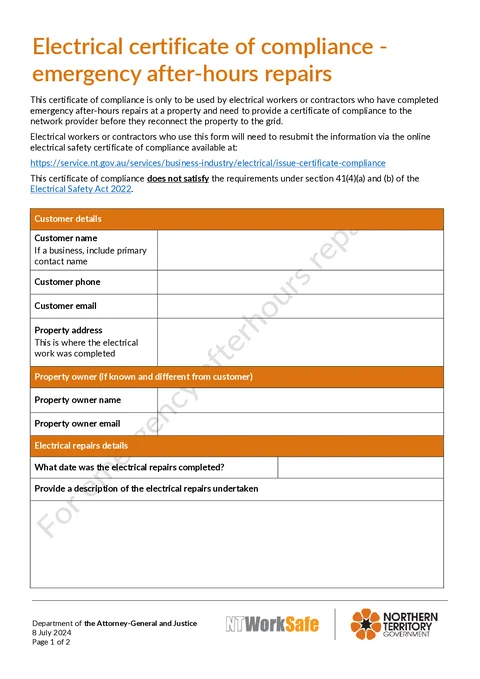
Help for NT electricians completing the NT WorkSafe emergency after-hours electrical repairs certificate.

NT Emergency Repairs CoC PDF preview
NTElectrical

NT WorkSafe

Complete the NT WorkSafe emergency after-hours electrical repairs certificate before network reconnection, then download the official PDF layout.

Open this form

The NT Electrical Certificate of Compliance - Emergency After-Hours Repairs is for electrical workers and contractors who completed emergency after-hours repairs and need to give a certificate to the network provider before reconnection.

Tradie Forms follows the official NT WorkSafe form order and maps your answers to the PDF layout.

Use this supplementary certificate only for the emergency after-hours reconnection situation described by NT WorkSafe. Use the normal certificate process for other electrical work.

Before you start

  • Confirm the network provider needs this emergency after-hours certificate before reconnection.
  • Check the current NT certificate process for the full job record.
  • Read the notes on the official form before relying on the PDF for network reconnection or statutory requirements.
  • Have customer contact details, the property address, repair details, and both worker and contractor licence details ready.

Customer

Customer contact details and the property where the emergency repairs were completed.

  • Customer Name - if a business, include the primary contact name.
  • Customer Phone and Customer Email - contact details for the job.
  • Property - use address search on Solo or Team for NT addresses, or type the street, suburb, state, and postcode manually.

Property Owner

Complete this section if the property owner is known and different from the customer.

  • Property Owner Name
  • Property Owner Email

Repairs

  • Repairs Completed Date - when the emergency repairs were finished.
  • Description of Repairs - describe the emergency electrical repairs undertaken.

Defects

Answer whether any defects or non-compliances were observed on the existing installation that were not repaired.

  • If Yes, include the standard and clause number in Non-Compliance Details.

Electrical Worker

Certification by the electrical worker who carried out the examinations and tests.

  • Electrical Worker Name and Licence Number
  • Signature and Date

Contractor

Certification by the contractor licence holder or authorised person acting on the contractor's behalf.

  • Contractor Licence Holder Name, Licence Number, Phone, and Email
  • Signature and Date

After download

Before relying on the certificate:

  • Check the customer, property, repair date, and repair description against the job record.
  • Confirm any unrepaired defect or non-compliance is recorded with the relevant standard and clause.
  • Check both licence numbers, signatures, and signature dates.
  • Preview every page and make sure no text is cut off.
  • Give the certificate to the network provider before reconnection where the emergency process requires it.
  • Send the other required copies using the current NT certificate process, including the NT WorkSafe copy.
  • Keep the contractor copy for at least 5 years, in line with NT WorkSafe's current certificate guidance.

Open the NT Emergency Repairs CoC

Start the certificate for an eligible emergency after-hours repair.

Tradie Forms prepares the PDF but does not send it to the network provider or NT WorkSafe. Check the current NT requirements before reconnection and distribution.

Was this page helpful?

NT CoC Addendum

Help for NT electricians completing the NT WorkSafe certificate of compliance addendum for ESS, EV, solar, and inverter work.

NSW Fire Safety Certificate

Help for completing the NSW Fire Safety Certificate in Tradie Forms.

On this page

Before you startCustomerProperty OwnerRepairsDefectsElectrical WorkerContractorAfter download