Skip to content
Tradie Forms
Contact supportOpen app
Tradie Forms
Overview
NT CoC AddendumNT Emergency Repairs CoC
Section
Section
Page title
Page title
Short description for the help article
Description continues on a second line
Short description for the help article
Description continues on a second line
Intro paragraph
Intro paragraph
Intro paragraph
Intro paragraph
Intro paragraph
Intro paragraph
Section heading
Section heading
Body paragraph
Body paragraph
Body paragraph
Body paragraph
Body paragraph
Body paragraph
Note
Callout title
Callout body
Callout body
Note
Callout title
Callout body
Callout body
Another heading
Another heading
Body paragraph
Body paragraph
Body paragraph
Body paragraph
Body paragraph
Body paragraph
List item one
List item two
List item three
List item one
List item two
List item three
Was this page helpful?
Yes
Yes
No
No

Documentation page
On this page
On this page
TOC item
TOC item
TOC item
TOC item
TOC item
TOC item
TOC item
TOC item
TOC item
TOC item
Section
Section
Page title
Page title
Short description for the help article
Description continues on a second line
Short description for the help article
Description continues on a second line
Intro paragraph
Intro paragraph
Intro paragraph
Intro paragraph
Intro paragraph
Intro paragraph
Section heading
Section heading
Body paragraph
Body paragraph
Body paragraph
Body paragraph
Body paragraph
Body paragraph
Note
Callout title
Callout body
Callout body
Note
Callout title
Callout body
Callout body
Another heading
Another heading
Body paragraph
Body paragraph
Body paragraph
Body paragraph
Body paragraph
Body paragraph
List item one
List item two
List item three
List item one
List item two
List item three
Was this page helpful?
Yes
Yes
No
No

Documentation page

On this page
On this page
TOC item
TOC item
TOC item
TOC item
TOC item
TOC item
TOC item
TOC item
TOC item
TOC item
  1. Form guides
  2. Electrical
  3. NT

NT CoC Addendum

Reviewed 28 July 2026

How to complete the NT WorkSafe certificate of compliance addendum for ESS, EV, solar, and inverter work in Tradie Forms.

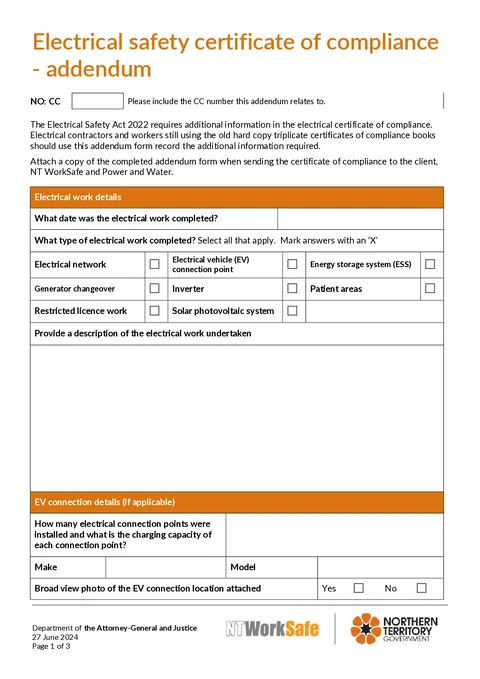
NT CoC Addendum PDF preview
State
NT
Trade
Electrical
Authority
NT WorkSafe
Form version
1.0.0
Open this form

This addendum records the extra equipment and work detail the hard-copy NT certificate of compliance books cannot hold for energy storage, EV connection point, solar PV, and inverter work. Electrical contractors and workers still using triplicate books attach it to the related certificate so the make, model, serial, chemistry, and location photos travel with the certifying document. NT WorkSafe says hard-copy books remain an approved form, and the addendum is how those books meet the detail expected for the listed work types.

This is the current NT WorkSafe electrical certificate of compliance addendum. Tradie Forms follows the official section order and maps your answers onto the official PDF layout.

Writing an emergency after-hours repairs certificate for network reconnection rather than an addendum to a hard-copy CoC? Use NT Emergency Repairs CoC

This is not a standalone certificate. Attach the finished addendum to the related hard-copy certificate of compliance before you send anything to the client, NT WorkSafe, or Power and Water.

Before you start

The addendum only works as a matched pair with the main certificate. Have the book page and the installed equipment in front of you before you open the form.

  • The related CC number

    The certificate of compliance number from the triplicate book page for this job, not the previous page in the book.

  • Which work types apply

    Electrical network, EV connection point, ESS, generator changeover, inverter, patient areas, restricted licence work, and solar PV. Tick every one that was done on this job.

  • Nameplate data for installed equipment

    Make, model, and serial numbers from the EV charger, battery, and inverter plates on site, not from the quote or delivery docket.

  • ESS chemistry when a battery was installed

    The chemistry printed on the unit or commissioning pack, for example lithium iron phosphate.

  • Broad-view location photos

    EV connection point, ESS, and inverter locations while you are still on site, including clearances and signage where they matter.

  • A clear work description

    What was installed or altered, in words a reviewer can follow without the quote file.

Three fields gate the download: CC number, work completed date, and work description. Detail sections for EV, solar, ESS, and inverter stay optional in the app, but fill every section that matches a work type you ticked.

Reference

Links this addendum to the hard-copy certificate of compliance it belongs with. The form notice states this addendum is used with older hard-copy triplicate certificate books to meet Electrical Safety Act 2022 requirements, and that you attach it when sending the certificate to the client, NT WorkSafe, and Power and Water.

CC NumberTextRequired

The certificate of compliance number from the triplicate book page for this job, for example CC-240612. Write the number that sits on the certificate you are filling out today. A blank or recycled number turns a matched pair into two loose pages that NT WorkSafe and Power and Water cannot tie together. If you are off site without the book, get the number from the contractor copy or the person who wrote up the certificate before you download.

Work

Records when the work finished, which triggering work types apply, and a plain description of what was done. The completion date is also the start of the retention clock on the certificate record.

Work Completed DateDateRequired

The day the electrical work was finished. Today and Yesterday shortcuts are there because this is often filled on site or the next morning. The field does not accept a future date, so you cannot date the addendum ahead of completion.

Work TypeCheckboxGroupOptional

Tick every type that applies on this job. Options are Electrical network, Electrical vehicle (EV) connection point, Energy storage system (ESS), Generator changeover, Inverter, Patient areas, Restricted licence work, and Solar photovoltaic system. Nothing is selected by default, so an untouched form downloads with no work types ticked. A hybrid solar and battery install with a garage EV point commonly needs several boxes, and each of EV, solar, ESS, and inverter has its own detail section below. Network, generator changeover, patient areas, and restricted licence work have no extra section, only the tick.

Work DescriptionTextareaRequired

General description of the electrical work undertaken. Name what was installed or altered so a reviewer can follow the job without the quote. Keep it to the work, not the sales title.

Useful

Installed EV charger circuit, 10 kWh battery energy storage, and hybrid inverter at residential premises.

Too vague

Solar work

EV Connection

Complete when EV connection point work was undertaken. Capacity and identity are what a later reviewer uses to check circuit and protection sizing.

Connection Points and CapacityTextareaOptional

How many connection points were installed and the charging capacity of each, for example 1 x 7.4 kW Type 2 connection point. A single point and a multi-point load-managed install read very differently, so count and capacity both matter.

MakeTextOptional

Charger manufacturer from the nameplate, for example Wallbox. Take it from the unit, not the quote.

ModelTextOptional

Model from the same nameplate, for example Pulsar Plus.

Broad view photo of the EV connection location attachedRadioGroupOptional

Yes or No. Choose Yes when you are attaching a broad-view photo of where the charger sits and how it is fed. Choose No when no photo is going with this addendum.

EV connection location photoPhotoRequired when you select Yes for the broad view photo attached

Upload the broad-view location photo. Selecting Yes without a photo blocks download. The photo is added as an appendix page on the finished PDF, so shoot the full location while you are still standing in front of the unit rather than a close-up of the nameplate alone.

Solar

Complete when solar photovoltaic system work was undertaken. This is the array and DC-side story; the inverter itself has its own section.

Solar Work DescriptionTextareaOptional

What the solar PV work involved: array size, DC isolators, protection, and shutdown labelling. Describe the isolation you actually installed rather than assuming the product is familiar. On a job that also changes the inverter, fill the inverter section as well so the array and the inverter are both on the record.

Useful

Installed a 6.6 kW rooftop solar array with DC isolators, inverter protection and shutdown labelling.

Too vague

New solar

ESS

Complete when energy storage system work was undertaken. Chemistry, serial number, and location photo are what make this section useful years later for service, warranty, or a recall.

ESS Work DescriptionTextareaOptional

What was installed or altered, including capacity and where it sits, for example a wall-mounted battery in the garage with backup circuits and signage.

ESS Chemistry TypeTextOptional

Chemistry from the unit or commissioning pack, for example Lithium iron phosphate. Chemistry drives placement and signage rules, so the value here must match the unit on the wall, not a generic lithium label.

MakeTextOptional

Battery manufacturer from the nameplate, for example Tesla.

ModelTextOptional

Model from the nameplate, for example Powerwall 2.

Serial NumberTextOptional

Serial from the unit plate, for example TW-123456. Read it off the installed unit rather than the delivery docket, because the two do not always agree. The serial is what ties the record to the physical battery for warranty and recalls. Photograph the plate if it is hard to read later.

Broad view photo of the ESS location attachedRadioGroupOptional

Yes or No. Choose Yes when you are attaching a broad-view photo of the battery location, clearances, and signage.

ESS location photoPhotoRequired when you select Yes for the broad view photo attached

Upload the broad-view ESS location photo. Selecting Yes without a photo blocks download. The photo lands as an appendix page on the PDF, so capture the full install arrangement on the day rather than reconstructing it later.

Inverter

Complete when inverter work was undertaken. On a solar and battery job this is the third piece of the picture after the array and the storage.

Inverter Work DescriptionTextareaOptional

What was installed or commissioned, including where the inverter sits relative to the switchboard, for example a hybrid inverter beside the main board for solar and battery integration.

MakeTextOptional

Inverter manufacturer from the nameplate, for example Fronius.

ModelTextOptional

Model from the nameplate, for example Primo GEN24.

Serial NumberTextOptional

Serial from the unit plate, for example FR-789012. Take it from the installed inverter, not the packing list.

Broad view photo of the inverter location attachedRadioGroupOptional

Yes or No. Choose Yes when you are attaching a broad-view photo of the inverter location.

Inverter location photoPhotoRequired when you select Yes for the broad view photo attached

Upload the broad-view inverter location photo. Selecting Yes without a photo blocks download. The photo is included as a PDF appendix page.

Submit

There are no job fields to complete here. The section shows the privacy notice from the source form and the distribution path for the finished certificate and addendum.

Personal information is collected under the Electrical Safety Act 2022 and handled in accordance with the Information Act 2002. NT WorkSafe may provide information to the property owner, the electricity network operator, and the Electrical Safety Regulator.

After download, send the certificate with this addendum attached to the customer, the property owner when they are different, NT WorkSafe at AGD.NTWSElectricalSafety@nt.gov.au, and Power and Water at powerconnections@powerwater.com.au. Keep a contractor copy for five years. The detailed send and retention steps sit in After download below.

Common mistakes

  • Using the previous page's CC number from the book.

    The addendum only works as a matched pair. Take the number from the certificate page for this job, not the last completed page sitting open in the book.

  • Ticking only one work type on a multi-system job.

    A hybrid solar and battery install with an EV point needs every applicable box. Unticked types leave their detail sections empty on a job that clearly included that work.

  • Writing a quote title as the work description.

    Solar work tells a reviewer nothing about what was installed. Name the systems and the main electrical work.

  • Copying make, model, or serial from the delivery docket.

    Dockets and quotes are raised early and often disagree with what was hung on the wall. Read identity off the nameplate of the installed unit.

  • Recording chemistry as a generic lithium label.

    Chemistry drives placement and signage rules. Use the chemistry on the unit, such as lithium iron phosphate, not a catch-all word.

  • Selecting Yes for a photo without uploading one.

    Yes without a photo blocks download. If you have no photo, select No rather than leaving the upload empty.

  • Sending the addendum without the hard-copy certificate.

    The addendum is not a certificate. Attach it to the related CoC every time it goes to the client, NT WorkSafe, or Power and Water.

Before download

  1. 0 of 7 checked

After download

Attach the finished addendum to the related hard-copy certificate of compliance before you distribute anything. NT WorkSafe certificate guidance is the source for who receives copies and how long contractors keep them. Confirm network lodgement with the current Power and Water process when the job needs it.

  • Send the certificate and addendum together. Copies go to the client, NT WorkSafe (AGD.NTWSElectricalSafety@nt.gov.au), and Power and Water (powerconnections@powerwater.com.au) when that is the network operator. Do not email the addendum alone.
  • Name the file with the CC number. Use something like CoC-addendum-CC-240612.pdf so the pair is obvious in the job folder years later.
  • File the pair with the job record. Keep the book page copy, the addendum, and any nameplate photos in the same place so equipment identity is not reconstructed from memory.
  • Retain the contractor copy for at least five years from the date the work was completed, with the addendum stored beside the certificate.

Check the current NT WorkSafe instructions for your job. Lodgement routes and retention sit with the authority and the network operator.

Tradie Forms prepares the PDF but does not send it. Check the current NT WorkSafe instructions before distributing or retaining the certificate and addendum.

Related guides

NT CoC addendum walkthrough

When the addendum is required, what each section records, and who receives the finished pair.

NT emergency repairs CoC

Emergency after-hours repairs certificate for network reconnection, not an addendum to a hard-copy CoC.

Official sources

The regulator publications this guide is based on. Always check the current official form before you lodge.

  • NT WorkSafe certificate of compliance guidance
  • NT WorkSafe electrical certificate of compliance addendum

QLD CoTC

How to complete the WorkSafe Queensland electrical testing certificate in Tradie Forms.

NT Emergency Repairs CoC

How to complete the NT WorkSafe emergency after-hours electrical repairs certificate in Tradie Forms.

Was this page helpful?

On this page

Before you startReferenceWorkEV ConnectionSolarESSInverterSubmitCommon mistakesBefore downloadAfter downloadRelated guides