Documentation page
Documentation page
How to complete the ACMA TCA2 outstanding matters cabling advice form in Tradie Forms.

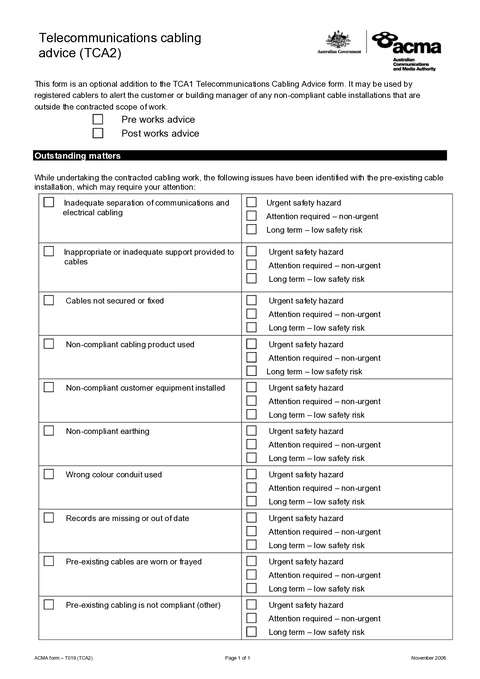
TCA2 records non-compliant cabling you noticed outside the work you were engaged to do, with a priority for each issue. You complete it as a registered cabler and hand the finished PDF to the customer or building manager so they can decide what to do. ACMA publishes the form for outstanding cable installations you notice, including pre-existing issues and work outside your booked scope.
This is the current ACMA TCA2. Tradie Forms follows the official section order and maps your answers onto the official PDF layout.
Almost every weak TCA2 comes from writing it later from memory instead of at the fault. Have these ready before you open the form.
A pre works or post works decision
When you actually noticed the issues, not when you are writing the form.
The matters you observed on site
Only the non-compliant conditions you can point at, not a full tick list for the building.
A priority for each matter
Urgent safety hazard, attention required (non-urgent), or long term low safety risk.
Location notes or photos
The official PDF has no free-text location field, so your job notes or photos are the only record of where each issue is.
Who receives the advice
Customer or building manager, whoever can authorise remediation on that infrastructure.
Advice type is the only field that always blocks download. Every matter you tick also needs a priority before the PDF will go out.
Records whether you noticed the outstanding matters before your cabling work started, or during or after the work on site. That timing separates what you inherited from what you found while doing the job.
Choose Pre works advice when you spotted the issues before your cabling work starts, including on a quote walk or scope visit. Choose Post works advice when you found them during or after your work on site. The box records when you saw the problem, not when you type the form. If you quoted on Monday and installed on Thursday, Monday finds stay pre works even if you fill the form on Friday.
The finished PDF prints one advice type at the top of the official one-page layout. Preview it before download so the timing matches the job story you will tell the customer.
Records each non-compliant condition you noticed, then the priority that tells the customer how quickly to act. Tick only rows that apply to this site. Leave the rest blank.
The form is a fixed table of ten official rows. When you tick a row, a priority choice opens for that row. Unticked rows stay closed. Download is blocked if a ticked row has no priority, or if a priority is set without the row ticked.
Use the official wording as it appears on the form. Tick a row only when you observed that condition.
The catch-all other row is for a real non-compliance that does not fit the first nine. It is not a place to park vague notes when you are unsure which row applies.
Pick exactly one priority per ticked row. Base it on what you saw, not on how awkward the conversation might be.
Marking every cosmetic mess as urgent trains the customer to ignore the next TCA2. Burying a real hazard as long term leaves the priority column empty of meaning.
The official TCA2 is a one-page checklist. It has no free-text field for location, description, or who should fix it. Your ticks and priorities land as checkboxes on that page. Keep separate job notes or photos that name the floor, riser, rack, ceiling space or cable route so the customer or the next cabler can find the issue without calling you.
Do not tick every row just in case. An empty TCA2 is also useless: if there is nothing advisory to record, the document for completed cabling work is the TCA1, not a blank outstanding matters form.
Using TCA2 as the completion statement for work you did.
ACMA treats TCA1 as the certification statement for customer cabling you performed or supervised. TCA2 only advises on other non-compliant installations you noticed. Issue both when both apply, and keep each form in its lane.
Marking post works for issues found on the quote walk.
Pre works means before your cabling work starts. Post works means during or after work on site. Wrong timing blurs what you inherited from what you uncovered mid-job.
Ticking a matter without a priority.
A tick with no priority leaves the customer guessing how quickly to act. The form blocks download until every ticked row has one of the three levels.
Defaulting every row to urgent, or every row to long term.
Blanket priorities make the form unusable. Set each level from the condition you observed so the top item is the one that actually needs action first.
Ticking rows you did not observe.
The form is a record of what you saw, not a building-wide audit checklist. Every tick has to stand up if the customer or a later cabler asks about it.
Writing the form later from memory in the ute.
Priorities get guessed and locations go vague. Complete it while the non-compliant cabling is still in front of you, and keep notes or photos for where it sits.
Starting from yesterday's draft on a shared tablet.
Changing the address on an old draft leaves half the previous building's matters selected. Start a fresh form for the current site, then preview.
Give the finished PDF to the customer or building manager, whoever can authorise work on that cabling. On a tenanted or strata site that is often the building manager rather than the person who booked the data point, because the outstanding cabling may sit in common property.
2026-07-24_12-smith-st_tca2.pdf, so it stays findable next to the job.Check the current ACMA cabling advice requirements for your job. Tradie Forms is not affiliated with the ACMA.
Wrong form, wrong timing, missing priorities, and handover failures that make advice useless.
What counts as an outstanding matter, when to issue TCA2, and how to write it so someone acts.
Who receives the PDF, how to file it with the job, and how TCA1 and TCA2 sit together.
The regulator publications this guide is based on. Always check the current official form before you lodge.